Vessel#
-
class Vessel#
These objects are used to interact with vessels in KSP. This includes getting orbital and flight data, manipulating control inputs and managing resources. Created using
active_vessel()orvessels().-
std::string name()#
-
void set_name(std::string value)#
The name of the vessel.
-
VesselType type()#
-
void set_type(VesselType value)#
The type of the vessel.
-
VesselSituation situation()#
The situation the vessel is in.
-
bool loaded()#
Whether the vessel is loaded, i.e. its parts are instantiated in the scene because it is within loading range of the active vessel. A vessel that is not loaded exists only as orbital data and is always on-rails (see
Vessel::packed()).
-
bool packed()#
Whether the vessel is packed (on-rails). A packed vessel has its physics simulation suspended and follows its orbit analytically. A vessel that is not loaded (see
Vessel::loaded()) is always packed.
-
float physics_range()#
-
void set_physics_range(float value)#
The distance from the active vessel, in meters, out to which this vessel keeps running its physics simulation, and so stays controllable, able to burn its engines and respond to its autopilot. Setting this raises the vessel out of the stock physics bubble, so that it keeps flying while the active vessel is far away. Set to zero to restore the game’s default range.
- Game Scenes:
Flight
Note
This always reports the vessel’s live range, so reading it when no range has been set gives the game’s default for the vessel’s current
Vessel::situation(), which is much shorter than the distance at which the vessel unloads. In orbit a vessel is put on rails just 350m away, long before it unloads at 2.5km, and a vessel on rails produces no thrust and ignores control input even though it is still loaded.There is a 10% margin below the range, so that a vessel hovering at the threshold does not repeatedly drop out of the simulation and rejoin it. The vessel leaves the simulation at the distance set here, and rejoins it at 90% of that distance; in between it keeps whichever state it is already in.
The requested range applies in every situation. The game’s own defaults are not uniform, and a vessel flying in atmosphere stays loaded out to 22.5km, so setting a small range can shorten the range such a vessel would otherwise have had.
A range lasts until it is set back to zero or the game is exited. Unlike most state a client sets, it is not released when that client disconnects, because dropping a distant vessel back to the default range would put it on-rails part way through a maneuver.
Holding a vessel off-rails a long way from the active vessel costs performance, and accumulates positional error that can destroy it. Raise the range on the vessels that need it, by as little as they need.
-
bool recoverable()#
Whether the vessel is recoverable.
-
void recover()#
Recover the vessel. The crew return to the astronaut complex, and the funds and science the vessel is worth are awarded.
Note
Recovering the active vessel ends the flight and returns to the space center, as pressing recover in game does. When a non-active vessel is recovered the current scene is unaffected, and the mission completion dialog is not shown, so a script flying several vessels keeps control of the rest of them.
Returns immediately, does not wait for the vessel to be recovered.
-
void terminate()#
Terminate the vessel. The vessel and its parts are removed from the game, and its crew are lost, as when the vessel is terminated from the tracking station. Nothing is recovered: no funds, no science and no crew.
Note
The crew are reported missing, and return to the astronaut complex once their respawn timer expires, or never if the game is set up so that missing crews do not respawn.
The active vessel cannot be terminated, because the vessel being flown cannot be taken out of the scene it is being flown in. Switch to another vessel first, or use
Vessel::recover(), which ends the flight and returns to the space center.Returns immediately, does not wait for the vessel to be terminated.
-
double met()#
The mission elapsed time in seconds.
-
std::string biome()#
The name of the biome the vessel is currently in.
-
Flight flight(std::optional<ReferenceFrame> reference_frame = std::optional<ReferenceFrame>())#
Returns a
Vessel::flight()object that can be used to get flight telemetry for the vessel, in the specified reference frame.- Parameters:
reference_frame – Reference frame. Defaults to the vessel’s surface reference frame (
Vessel::surface_reference_frame()).
- Game Scenes:
Flight
Note
When this is called with no arguments, the vessel’s surface reference frame is used. This reference frame moves with the vessel, therefore velocities and speeds returned by the flight object will be zero. See the reference frames tutorial for examples of getting the orbital and surface speeds of a vessel.
-
Control control()#
Returns a
Vessel::control()object that can be used to manipulate the vessel’s control inputs. For example, its pitch/yaw/roll controls, RCS and thrust.- Game Scenes:
Flight
-
Comms comms()#
Returns a
Vessel::comms()object that can be used to interact with CommNet for this vessel.- Game Scenes:
Flight
-
AutoPilot auto_pilot()#
An
Vessel::auto_pilot()object, that can be used to perform simple auto-piloting of the vessel.- Game Scenes:
Flight
-
int32_t crew_capacity()#
The number of crew that can occupy the vessel.
-
int32_t crew_count()#
The number of crew that are occupying the vessel.
-
std::vector<CrewMember> crew()#
The crew in the vessel.
-
Resources resources()#
A
Vessel::resources()object, that can used to get information about resources stored in the vessel.- Game Scenes:
Flight
-
std::vector<Stage> stages()#
Activation (burn) stages for this vessel, in ascending stage order. This does not include the -1 stage (parts with no staging icon), as it carries no delta-v; use
Vessel::stage_at()with -1 to get those parts.- Game Scenes:
Flight
Note
Lists activation stages only (
decoupleisfalse). See also Staging.
-
Stage stage_at(int32_t stage)#
The activation stage with the given number. Pass -1 to get the parts that are never activated (those with no staging icon).
- Parameters:
stage – Get activation stage at this index.
- Game Scenes:
Flight
-
std::vector<Stage> decouple_stages()#
Decouple stages for this vessel, in ascending stage order. The -1 stage, containing the parts that are never decoupled and remain on the vessel, is included first when any such parts exist.
- Game Scenes:
Flight
Note
Lists decouple stages only. Delta-v is not defined on these stages.
-
Stage decouple_stage_at(int32_t stage)#
The decouple stage with the given number. Pass -1 to get the parts that are never decoupled and remain on the vessel after all stages have fired.
- Parameters:
stage – Get decouple stage at this index.
- Game Scenes:
Flight
-
bool delta_v_ready()#
Whether the vessel’s delta-v figures are current.
- Game Scenes:
Flight
Note
The game calculates delta-v for the active vessel alone, over the several ticks after the vessel changes. A delta-v member reports the figures from the last calculation, and waits only when the game has calculated none.
-
void recalculate_delta_v()#
Recalculates the vessel’s delta-v figures, and waits until they are current. Throws an exception if the vessel is not the active vessel.
- Game Scenes:
Flight
-
float delta_v()#
Total delta-v for the vessel in the current situation, in m/s.
- Game Scenes:
Flight
Note
Requires the stock delta-v display to be ready. Units are meters per second.
-
float vacuum_delta_v()#
Total vacuum delta-v for the vessel, in m/s.
- Game Scenes:
Flight
-
float sea_level_delta_v()#
Total sea-level delta-v for the vessel, in m/s.
- Game Scenes:
Flight
-
float burn_time()#
Total burn time for the vessel, in seconds.
- Game Scenes:
Flight
-
Parts parts()#
A
Partsobject, that can used to interact with the parts that make up this vessel.- Game Scenes:
Flight
-
float mass()#
The total mass of the vessel, including resources, in kg.
- Game Scenes:
Flight
-
float dry_mass()#
The total mass of the vessel, excluding resources, in kg.
- Game Scenes:
Flight
-
float thrust()#
The total thrust currently being produced by the vessel’s engines, in Newtons. This is computed by summing
Engine::thrust()for every engine in the vessel.- Game Scenes:
Flight
-
float available_thrust()#
Gets the total available thrust that can be produced by the vessel’s active engines, in Newtons. This is computed by summing
Engine::available_thrust()for every active engine in the vessel.- Game Scenes:
Flight
-
float available_thrust_at(double pressure)#
Gets the total available thrust that can be produced by the vessel’s active engines, in Newtons. This is computed by summing
Engine::available_thrust_at()for every active engine in the vessel. Takes the given pressure into account.- Parameters:
pressure – Atmospheric pressure in atmospheres
- Game Scenes:
Flight
-
float max_thrust()#
The total maximum thrust that can be produced by the vessel’s active engines, in Newtons. This is computed by summing
Engine::max_thrust()for every active engine.- Game Scenes:
Flight
-
float max_thrust_at(double pressure)#
The total maximum thrust that can be produced by the vessel’s active engines, in Newtons. This is computed by summing
Engine::max_thrust_at()for every active engine. Takes the given pressure into account.- Parameters:
pressure – Atmospheric pressure in atmospheres
- Game Scenes:
Flight
-
float max_vacuum_thrust()#
The total maximum thrust that can be produced by the vessel’s active engines when the vessel is in a vacuum, in Newtons. This is computed by summing
Engine::max_vacuum_thrust()for every active engine.- Game Scenes:
Flight
-
float acceleration()#
The acceleration currently produced by the vessel’s engines, in \(m/s^2\). This is
Vessel::thrust()divided by the vessel’sVessel::mass().- Game Scenes:
Flight
-
float available_acceleration()#
The total available acceleration that can be produced by the vessel’s active engines, in \(m/s^2\). This is
Vessel::available_thrust()divided by the vessel’sVessel::mass().- Game Scenes:
Flight
-
float available_acceleration_at(double pressure)#
The total available acceleration that can be produced by the vessel’s active engines, in \(m/s^2\). This is
Vessel::available_thrust_at()divided by the vessel’sVessel::mass(). Takes the given pressure into account.- Parameters:
pressure – Atmospheric pressure in atmospheres
- Game Scenes:
Flight
-
float max_acceleration()#
The total maximum acceleration that can be produced by the vessel’s active engines, in \(m/s^2\). This is
Vessel::max_thrust()divided by the vessel’sVessel::mass().- Game Scenes:
Flight
-
float max_acceleration_at(double pressure)#
The total maximum acceleration that can be produced by the vessel’s active engines, in \(m/s^2\). This is
Vessel::max_thrust_at()divided by the vessel’sVessel::mass(). Takes the given pressure into account.- Parameters:
pressure – Atmospheric pressure in atmospheres
- Game Scenes:
Flight
-
float max_vacuum_acceleration()#
The total maximum acceleration that can be produced by the vessel’s active engines when the vessel is in a vacuum, in \(m/s^2\). This is
Vessel::max_vacuum_thrust()divided by the vessel’sVessel::mass().- Game Scenes:
Flight
-
float specific_impulse()#
The combined specific impulse of all active engines, in seconds. This is computed using the formula described here.
- Game Scenes:
Flight
-
float specific_impulse_at(double pressure)#
The combined specific impulse of all active engines, in seconds. This is computed using the formula described here. Takes the given pressure into account.
- Parameters:
pressure – Atmospheric pressure in atmospheres
- Game Scenes:
Flight
-
float vacuum_specific_impulse()#
The combined vacuum specific impulse of all active engines, in seconds. This is computed using the formula described here.
- Game Scenes:
Flight
-
float kerbin_sea_level_specific_impulse()#
The combined specific impulse of all active engines at sea level on Kerbin, in seconds. This is computed using the formula described here.
- Game Scenes:
Flight
-
std::tuple<double, double, double> moment_of_inertia()#
The moment of inertia of the vessel around its center of mass in \(kg.m^2\). The inertia values in the returned 3-tuple are around the pitch, roll and yaw directions respectively. This corresponds to the vessels reference frame (
Vessel::reference_frame()).- Game Scenes:
Flight
-
std::vector<double> inertia_tensor()#
The inertia tensor of the vessel around its center of mass, in the vessels reference frame (
Vessel::reference_frame()). Returns the 3x3 matrix as a list of elements, in row-major order.- Game Scenes:
Flight
-
AxisRange available_torque()#
The maximum torque that the vessel generates. Includes contributions from reaction wheels, RCS, gimballed engines and aerodynamic control surfaces. Returns the torques in \(N.m\) around each of the coordinate axes of the vessels reference frame (
Vessel::reference_frame()). These axes are equivalent to the pitch, roll and yaw axes of the vessel.- Game Scenes:
Flight
-
AxisRange available_reaction_wheel_torque()#
The maximum torque that the currently active and powered reaction wheels can generate. Returns the torques in \(N.m\) around each of the coordinate axes of the vessels reference frame (
Vessel::reference_frame()). These axes are equivalent to the pitch, roll and yaw axes of the vessel.- Game Scenes:
Flight
-
AxisRange available_rcs_torque()#
The maximum torque that the currently active RCS thrusters can generate. Returns the torques in \(N.m\) around each of the coordinate axes of the vessels reference frame (
Vessel::reference_frame()). These axes are equivalent to the pitch, roll and yaw axes of the vessel.- Game Scenes:
Flight
-
AxisRange available_rcs_force()#
The maximum force that the currently active RCS thrusters can generate. Returns the forces in \(N\) along each of the coordinate axes of the vessels reference frame (
Vessel::reference_frame()). These axes are equivalent to the right, forward and bottom directions of the vessel.- Game Scenes:
Flight
-
AxisRange available_rcs_acceleration()#
The maximum acceleration that the currently active RCS thrusters can generate. This is
Vessel::available_rcs_force()divided by the vessel’sVessel::mass(). Returns the accelerations in \(m/s^2\) along each of the coordinate axes of the vessels reference frame (Vessel::reference_frame()). These axes are equivalent to the right, forward and bottom directions of the vessel.- Game Scenes:
Flight
-
AxisRange available_engine_torque()#
The maximum torque that the currently active and gimballed engines can generate. Returns the torques in \(N.m\) around each of the coordinate axes of the vessels reference frame (
Vessel::reference_frame()). These axes are equivalent to the pitch, roll and yaw axes of the vessel.- Game Scenes:
Flight
-
AxisRange available_control_surface_torque()#
The maximum torque that the aerodynamic control surfaces can generate. Returns the torques in \(N.m\) around each of the coordinate axes of the vessels reference frame (
Vessel::reference_frame()). These axes are equivalent to the pitch, roll and yaw axes of the vessel.- Game Scenes:
Flight
-
AxisRange available_other_torque()#
The maximum torque that parts (excluding reaction wheels, gimballed engines, RCS and control surfaces) can generate. Returns the torques in \(N.m\) around each of the coordinate axes of the vessels reference frame (
Vessel::reference_frame()). These axes are equivalent to the pitch, roll and yaw axes of the vessel.- Game Scenes:
Flight
-
AxisRange available_angular_acceleration()#
The maximum angular acceleration that the vessel can generate. Includes contributions from reaction wheels, RCS, gimballed engines and aerodynamic control surfaces. This is
Vessel::available_torque()divided by the vessel’sVessel::moment_of_inertia(). Returns the angular accelerations in \(rad/s^2\) around each of the coordinate axes of the vessels reference frame (Vessel::reference_frame()). These axes are equivalent to the pitch, roll and yaw axes of the vessel.- Game Scenes:
Flight
-
AxisRange available_reaction_wheel_angular_acceleration()#
The maximum angular acceleration that the currently active and powered reaction wheels can generate. This is
Vessel::available_reaction_wheel_torque()divided by the vessel’sVessel::moment_of_inertia(). Returns the angular accelerations in \(rad/s^2\) around each of the coordinate axes of the vessels reference frame (Vessel::reference_frame()). These axes are equivalent to the pitch, roll and yaw axes of the vessel.- Game Scenes:
Flight
-
AxisRange available_rcs_angular_acceleration()#
The maximum angular acceleration that the currently active RCS thrusters can generate. This is
Vessel::available_rcs_torque()divided by the vessel’sVessel::moment_of_inertia(). Returns the angular accelerations in \(rad/s^2\) around each of the coordinate axes of the vessels reference frame (Vessel::reference_frame()). These axes are equivalent to the pitch, roll and yaw axes of the vessel.- Game Scenes:
Flight
-
AxisRange available_engine_angular_acceleration()#
The maximum angular acceleration that the currently active and gimballed engines can generate. This is
Vessel::available_engine_torque()divided by the vessel’sVessel::moment_of_inertia(). Returns the angular accelerations in \(rad/s^2\) around each of the coordinate axes of the vessels reference frame (Vessel::reference_frame()). These axes are equivalent to the pitch, roll and yaw axes of the vessel.- Game Scenes:
Flight
-
AxisRange available_control_surface_angular_acceleration()#
The maximum angular acceleration that the aerodynamic control surfaces can generate. This is
Vessel::available_control_surface_torque()divided by the vessel’sVessel::moment_of_inertia(). Returns the angular accelerations in \(rad/s^2\) around each of the coordinate axes of the vessels reference frame (Vessel::reference_frame()). These axes are equivalent to the pitch, roll and yaw axes of the vessel.- Game Scenes:
Flight
-
AxisRange available_other_angular_acceleration()#
The maximum angular acceleration that parts (excluding reaction wheels, gimballed engines, RCS and control surfaces) can generate. This is
Vessel::available_other_torque()divided by the vessel’sVessel::moment_of_inertia(). Returns the angular accelerations in \(rad/s^2\) around each of the coordinate axes of the vessels reference frame (Vessel::reference_frame()). These axes are equivalent to the pitch, roll and yaw axes of the vessel.- Game Scenes:
Flight
-
ReferenceFrame reference_frame()#
The reference frame that is fixed relative to the vessel, and orientated with the vessel.
The origin is at the center of mass of the vessel.
The axes rotate with the vessel.
The x-axis points out to the right of the vessel.
The y-axis points in the forward direction of the vessel.
The z-axis points out of the bottom off the vessel.
- Game Scenes:
Flight
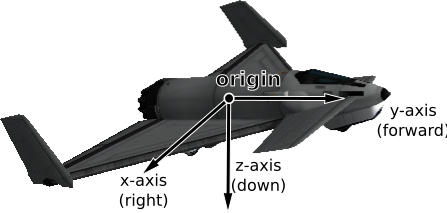
Vessel reference frame origin and axes for the Aeris 3A aircraft#
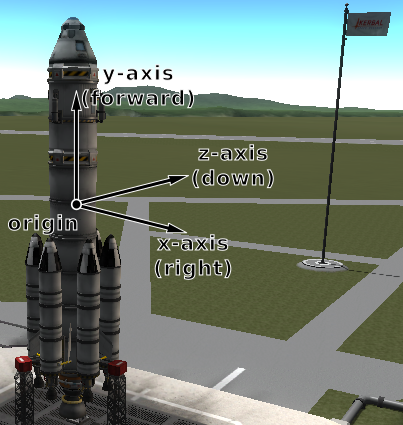
Vessel reference frame origin and axes for the Kerbal-X rocket#
-
ReferenceFrame orbital_reference_frame()#
The reference frame that is fixed relative to the vessel, and orientated with the vessels orbital prograde/normal/radial directions.
The origin is at the center of mass of the vessel.
The axes rotate with the orbital prograde/normal/radial directions.
The x-axis points in the orbital anti-radial direction.
The y-axis points in the orbital prograde direction.
The z-axis points in the orbital normal direction.
- Game Scenes:
Flight
Note
Be careful not to confuse this with ‘orbit’ mode on the navball.
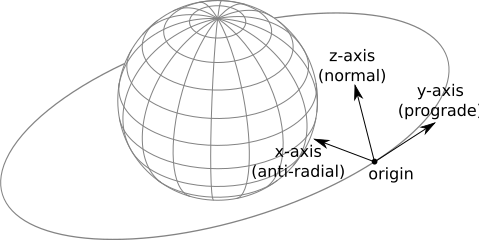
Vessel orbital reference frame origin and axes#
-
ReferenceFrame surface_reference_frame()#
The reference frame that is fixed relative to the vessel, and orientated with the surface of the body being orbited.
The origin is at the center of mass of the vessel.
The axes rotate with the north and up directions on the surface of the body.
The x-axis points in the zenith direction (upwards, normal to the body being orbited, from the center of the body towards the center of mass of the vessel).
The y-axis points northwards towards the astronomical horizon (north, and tangential to the surface of the body – the direction in which a compass would point when on the surface).
The z-axis points eastwards towards the astronomical horizon (east, and tangential to the surface of the body – east on a compass when on the surface).
- Game Scenes:
Flight
Note
Be careful not to confuse this with ‘surface’ mode on the navball.
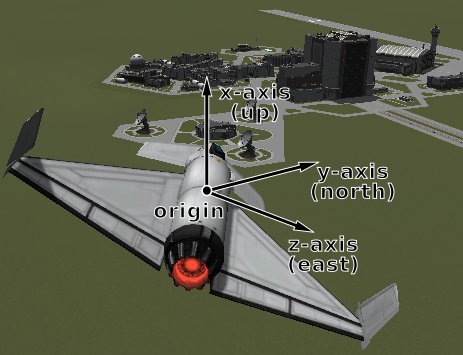
Vessel surface reference frame origin and axes#
-
ReferenceFrame surface_velocity_reference_frame()#
The reference frame that is fixed relative to the vessel, and orientated with the velocity vector of the vessel relative to the surface of the body being orbited.
The origin is at the center of mass of the vessel.
The axes rotate with the vessel’s velocity vector.
The y-axis points in the direction of the vessel’s velocity vector, relative to the surface of the body being orbited.
The z-axis is in the plane of the astronomical horizon.
The x-axis is orthogonal to the other two axes.
- Game Scenes:
Flight
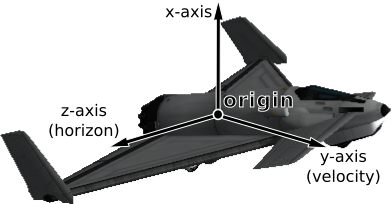
Vessel surface velocity reference frame origin and axes#
-
ReferenceFrame orbit_speed_reference_frame()#
The reference frame that the navball measures speed against in ‘orbit’ mode.
The origin is at the center of mass of the vessel.
The axes are those of
Vessel::orbital_reference_frame(), which are the directions the navball marks in this mode: the x-axis points in the orbital anti-radial direction, the y-axis in the orbital prograde direction and the z-axis in the orbital normal direction.The frame moves with the body being orbited, but does not rotate with it.
- Game Scenes:
Flight
Note
The velocity of the vessel in this frame is the one the navball shows in ‘orbit’ mode:
Flight::speed()is the speed it displays, andFlight::velocity()points along the y-axis, towards its prograde marker.
-
ReferenceFrame surface_speed_reference_frame()#
The reference frame that the navball measures speed against in ‘surface’ mode.
The origin is at the center of mass of the vessel.
The axes are the directions the navball marks in this mode, in the same arrangement as
Vessel::orbital_reference_frame(): the y-axis points in the direction the vessel is moving relative to the surface, which is where the prograde marker points; the z-axis is normal to the plane of that motion; and the x-axis is anti-radial, pointing towards the body and perpendicular to the other two.The frame moves with the surface of the body being orbited, so it rotates with the body.
- Game Scenes:
Flight
Note
The velocity of the vessel in this frame is the one the navball shows in ‘surface’ mode:
Flight::speed()is the speed it displays, andFlight::velocity()points along the y-axis, towards its prograde marker. The velocity gives the frame its orientation, so, as withVessel::surface_velocity_reference_frame(), the frame is singular and raises an error when the vessel is stationary relative to the surface.
-
ReferenceFrame target_speed_reference_frame()#
The reference frame that the navball measures speed against in ‘target’ mode.
The origin is at the center of mass of the vessel.
The axes are the directions the navball marks in this mode, in the same arrangement as
Vessel::orbital_reference_frame(): the y-axis points in the direction the vessel is moving relative to the target, which is where the prograde marker points; the z-axis is normal to the plane of that motion; and the x-axis is anti-radial, pointing towards the body being orbited and perpendicular to the other two.The frame moves with the vessels target.
- Game Scenes:
Flight
Note
The velocity of the vessel in this frame is the one the navball shows in ‘target’ mode:
Flight::speed()is the speed it displays, andFlight::velocity()points along the y-axis, towards its prograde marker. The target is the one set for the active vessel, via for exampletarget_vessel()ortarget_body(). This is undefined when no target is set. The velocity gives the frame its orientation, so it is also singular, and raises an error, when the vessel matches the velocity of its target.
-
std::tuple<double, double, double> position(ReferenceFrame reference_frame)#
The position of the center of mass of the vessel, in the given reference frame.
- Parameters:
reference_frame – The reference frame that the returned position vector is in.
- Returns:
The position as a vector.
- Game Scenes:
Flight
-
BoundingBox bounding_box(ReferenceFrame reference_frame)#
The axis-aligned bounding box of the vessel in the given reference frame.
- Parameters:
reference_frame – The reference frame that the returned position vectors are in.
- Returns:
The positions of the minimum and maximum vertices of the box.
- Game Scenes:
Flight
-
std::tuple<double, double, double> velocity(ReferenceFrame reference_frame)#
The velocity of the center of mass of the vessel, in the given reference frame.
- Parameters:
reference_frame – The reference frame that the returned velocity vector is in.
- Returns:
The velocity as a vector. The vector points in the direction of travel, and its magnitude is the speed of the body in meters per second.
- Game Scenes:
Flight
-
std::tuple<double, double, double, double> rotation(ReferenceFrame reference_frame)#
The rotation of the vessel, in the given reference frame.
- Parameters:
reference_frame – The reference frame that the returned rotation is in.
- Returns:
The rotation as a quaternion of the form \((x, y, z, w)\).
- Game Scenes:
Flight
-
std::tuple<double, double, double> direction(ReferenceFrame reference_frame)#
The direction in which the vessel is pointing, in the given reference frame.
- Parameters:
reference_frame – The reference frame that the returned direction is in.
- Returns:
The direction as a unit vector.
- Game Scenes:
Flight
-
std::tuple<double, double, double> angular_velocity(ReferenceFrame reference_frame)#
The angular velocity of the vessel, in the given reference frame.
- Parameters:
reference_frame – The reference frame the returned angular velocity is in.
- Returns:
The angular velocity as a vector. The magnitude of the vector is the rotational speed of the vessel, in radians per second. The direction of the vector indicates the axis of rotation, using the right-hand rule.
- Game Scenes:
Flight
-
std::string name()#
-
struct AxisRange#
The largest value of a quantity, such as a torque or a force, in the positive and the negative direction of each of three axes.
-
std::tuple<double, double, double> positive#
The value in the positive direction of each axis.
-
std::tuple<double, double, double> negative#
The value in the negative direction of each axis, which is zero or less.
-
std::tuple<double, double, double> positive#
-
struct BoundingBox#
An axis-aligned bounding box, as the positions of its minimum and maximum vertices.
-
std::tuple<double, double, double> min#
The position of the minimum vertex of the box.
-
std::tuple<double, double, double> max#
The position of the maximum vertex of the box.
-
std::tuple<double, double, double> min#
-
enum struct VesselType#
The type of a vessel. See
Vessel::type().-
enumerator base#
Base.
-
enumerator debris#
Debris.
-
enumerator lander#
Lander.
-
enumerator plane#
Plane.
-
enumerator probe#
Probe.
-
enumerator relay#
Relay.
-
enumerator rover#
Rover.
-
enumerator ship#
Ship.
-
enumerator station#
Station.
-
enumerator space_object#
SpaceObject.
-
enumerator unknown#
Unknown.
-
enumerator eva#
EVA.
-
enumerator flag#
Flag.
-
enumerator deployed_science_controller#
DeployedScienceController.
-
enumerator deployed_science_part#
DeploedSciencePart.
-
enumerator dropped_part#
DroppedPart.
-
enumerator deployed_ground_part#
DeployedGroundPart.
-
enumerator base#
-
enum struct VesselSituation#
The situation a vessel is in. See
Vessel::situation().-
enumerator docked#
Vessel is docked to another.
-
enumerator escaping#
Escaping.
-
enumerator flying#
Vessel is flying through an atmosphere.
-
enumerator landed#
Vessel is landed on the surface of a body.
-
enumerator orbiting#
Vessel is orbiting a body.
-
enumerator pre_launch#
Vessel is awaiting launch.
-
enumerator splashed#
Vessel has splashed down in an ocean.
-
enumerator sub_orbital#
Vessel is on a sub-orbital trajectory.
-
enumerator docked#
-
class CrewMember#
Represents crew in a vessel. Can be obtained using
Vessel::crew().-
std::string name()#
-
void set_name(std::string value)#
The crew members name.
-
CrewMemberType type()#
The type of crew member.
-
bool on_mission()#
Whether the crew member is on a mission.
-
float courage()#
-
void set_courage(float value)#
The crew members courage.
-
float stupidity()#
-
void set_stupidity(float value)#
The crew members stupidity.
-
float experience()#
-
void set_experience(float value)#
The crew members experience.
-
bool badass()#
-
void set_badass(bool value)#
Whether the crew member is a badass.
-
bool veteran()#
-
void set_veteran(bool value)#
Whether the crew member is a veteran.
-
std::string trait()#
The crew member’s job.
-
CrewMemberGender gender()#
The crew member’s gender.
-
RosterStatus roster_status()#
The crew member’s current roster status.
-
std::optional<Part> part()#
The part containing the crew member. Returns
NULLif the crew member is not occupying a part, or the vessel containing the part is not loaded.- Game Scenes:
Flight
-
Vessel eva()#
Send the crew member outside on EVA, through the hatch of the part it is in, and return the vessel it becomes. The game switches to that vessel, which can then be walked around and flown using its
Vessel::control(), and brought back in withControl::board(). The kerbal climbs out onto the ladder by the hatch, if there is one.- Game Scenes:
Flight
Note
Throws an exception if EVA is disabled for the game, if the crew member is not in a loaded vessel, if it is already on EVA, or if every hatch out of the part it is in is obstructed.
-
std::vector<FlightLogEntry> career_log()#
The entries in the crew member’s career flight log.
-
std::string name()#
-
struct FlightLogEntry#
An entry in a crew member’s career flight log.
Note
-
int32_t flight#
The flight identifier of the entry.
-
std::string type#
The type of the entry, e.g.
OrbitorLand.
-
std::string target#
The name of the body the entry is for.
-
int32_t flight#
-
enum struct CrewMemberType#
The type of a crew member. See
CrewMember::type().-
enumerator applicant#
An applicant for crew.
-
enumerator crew#
Rocket crew.
-
enumerator tourist#
A tourist.
-
enumerator unowned#
An unowned crew member.
-
enumerator applicant#
-
enum struct CrewMemberGender#
A crew member’s gender. See
CrewMember::gender().-
enumerator male#
Male.
-
enumerator female#
Female.
-
enumerator male#