Reference Frames#
Introduction#
All of the positions, directions, velocities and rotations in kRPC are relative to something, and reference frames define what that something is.
A reference frame specifies:
The position of the origin at (0,0,0)
the direction of the coordinate axes x, y, and z
the linear velocity of the origin (if the reference frame moves)
The angular velocity of the coordinate axes (the speed and direction of rotation of the axes)
Note
KSP and kRPC use a left handed coordinate system
Origin Position and Axis Orientation#
The following gives some examples of the position of the origin and the orientation of the coordinate axes for various reference frames.
Celestial Body Reference Frame#
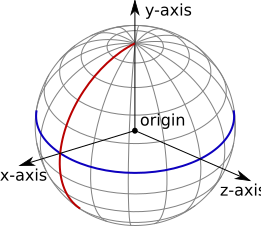
The reference frame for a celestial body, such as Kerbin. The equator is shown in blue, and the prime meridian in red. The black arrows show the coordinate axes, and the origin is at the center of the planet.#
The reference frame obtained by calling CelestialBody.reference_frame
for Kerbin has the following properties:
The origin is at the center of Kerbin,
the y-axis points from the center of Kerbin to the north pole,
the x-axis points from the center of Kerbin to the intersection of the prime meridian and equator (the surface position at 0° longitude, 0° latitude),
the z-axis points from the center of Kerbin to the equator at 90°E longitude,
and the axes rotate with the planet, i.e. the reference frame has the same rotational/angular velocity as Kerbin.
This means that the reference frame is fixed relative to Kerbin – it moves with the center of the planet, and also rotates with the planet. Therefore, positions in this reference frame are relative to the center of the planet. The following code prints out the position of the active vessel in Kerbin’s reference frame:
using System;
using KRPC.Client;
using KRPC.Client.Services.SpaceCenter;

class VesselPosition
{
    public static void Main ()
    {
        using (var connection = new Connection ()) {
            var vessel = connection.SpaceCenter ().ActiveVessel;
            var position = vessel.Position (vessel.Orbit.Body.ReferenceFrame);
            Console.WriteLine ("({0:F1}, {1:F1}, {2:F1})",
                               position.Item1, position.Item2, position.Item3);
        }
    }
}
#include <iostream>
#include <iomanip>
#include <krpc.hpp>
#include <krpc/services/space_center.hpp>

int main() {
  krpc::Client conn = krpc::connect();
  krpc::services::SpaceCenter spaceCenter(&conn);
  auto vessel = spaceCenter.active_vessel().value();
  auto position = vessel.position(vessel.orbit().body().reference_frame());
    std::cout << std::fixed << std::setprecision(1);
  std::cout << std::get<0>(position) << ", "
            << std::get<1>(position) << ", "
            << std::get<2>(position) << std::endl;
}
#ifdef _WIN32
#define WIN32_LEAN_AND_MEAN
#include <windows.h>
#define sleep(seconds) Sleep((seconds) * 1000)
#else
#include <unistd.h>
#endif
#include <math.h>
#include <krpc_cnano.h>
#include <krpc_cnano/services/space_center.h>

int main() {
  krpc_connection_t conn;
  krpc_open(&conn, "COM0");
  krpc_connect(conn, "Vessel position");

  krpc_SpaceCenter_Vessel_t vessel;
  krpc_SpaceCenter_ActiveVessel(conn, &vessel);
  krpc_SpaceCenter_Orbit_t orbit;
  krpc_SpaceCenter_Vessel_Orbit(conn, &orbit, vessel);
  krpc_SpaceCenter_CelestialBody_t body;
  krpc_SpaceCenter_Orbit_Body(conn, &body, orbit);
  krpc_SpaceCenter_ReferenceFrame_t body_frame;
  krpc_SpaceCenter_CelestialBody_ReferenceFrame(conn, &body_frame, body);

  krpc_tuple_double_double_double_t position;
  krpc_SpaceCenter_Vessel_Position(conn, &position, vessel, body_frame);
  printf("%.2f, %.2f, %.2f\n", position.e0, position.e1, position.e2);
}
import krpc.client.Connection;
import krpc.client.RPCException;
import krpc.client.services.SpaceCenter;
import krpc.client.services.SpaceCenter.Vessel;

import org.javatuples.Triplet;

import java.io.IOException;

public class VesselPosition {
    public static void main(String[] args) throws IOException, RPCException {
        Connection connection = Connection.newInstance();
        SpaceCenter spaceCenter = SpaceCenter.newInstance(connection);
        Vessel vessel = spaceCenter.getActiveVessel();
        Triplet<Double, Double, Double> position =
          vessel.position(vessel.getOrbit().getBody().getReferenceFrame());
        System.out.printf("(%.1f, %.1f, %.1f)\n",
                          position.getValue0(),
                          position.getValue1(),
                          position.getValue2());
        connection.close();
    }
}
local krpc = require 'krpc'
local conn = krpc.connect()
local vessel = conn.space_center.active_vessel
print(vessel:position(vessel.orbit.body.reference_frame))
import krpc

conn = krpc.connect()
vessel = conn.space_center.active_vessel
print("(%.1f, %.1f, %.1f)" % vessel.position(vessel.orbit.body.reference_frame))
For a vessel sat on the launchpad, the magnitude of this position vector will be roughly 600,000 meters (equal to the radius of Kerbin). The position vector will also not change over time, because the vessel is sat on the surface of Kerbin and the reference frame also rotates with Kerbin.
Vessel Orbital Reference Frame#
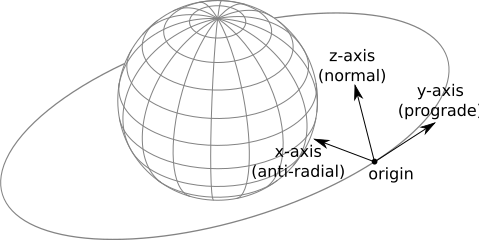
The orbital reference frame for a vessel.#
Another example is the orbital reference frame for a vessel, obtained by calling
Vessel.orbital_reference_frame. This is fixed to the vessel (the origin
moves with the vessel) and is orientated so that the axes point in the orbital
prograde/normal/radial directions.
The origin is at the center of mass of the vessel,
the y-axis points in the prograde direction of the vessels orbit,
the x-axis points in the anti-radial direction of the vessels orbit,
the z-axis points in the normal direction of the vessels orbit,
and the axes rotate to match any changes to the prograde/normal/radial directions, for example when the prograde direction changes as the vessel continues on its orbit.
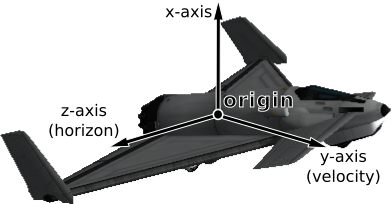
Vessel Reference Frame#
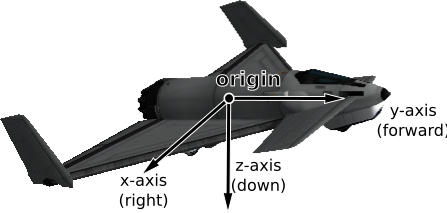
The reference frame for an aircraft.#
Another example is Vessel.reference_frame. As with the previous example,
it is fixed to the vessel (the origin moves with the vessel), however the
orientation of the coordinate axes is different. They track the orientation of
the vessel:
The origin is at the center of mass of the vessel,
the y-axis points in the same direction that the vessel is pointing,
the x-axis points out of the right side of the vessel,
the z-axis points downwards out of the bottom of the vessel,
and the axes rotate with any changes to the direction of the vessel.
Linear Velocity and Angular Velocity#
Reference frames move and rotate relative to one another. For example, the reference frames discussed previously all have their origin position fixed to some object (such as a vessel or a planet). This means that they move and rotate to track the object, and so have a linear and angular velocity associated with them.
For example, the reference frame obtained by calling
CelestialBody.reference_frame for Kerbin is fixed relative to
Kerbin. This means the angular velocity of the reference frame is identical to
Kerbin’s angular velocity, and the linear velocity of the reference frame
matches the current orbital velocity of Kerbin.
Available Reference Frames#
kRPC provides the following reference frames:
krpc_SpaceCenter_Vessel_ReferenceFrame()krpc_SpaceCenter_Vessel_OrbitalReferenceFrame()krpc_SpaceCenter_Vessel_SurfaceReferenceFrame()krpc_SpaceCenter_Vessel_SurfaceVelocityReferenceFrame()krpc_SpaceCenter_Vessel_OrbitSpeedReferenceFrame()krpc_SpaceCenter_Vessel_SurfaceSpeedReferenceFrame()krpc_SpaceCenter_Vessel_TargetSpeedReferenceFrame()krpc_SpaceCenter_CelestialBody_ReferenceFrame()krpc_SpaceCenter_CelestialBody_NonRotatingReferenceFrame()krpc_SpaceCenter_CelestialBody_OrbitalReferenceFrame()krpc_SpaceCenter_Orbit_ReferenceFrame()krpc_SpaceCenter_Orbit_OrbitalReferenceFrame()krpc_SpaceCenter_Node_ReferenceFrame()krpc_SpaceCenter_Node_OrbitalReferenceFrame()krpc_SpaceCenter_Part_ReferenceFrame()krpc_SpaceCenter_Part_CenterOfMassReferenceFrame()krpc_SpaceCenter_DockingPort_ReferenceFrame()krpc_SpaceCenter_Thruster_ThrustReferenceFrame()
Relative and hybrid reference frames can also be constructed from the above.
Custom Reference Frames#
Custom reference frames can be constructed from the built in frames listed above. They come in two varieties: ‘relative’ and ‘hybrid’.
A relative reference frame is constructed from a parent reference frame, a fixed
position offset and a fixed rotation offset. For example, this could be used to
construct a reference frame whose origin is 10m below the vessel as follows, by
applying a position offset of 10 along the z-axis to
Vessel.reference_frame. Relative reference frames can be constructed by
calling ReferenceFrame.create_relative().
A hybrid reference frame inherits its components (position, rotation, velocity
and angular velocity) from the components of other reference frames. Note that
these components need not be fixed. For example, you could construct a reference
frame whose position is the center of mass of the vessel (inherited from
Vessel.reference_frame) and whose rotation is that of the planet being
orbited (inherited from CelestialBody.reference_frame). Hybrid
reference frames can be constructed by calling
ReferenceFrame.create_hybrid().
Each call returns a new frame, and the server holds it until the client removes
it or disconnects. Call ReferenceFrame.remove() on a frame once you are
done with it.
A frame that follows a moving object inherits that component from the frame of the object itself, instead of being constructed again on every update.
The parent reference frame(s) of a custom reference frame can also be other custom reference frames. For example, you could combine the two example frames from above: construct a hybrid reference frame, centered on the vessel and rotated with the planet being orbited, and then create a relative reference that offsets the position of this 10m along the z-axis. The resulting frame will have its origin 10m below the vessel, and will be rotated with the planet being orbited.
Converting Between Reference Frames#
kRPC provides utility methods to convert positions, directions, rotations and velocities between the different reference frames:
Visual Debugging#
References frames can be confusing, and choosing the correct one is a challenge in itself. To aid debugging, kRPCs drawing functionality can be used to visualize direction vectors in-game.
Drawing.add_axes() draws the axes of a reference frame as red, green and blue
arrows, for the x, y and z axes. Drawing.add_direction_from_com() draws a
direction vector, starting from the center of mass of the active vessel. The
following code draws the axes of Vessel.surface_reference_frame, and a
labeled arrow in the direction of the vessel’s velocity relative to the surface:
using System;
using KRPC.Client;
using KRPC.Client.Services.Drawing;
using KRPC.Client.Services.SpaceCenter;

class VisualDebugging
{
    public static void Main ()
    {
        var conn = new Connection ("Visual Debugging");
        var vessel = conn.SpaceCenter ().ActiveVessel;

        // Draw the axes of the surface reference frame
        conn.Drawing ().AddAxes (vessel.SurfaceReferenceFrame);

        // Draw the direction of the surface velocity, as a labeled arrow
        var refFrame = vessel.SurfaceVelocityReferenceFrame;
        var line = conn.Drawing ().AddDirectionFromCom(
            new Tuple<double, double, double>(0, 1, 0), refFrame);
        line.EndArrow = true;
        line.Label = "Surface velocity";
        while (true) {
        }
    }
}
#include <krpc.hpp>
#include <krpc/services/space_center.hpp>
#include <krpc/services/ui.hpp>
#include <krpc/services/drawing.hpp>

int main() {
  krpc::Client conn = krpc::connect("Visual Debugging");
  krpc::services::SpaceCenter space_center(&conn);
  krpc::services::Drawing drawing(&conn);
  auto vessel = space_center.active_vessel().value();

  // Draw the axes of the surface reference frame
  drawing.add_axes(vessel.surface_reference_frame());

  // Draw the direction of the surface velocity, as a labeled arrow
  auto ref_frame = vessel.surface_velocity_reference_frame();
  auto line = drawing.add_direction_from_com(std::make_tuple(0, 1, 0), ref_frame);
  line.set_end_arrow(true);
  line.set_label("Surface velocity");
  while (true) {
  }
}
#include <krpc_cnano.h>
#include <krpc_cnano/services/space_center.h>
#include <krpc_cnano/services/ui.h>
#include <krpc_cnano/services/drawing.h>

int main() {
  krpc_connection_t conn;
  krpc_open(&conn, "COM0");
  krpc_connect(conn, "Visual debugging");

  krpc_SpaceCenter_Vessel_t vessel;
  krpc_SpaceCenter_ActiveVessel(conn, &vessel);

  // Draw the axes of the surface reference frame
  krpc_SpaceCenter_ReferenceFrame_t surface_ref;
  krpc_SpaceCenter_Vessel_SurfaceReferenceFrame(conn, &surface_ref, vessel);
  krpc_Drawing_AddAxes(conn, NULL, surface_ref, 10, true);

  // Draw the direction of the surface velocity, as a labeled arrow
  krpc_SpaceCenter_ReferenceFrame_t ref_frame;
  krpc_SpaceCenter_Vessel_SurfaceVelocityReferenceFrame(conn, &ref_frame, vessel);
  krpc_tuple_double_double_double_t direction = { 0, 1, 0 };
  krpc_Drawing_Line_t line;
  krpc_Drawing_AddDirectionFromCom(conn, &line, &direction, ref_frame, 10, true);
  krpc_Drawing_Line_set_EndArrow(conn, line, true);
  krpc_Drawing_Line_set_Label(conn, line, "Surface velocity");
  while (true) {
  }
}
import krpc.client.Connection;
import krpc.client.RPCException;
import krpc.client.services.SpaceCenter;
import krpc.client.services.SpaceCenter.ReferenceFrame;
import krpc.client.services.Drawing;

import org.javatuples.Triplet;

import java.io.IOException;

public class VisualDebugging {
    public static void main(String[] args) throws IOException, RPCException {
        Connection connection = Connection.newInstance("Visual Debugging");
        SpaceCenter spaceCenter = SpaceCenter.newInstance(connection);
        Drawing drawing = Drawing.newInstance(connection);
        SpaceCenter.Vessel vessel = spaceCenter.getActiveVessel();

        // Draw the axes of the surface reference frame
        drawing.addAxes(vessel.getSurfaceReferenceFrame(), 10, true);

        // Draw the direction of the surface velocity, as a labeled arrow
        ReferenceFrame refFrame = vessel.getSurfaceVelocityReferenceFrame();
        Drawing.Line line = drawing.addDirectionFromCom(
          new Triplet<Double, Double, Double>(0.0, 1.0, 0.0), refFrame, 10, true);
        line.setEndArrow(true);
        line.setLabel("Surface velocity");
        while (true) {
        }
    }
}
local krpc = require 'krpc'
local List = require 'pl.List'
local conn = krpc.connect('Visual Debugging')
local vessel = conn.space_center.active_vessel

-- Draw the axes of the surface reference frame
conn.drawing.add_axes(vessel.surface_reference_frame)

-- Draw the direction of the surface velocity, as a labeled arrow
local ref_frame = vessel.surface_velocity_reference_frame
local line = conn.drawing.add_direction_from_com(List{0, 1, 0}, ref_frame)
line.end_arrow = true
line.label = 'Surface velocity'
while true do
end
import krpc

conn = krpc.connect(name="Visual Debugging")
vessel = conn.space_center.active_vessel

# Draw the axes of the surface reference frame
conn.drawing.add_axes(vessel.surface_reference_frame)

# Draw the direction of the surface velocity, as a labeled arrow
ref_frame = vessel.surface_velocity_reference_frame
line = conn.drawing.add_direction_from_com((0, 1, 0), ref_frame)
line.end_arrow = True
line.label = "Surface velocity"
while True:
    pass
Note
This example uses Vessel.surface_velocity_reference_frame, which is
singular when the vessel’s surface speed is zero (hovering, landed). Run it while the
vessel is moving; on the launchpad the drawing calls will raise an error.
Note
The client must remain connected for the line to continue to be drawn, hence the infinite loop at the end of this example.
Examples#
The following examples demonstrate various uses of reference frames.
Navball directions#
This example demonstrates how to make the vessel point in various directions on the navball:
using System;
using System.Collections.Generic;
using System.Net;
using KRPC.Client;
using KRPC.Client.Services.SpaceCenter;

class NavballDirections
{
    public static void Main ()
    {
        using (var conn = new Connection ("Navball directions")) {
            var vessel = conn.SpaceCenter ().ActiveVessel;
            var ap = vessel.AutoPilot;
            ap.ReferenceFrame = vessel.SurfaceReferenceFrame;
            ap.Engaged = true;

            // Point the vessel north on the navball, with a pitch of 0 degrees
            ap.TargetDirection = Tuple.Create (0.0, 1.0, 0.0);
            ap.Wait();

            // Point the vessel vertically upwards on the navball
            ap.TargetDirection = Tuple.Create (1.0, 0.0, 0.0);
            ap.Wait();

            // Point the vessel west (heading of 270 degrees), with a pitch of 0 degrees
            ap.TargetDirection = Tuple.Create (0.0, 0.0, -1.0);
            ap.Wait();

            ap.Engaged = false;
        }
    }
}
#include <krpc.hpp>
#include <krpc/services/space_center.hpp>

int main() {
  krpc::Client conn = krpc::connect("Navball directions");
  krpc::services::SpaceCenter space_center(&conn);
  auto vessel = space_center.active_vessel().value();
  auto ap = vessel.auto_pilot();
  ap.set_reference_frame(vessel.surface_reference_frame());
  ap.set_engaged(true);

  // Point the vessel north on the navball, with a pitch of 0 degrees
  ap.set_target_direction(std::make_tuple(0, 1, 0));
  ap.wait();

  // Point the vessel vertically upwards on the navball
  ap.set_target_direction(std::make_tuple(1, 0, 0));
  ap.wait();

  // Point the vessel west (heading of 270 degrees), with a pitch of 0 degrees
  ap.set_target_direction(std::make_tuple(0, 0, -1));
  ap.wait();

  ap.set_engaged(false);
}
#ifdef _WIN32
#define WIN32_LEAN_AND_MEAN
#include <windows.h>
#define sleep(seconds) Sleep((seconds) * 1000)
#else
#include <unistd.h>
#endif
#include <math.h>
#include <krpc_cnano.h>
#include <krpc_cnano/services/space_center.h>

typedef krpc_tuple_double_double_double_t vector3;

int main() {
  krpc_connection_t conn;
  krpc_open(&conn, "COM0");
  krpc_connect(conn, "Navball directions");

  krpc_SpaceCenter_Vessel_t vessel;
  krpc_SpaceCenter_ActiveVessel(conn, &vessel);
  krpc_SpaceCenter_ReferenceFrame_t vessel_srf_ref;
  krpc_SpaceCenter_Vessel_SurfaceReferenceFrame(conn, &vessel_srf_ref, vessel);

  krpc_SpaceCenter_AutoPilot_t ap;
  krpc_SpaceCenter_Vessel_AutoPilot(conn, &ap, vessel);
  krpc_SpaceCenter_AutoPilot_set_ReferenceFrame(conn, ap, vessel_srf_ref);
  krpc_SpaceCenter_AutoPilot_set_Engaged(conn, ap, true);

  // Point the vessel north on the navball, with a pitch of 0 degrees
  {
    krpc_tuple_double_double_double_t direction = { 0, 1, 0 };
    krpc_SpaceCenter_AutoPilot_set_TargetDirection(conn, ap, &direction);
    krpc_SpaceCenter_AutoPilot_Wait(conn, ap, -1);
  }

  // Point the vessel vertically upwards on the navball
  {
    krpc_tuple_double_double_double_t direction = { 1, 0, 0 };
    krpc_SpaceCenter_AutoPilot_set_TargetDirection(conn, ap, &direction);
    krpc_SpaceCenter_AutoPilot_Wait(conn, ap, -1);
  }

  // Point the vessel west (heading of 270 degrees), with a pitch of 0 degrees
  {
    krpc_tuple_double_double_double_t direction = { 0, 0, -1 };
    krpc_SpaceCenter_AutoPilot_set_TargetDirection(conn, ap, &direction);
    krpc_SpaceCenter_AutoPilot_Wait(conn, ap, -1);
  }

  krpc_SpaceCenter_AutoPilot_set_Engaged(conn, ap, false);
}
import krpc.client.Connection;
import krpc.client.RPCException;
import krpc.client.services.SpaceCenter;
import krpc.client.services.SpaceCenter.AutoPilot;
import krpc.client.services.SpaceCenter.Vessel;

import org.javatuples.Triplet;

import java.io.IOException;

public class NavballDirections {
    public static void main(String[] args) throws IOException, RPCException {
        Connection connection = Connection.newInstance("Navball directions");
        SpaceCenter spaceCenter = SpaceCenter.newInstance(connection);
        Vessel vessel = spaceCenter.getActiveVessel();
        AutoPilot ap = vessel.getAutoPilot();
        ap.setReferenceFrame(vessel.getSurfaceReferenceFrame());
        ap.setEngaged(true);

        // Point the vessel north on the navball, with a pitch of 0 degrees
        ap.setTargetDirection(new Triplet<Double,Double,Double> (0.0, 1.0, 0.0));
        ap.wait_(-1);

        // Point the vessel vertically upwards on the navball
        ap.setTargetDirection(new Triplet<Double,Double,Double> (1.0, 0.0, 0.0));
        ap.wait_(-1);

        // Point the vessel west (heading of 270 degrees), with a pitch of 0 degrees
        ap.setTargetDirection(new Triplet<Double,Double,Double> (0.0, 0.0, -1.0));
        ap.wait_(-1);

        ap.setEngaged(false);
        connection.close();
    }
}
local krpc = require 'krpc'
local List = require 'pl.List'
local conn = krpc.connect('Navball directions')
local vessel = conn.space_center.active_vessel
local ap = vessel.auto_pilot
ap.reference_frame = vessel.surface_reference_frame
ap.engaged = true

-- Point the vessel north on the navball, with a pitch of 0 degrees
ap.target_direction = List{0, 1, 0}
ap:wait()

-- Point the vessel vertically upwards on the navball
ap.target_direction = List{1, 0, 0}
ap:wait()

-- Point the vessel west (heading of 270 degrees), with a pitch of 0 degrees
ap.target_direction = List{0, 0, -1}
ap:wait()

ap.engaged = false
import krpc

conn = krpc.connect(name="Navball directions")
vessel = conn.space_center.active_vessel
ap = vessel.auto_pilot
ap.reference_frame = vessel.surface_reference_frame
ap.engaged = True

# Point the vessel north on the navball, with a pitch of 0 degrees
ap.target_direction = (0, 1, 0)
ap.wait()

# Point the vessel vertically upwards on the navball
ap.target_direction = (1, 0, 0)
ap.wait()

# Point the vessel west (heading of 270 degrees), with a pitch of 0 degrees
ap.target_direction = (0, 0, -1)
ap.wait()

ap.engaged = False
The code uses the vessel’s surface reference frame
(Vessel.surface_reference_frame), pictured below:
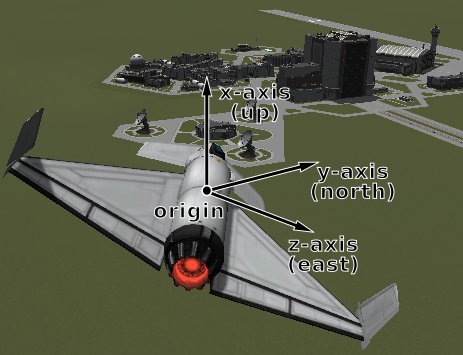
The first part instructs the auto-pilot to point in direction (0,1,0)
(i.e. along the y-axis) in the vessel’s surface reference frame. The y-axis of
the reference frame points in the north direction, as required.
The second part instructs the auto-pilot to point in direction (1,0,0)
(along the x-axis) in the vessel’s surface reference frame. This x-axis of the
reference frame points upwards (away from the planet) as required.
Finally, the code instructs the auto-pilot to point in direction (0,0,-1)
(along the negative z axis). The z-axis of the reference frame points east, so
the requested direction points west – as required.
Orbital directions#
This example demonstrates how to make the vessel point in the various orbital
directions, as seen on the navball when it is in ‘orbit’ mode. It uses
Vessel.orbital_reference_frame.
using System;
using System.Collections.Generic;
using System.Net;
using KRPC.Client;
using KRPC.Client.Services.SpaceCenter;

class OrbitalDirections
{
    public static void Main ()
    {
        using (var conn = new Connection ("Orbital directions")) {
            var vessel = conn.SpaceCenter ().ActiveVessel;
            var ap = vessel.AutoPilot;
            ap.ReferenceFrame = vessel.OrbitalReferenceFrame;
            ap.Engaged = true;

            // Point the vessel in the prograde direction
            ap.TargetDirection = Tuple.Create (0.0, 1.0, 0.0);
            ap.Wait();

            // Point the vessel in the orbit normal direction
            ap.TargetDirection = Tuple.Create (0.0, 0.0, 1.0);
            ap.Wait();

            // Point the vessel in the orbit radial direction
            ap.TargetDirection = Tuple.Create (-1.0, 0.0, 0.0);
            ap.Wait();

            ap.Engaged = false;
        }
    }
}
#include <krpc.hpp>
#include <krpc/services/space_center.hpp>

int main() {
  krpc::Client conn = krpc::connect("Orbital directions");
  krpc::services::SpaceCenter space_center(&conn);
  auto vessel = space_center.active_vessel().value();
  auto ap = vessel.auto_pilot();
  ap.set_reference_frame(vessel.orbital_reference_frame());
  ap.set_engaged(true);

  // Point the vessel in the prograde direction
  ap.set_target_direction(std::make_tuple(0, 1, 0));
  ap.wait();

  // Point the vessel in the orbit normal direction
  ap.set_target_direction(std::make_tuple(0, 0, 1));
  ap.wait();

  // Point the vessel in the orbit radial direction
  ap.set_target_direction(std::make_tuple(-1, 0, 0));
  ap.wait();

  ap.set_engaged(false);
}
#ifdef _WIN32
#define WIN32_LEAN_AND_MEAN
#include <windows.h>
#define sleep(seconds) Sleep((seconds) * 1000)
#else
#include <unistd.h>
#endif
#include <math.h>
#include <krpc_cnano.h>
#include <krpc_cnano/services/space_center.h>

typedef krpc_tuple_double_double_double_t vector3;

int main() {
  krpc_connection_t conn;
  krpc_open(&conn, "COM0");
  krpc_connect(conn, "Orbital directions");

  krpc_SpaceCenter_Vessel_t vessel;
  krpc_SpaceCenter_ActiveVessel(conn, &vessel);
  krpc_SpaceCenter_ReferenceFrame_t vessel_obt_ref;
  krpc_SpaceCenter_Vessel_OrbitalReferenceFrame(conn, &vessel_obt_ref, vessel);

  krpc_SpaceCenter_AutoPilot_t ap;
  krpc_SpaceCenter_Vessel_AutoPilot(conn, &ap, vessel);
  krpc_SpaceCenter_AutoPilot_set_ReferenceFrame(conn, ap, vessel_obt_ref);
  krpc_SpaceCenter_AutoPilot_set_Engaged(conn, ap, true);

  // Point the vessel in the prograde direction
  {
    krpc_tuple_double_double_double_t direction = { 0, 1, 0 };
    krpc_SpaceCenter_AutoPilot_set_TargetDirection(conn, ap, &direction);
    krpc_SpaceCenter_AutoPilot_Wait(conn, ap, -1);
  }

  // Point the vessel in the orbit normal direction
  {
    krpc_tuple_double_double_double_t direction = { 0, 0, 1 };
    krpc_SpaceCenter_AutoPilot_set_TargetDirection(conn, ap, &direction);
    krpc_SpaceCenter_AutoPilot_Wait(conn, ap, -1);
  }

  // Point the vessel in the orbit radial direction
  {
    krpc_tuple_double_double_double_t direction = { -1, 0, 0 };
    krpc_SpaceCenter_AutoPilot_set_TargetDirection(conn, ap, &direction);
    krpc_SpaceCenter_AutoPilot_Wait(conn, ap, -1);
  }

  krpc_SpaceCenter_AutoPilot_set_Engaged(conn, ap, false);
}
import krpc.client.Connection;
import krpc.client.RPCException;
import krpc.client.services.SpaceCenter;
import krpc.client.services.SpaceCenter.AutoPilot;
import krpc.client.services.SpaceCenter.Vessel;

import org.javatuples.Triplet;

import java.io.IOException;

public class OrbitalDirections {
    public static void main(String[] args) throws IOException, RPCException {
        Connection connection = Connection.newInstance("Orbital directions");
        SpaceCenter spaceCenter = SpaceCenter.newInstance(connection);
        Vessel vessel = spaceCenter.getActiveVessel();
        AutoPilot ap = vessel.getAutoPilot();
        ap.setReferenceFrame(vessel.getOrbitalReferenceFrame());
        ap.setEngaged(true);

        // Point the vessel in the prograde direction
        ap.setTargetDirection(new Triplet<Double,Double,Double> (0.0, 1.0, 0.0));
        ap.wait_(-1);

        // Point the vessel in the orbit normal direction
        ap.setTargetDirection(new Triplet<Double,Double,Double> (0.0, 0.0, 1.0));
        ap.wait_(-1);

        // Point the vessel in the orbit radial direction
        ap.setTargetDirection(new Triplet<Double,Double,Double> (-1.0, 0.0, 0.0));
        ap.wait_(-1);

        ap.setEngaged(false);
        connection.close();
    }
}
local krpc = require 'krpc'
local List = require 'pl.List'
local conn = krpc.connect('Orbital directions')
local vessel = conn.space_center.active_vessel
local ap = vessel.auto_pilot
ap.reference_frame = vessel.orbital_reference_frame
ap.engaged = true

-- Point the vessel in the prograde direction
ap.target_direction = List{0, 1, 0}
ap:wait()

-- Point the vessel in the orbit normal direction
ap.target_direction = List{0, 0, 1}
ap:wait()

-- Point the vessel in the orbit radial direction
ap.target_direction = List{-1, 0, 0}
ap:wait()

ap.engaged = false
import krpc

conn = krpc.connect(name="Orbital directions")
vessel = conn.space_center.active_vessel
ap = vessel.auto_pilot
ap.reference_frame = vessel.orbital_reference_frame
ap.engaged = True

# Point the vessel in the prograde direction
ap.target_direction = (0, 1, 0)
ap.wait()

# Point the vessel in the orbit normal direction
ap.target_direction = (0, 0, 1)
ap.wait()

# Point the vessel in the orbit radial direction
ap.target_direction = (-1, 0, 0)
ap.wait()

ap.engaged = False
This code uses the vessel’s orbital reference frame, pictured below:
Surface ‘prograde’#
This example demonstrates how to point the vessel in the ‘prograde’ direction on the navball, when in ‘surface’ mode. This is the direction of the vessels velocity relative to the surface:
using System;
using KRPC.Client;
using KRPC.Client.Services.SpaceCenter;

class SurfacePrograde
{
    public static void Main ()
    {
        using (var connection = new Connection (name : "Surface prograde")) {
            var vessel = connection.SpaceCenter ().ActiveVessel;
            var ap = vessel.AutoPilot;

            ap.ReferenceFrame = vessel.SurfaceVelocityReferenceFrame;
            ap.TargetDirection = new Tuple<double,double,double> (0, 1, 0);
            ap.Engaged = true;
            ap.Wait ();
            ap.Engaged = false;
        }
    }
}
#include <iostream>
#include <krpc.hpp>
#include <krpc/services/space_center.hpp>

int main() {
  krpc::Client conn = krpc::connect("Surface prograde");
  krpc::services::SpaceCenter spaceCenter(&conn);
  auto vessel = spaceCenter.active_vessel().value();
  auto ap = vessel.auto_pilot();

  ap.set_reference_frame(vessel.surface_velocity_reference_frame());
  ap.set_target_direction(std::make_tuple(0.0, 1.0, 0.0));
  ap.set_engaged(true);
  ap.wait();
  ap.set_engaged(false);
}
#ifdef _WIN32
#define WIN32_LEAN_AND_MEAN
#include <windows.h>
#define sleep(seconds) Sleep((seconds) * 1000)
#else
#include <unistd.h>
#endif
#include <math.h>
#include <krpc_cnano.h>
#include <krpc_cnano/services/space_center.h>

typedef krpc_tuple_double_double_double_t vector3;

int main() {
  krpc_connection_t conn;
  krpc_open(&conn, "COM0");
  krpc_connect(conn, "Surface prograde");

  krpc_SpaceCenter_Vessel_t vessel;
  krpc_SpaceCenter_ActiveVessel(conn, &vessel);
  krpc_SpaceCenter_ReferenceFrame_t vessel_srf_vel_ref;
  krpc_SpaceCenter_Vessel_SurfaceVelocityReferenceFrame(conn, &vessel_srf_vel_ref, vessel);

  krpc_SpaceCenter_AutoPilot_t ap;
  krpc_SpaceCenter_Vessel_AutoPilot(conn, &ap, vessel);

  krpc_SpaceCenter_AutoPilot_set_ReferenceFrame(conn, ap, vessel_srf_vel_ref);
  krpc_tuple_double_double_double_t direction = { 0, 1, 0 };
  krpc_SpaceCenter_AutoPilot_set_TargetDirection(conn, ap, &direction);
  krpc_SpaceCenter_AutoPilot_set_Engaged(conn, ap, true);
  krpc_SpaceCenter_AutoPilot_Wait(conn, ap, -1);
  krpc_SpaceCenter_AutoPilot_set_Engaged(conn, ap, false);
}
import krpc.client.Connection;
import krpc.client.RPCException;
import krpc.client.services.SpaceCenter;
import krpc.client.services.SpaceCenter.AutoPilot;
import krpc.client.services.SpaceCenter.Vessel;

import org.javatuples.Triplet;

import java.io.IOException;

public class SurfacePrograde {
    public static void main(String[] args) throws IOException, RPCException {
        Connection connection = Connection.newInstance("Surface prograde");
        SpaceCenter spaceCenter = SpaceCenter.newInstance(connection);
        Vessel vessel = spaceCenter.getActiveVessel();
        AutoPilot ap = vessel.getAutoPilot();

        ap.setReferenceFrame(vessel.getSurfaceVelocityReferenceFrame());
        ap.setTargetDirection(new Triplet<Double,Double,Double>(0.0, 1.0, 0.0));
        ap.setEngaged(true);
        ap.wait_(-1);
        ap.setEngaged(false);
        connection.close();
    }
}
local krpc = require 'krpc'
local List = require 'pl.List'
local conn = krpc.connect('Surface prograde')
local vessel = conn.space_center.active_vessel
local ap = vessel.auto_pilot

ap.reference_frame = vessel.surface_velocity_reference_frame
ap.target_direction = List{0, 1, 0}
ap.engaged = true
ap:wait()
ap.engaged = false
import krpc

conn = krpc.connect(name="Surface prograde")
vessel = conn.space_center.active_vessel
ap = vessel.auto_pilot

ap.reference_frame = vessel.surface_velocity_reference_frame
ap.target_direction = (0, 1, 0)
ap.engaged = True
ap.wait()
ap.engaged = False
Note
Vessel.surface_velocity_reference_frame is singular when the
vessel’s surface speed is zero (hovering, landed). Calling this when the
vessel is stationary will raise an error.
This code uses the Vessel.surface_velocity_reference_frame, pictured
below:
See also
If you only need the surface prograde or retrograde direction as a
vector, rather than a reference frame to point the auto-pilot at,
Flight.surface_prograde and Flight.surface_retrograde return
it directly, matching the navball’s surface mode.
Vessel Speed#
This example demonstrates how to get the orbital and surface speeds of the vessel, equivalent to the values displayed by the navball.
To compute the orbital speed of a vessel, you need to get the velocity relative
to the planet’s non-rotating reference frame
(CelestialBody.non_rotating_reference_frame). This reference frame is
fixed relative to the body, but does not rotate.
For the surface speed, the planet’s reference frame
(CelestialBody.reference_frame) is required, as this reference frame
rotates with the body.
using System;
using KRPC.Client;
using KRPC.Client.Services.SpaceCenter;

class VesselSpeed
{
    public static void Main ()
    {
        var connection = new Connection (name : "Vessel speed");
        var vessel = connection.SpaceCenter ().ActiveVessel;
        var obtFrame = vessel.Orbit.Body.NonRotatingReferenceFrame;
        var srfFrame = vessel.Orbit.Body.ReferenceFrame;
        while (true) {
            var obtSpeed = vessel.Flight (obtFrame).Speed;
            var srfSpeed = vessel.Flight (srfFrame).Speed;
            Console.WriteLine (
                "Orbital speed = {0:F1} m/s, Surface speed = {1:F1} m/s",
                obtSpeed, srfSpeed);
            System.Threading.Thread.Sleep (1000);
        }
    }
}
#include <iostream>
#include <iomanip>
#include <thread>
#include <krpc.hpp>
#include <krpc/services/space_center.hpp>

int main() {
  krpc::Client conn = krpc::connect("Vessel speed");
  krpc::services::SpaceCenter spaceCenter(&conn);
  auto vessel = spaceCenter.active_vessel().value();
  auto obt_frame = vessel.orbit().body().non_rotating_reference_frame();
  auto srf_frame = vessel.orbit().body().reference_frame();

  while (true) {
    auto obt_speed = vessel.flight(obt_frame).speed();
    auto srf_speed = vessel.flight(srf_frame).speed();
    std::cout << std::fixed << std::setprecision(1)
              << "Orbital speed = " << obt_speed << " m/s, "
              << "Surface speed = " << srf_speed << " m/s" << std::endl;
    std::this_thread::sleep_for(std::chrono::seconds(1));
  }
}
#ifdef _WIN32
#define WIN32_LEAN_AND_MEAN
#include <windows.h>
#define sleep(seconds) Sleep((seconds) * 1000)
#else
#include <unistd.h>
#endif
#include <math.h>
#include <krpc_cnano.h>
#include <krpc_cnano/services/space_center.h>

typedef krpc_tuple_double_double_double_t vector3;

int main() {
  krpc_connection_t conn;
  krpc_open(&conn, "COM0");
  krpc_connect(conn, "Vessel speed");

  krpc_SpaceCenter_Vessel_t vessel;
  krpc_SpaceCenter_ActiveVessel(conn, &vessel);
  krpc_SpaceCenter_Orbit_t orbit;
  krpc_SpaceCenter_Vessel_Orbit(conn, &orbit, vessel);
  krpc_SpaceCenter_CelestialBody_t body;
  krpc_SpaceCenter_Orbit_Body(conn, &body, orbit);

  krpc_SpaceCenter_ReferenceFrame_t obt_frame;
  krpc_SpaceCenter_ReferenceFrame_t srf_frame;
  krpc_SpaceCenter_CelestialBody_NonRotatingReferenceFrame(conn, &obt_frame, body);
  krpc_SpaceCenter_CelestialBody_ReferenceFrame(conn, &srf_frame, body);

  while (true) {
    double obt_speed;
    double srf_speed;
    krpc_SpaceCenter_Flight_t flight;
    krpc_SpaceCenter_Vessel_Flight(conn, &flight, vessel, obt_frame);
    krpc_SpaceCenter_Flight_Speed(conn, &obt_speed, flight);
    krpc_SpaceCenter_Vessel_Flight(conn, &flight, vessel, srf_frame);
    krpc_SpaceCenter_Flight_Speed(conn, &srf_speed, flight);
    printf("Orbital speed = %.1f m/s, Surface speed = %.1f m/s\n", obt_speed, srf_speed);
    sleep(1);
  }
}
import krpc.client.Connection;
import krpc.client.RPCException;
import krpc.client.services.SpaceCenter;
import krpc.client.services.SpaceCenter.ReferenceFrame;
import krpc.client.services.SpaceCenter.Vessel;

import org.javatuples.Triplet;

import java.io.IOException;

public class VesselSpeed {
    public static void main(String[] args)
        throws IOException, RPCException, InterruptedException {
        Connection connection = Connection.newInstance("Vessel speed");
        SpaceCenter spaceCenter = SpaceCenter.newInstance(connection);
        Vessel vessel = spaceCenter.getActiveVessel();
        ReferenceFrame obtFrame = vessel.getOrbit().getBody().getNonRotatingReferenceFrame();
        ReferenceFrame srfFrame = vessel.getOrbit().getBody().getReferenceFrame();
        while (true) {
            double obtSpeed = vessel.flight(obtFrame).getSpeed();
            double srfSpeed = vessel.flight(srfFrame).getSpeed();
            System.out.printf(
              "Orbital speed = %.1f m/s, Surface speed = %.1f m/s\n",
              obtSpeed, srfSpeed);
            Thread.sleep(1000);
        }
    }
}
local krpc = require 'krpc'
local platform = require 'krpc.platform'
local conn = krpc.connect('Vessel speed')
local vessel = conn.space_center.active_vessel
local obt_frame = vessel.orbit.body.non_rotating_reference_frame
local srf_frame = vessel.orbit.body.reference_frame

while true do
    local obt_speed = vessel:flight(obt_frame).speed
    local srf_speed = vessel:flight(srf_frame).speed
    print(string.format(
      'Orbital speed = %.1f m/s, Surface speed = %.1f m/s',
      obt_speed, srf_speed))
    platform.sleep(1)
end
import time

import krpc

conn = krpc.connect(name="Vessel speed")
vessel = conn.space_center.active_vessel
obt_frame = vessel.orbit.body.non_rotating_reference_frame
srf_frame = vessel.orbit.body.reference_frame

while True:
    obt_speed = vessel.flight(obt_frame).speed
    srf_speed = vessel.flight(srf_frame).speed
    print("Orbital speed = %.1f m/s, Surface speed = %.1f m/s" % (obt_speed, srf_speed))
    time.sleep(1)
See also
Vessel.orbit_speed_reference_frame and
Vessel.surface_speed_reference_frame give the same two speeds
directly, in frames centered on the vessel and oriented like the navball is in
each mode. See Navball speed modes.
Vessel Velocity#
This example demonstrates how to get the velocity of the vessel (as a vector), relative to the surface of the body being orbited.
To do this, a hybrid reference frame is required. This is because we want a reference frame that is centered on the vessel, but whose linear velocity is fixed relative to the ground.
We therefore create a hybrid reference frame with its rotation set to the
vessel’s surface reference frame (Vessel.surface_reference_frame), and
all other properties (including position and velocity) set to the body’s
reference frame (CelestialBody.reference_frame) – which rotates with
the body.
using System;
using KRPC.Client;
using KRPC.Client.Services.SpaceCenter;

class VesselVelocity
{
    public static void Main ()
    {
        var connection = new Connection (name : "Vessel velocity");
        var vessel = connection.SpaceCenter ().ActiveVessel;
        var refFrame = ReferenceFrame.CreateHybrid(
          connection,
          vessel.Orbit.Body.ReferenceFrame,
          vessel.SurfaceReferenceFrame);

        while (true) {
            var velocity = vessel.Flight (refFrame).Velocity;
            Console.WriteLine ("Surface velocity = ({0:F1}, {1:F1}, {2:F1})",
                               velocity.Item1, velocity.Item2, velocity.Item3);
            System.Threading.Thread.Sleep (1000);
        }
    }
}
#include <iostream>
#include <iomanip>
#include <thread>
#include <krpc.hpp>
#include <krpc/services/space_center.hpp>

int main() {
  krpc::Client connection = krpc::connect("Vessel velocity");
  krpc::services::SpaceCenter spaceCenter(&connection);
  auto vessel = spaceCenter.active_vessel().value();
  auto ref_frame = krpc::services::SpaceCenter::ReferenceFrame::create_hybrid(
    connection,
    vessel.orbit().body().reference_frame(),
    vessel.surface_reference_frame()
  );

  while (true) {
    auto velocity = vessel.flight(ref_frame).velocity();
    std::cout
      << std::fixed << std::setprecision(1)
      << "Surface velocity = ("
      << std::get<0>(velocity) << ","
      << std::get<1>(velocity) << ","
      << std::get<2>(velocity)
      << ")" << std::endl;
    std::this_thread::sleep_for(std::chrono::seconds(1));
  }
}
#ifdef _WIN32
#define WIN32_LEAN_AND_MEAN
#include <windows.h>
#define sleep(seconds) Sleep((seconds) * 1000)
#else
#include <unistd.h>
#endif
#include <math.h>
#include <krpc_cnano.h>
#include <krpc_cnano/services/space_center.h>

typedef krpc_tuple_double_double_double_t vector3;

int main() {
  krpc_connection_t conn;
  krpc_open(&conn, "COM0");
  krpc_connect(conn, "Vessel velocity");

  krpc_SpaceCenter_Vessel_t vessel;
  krpc_SpaceCenter_ActiveVessel(conn, &vessel);
  krpc_SpaceCenter_Orbit_t orbit;
  krpc_SpaceCenter_Vessel_Orbit(conn, &orbit, vessel);
  krpc_SpaceCenter_CelestialBody_t body;
  krpc_SpaceCenter_Orbit_Body(conn, &body, orbit);

  krpc_SpaceCenter_ReferenceFrame_t vessel_srf_frame;
  krpc_SpaceCenter_Vessel_SurfaceReferenceFrame(conn, &vessel_srf_frame, vessel);
  krpc_SpaceCenter_ReferenceFrame_t body_frame;
  krpc_SpaceCenter_CelestialBody_ReferenceFrame(conn, &body_frame, body);

  krpc_SpaceCenter_ReferenceFrame_t ref_frame;
  krpc_SpaceCenter_ReferenceFrame_CreateHybrid(
    conn, &ref_frame, body_frame, vessel_srf_frame, KRPC_NULL, KRPC_NULL);

  while (true) {
    krpc_tuple_double_double_double_t velocity;
    krpc_SpaceCenter_Flight_t flight;
    krpc_SpaceCenter_Vessel_Flight(conn, &flight, vessel, ref_frame);
    krpc_SpaceCenter_Flight_Velocity(conn, &velocity, flight);
    printf("Surface velocity = %.1f, %.1f, %.1f\n", velocity.e0, velocity.e1, velocity.e2);
    sleep(1);
  }
}
import krpc.client.Connection;
import krpc.client.RPCException;
import krpc.client.services.SpaceCenter;
import krpc.client.services.SpaceCenter.ReferenceFrame;
import krpc.client.services.SpaceCenter.Vessel;

import org.javatuples.Triplet;

import java.io.IOException;

public class VesselVelocity {
    public static void main(String[] args)
        throws IOException, RPCException, InterruptedException {
      Connection connection = Connection.newInstance("Vessel velocity");
        SpaceCenter spaceCenter = SpaceCenter.newInstance(connection);
        Vessel vessel = spaceCenter.getActiveVessel();
        ReferenceFrame refFrame = ReferenceFrame.createHybrid(
          connection,
          vessel.getOrbit().getBody().getReferenceFrame(),
          vessel.getSurfaceReferenceFrame(),
          vessel.getOrbit().getBody().getReferenceFrame(),
          vessel.getOrbit().getBody().getReferenceFrame());
        while (true) {
            Triplet<Double,Double,Double> velocity =
                vessel.flight(refFrame).getVelocity();
            System.out.printf("Surface velocity = (%.1f, %.1f, %.1f)\n",
                              velocity.getValue0(),
                              velocity.getValue1(),
                              velocity.getValue2());
            Thread.sleep(1000);
        }
    }
}
local krpc = require 'krpc'
local platform = require 'krpc.platform'
local conn = krpc.connect('Orbital speed')
local vessel = conn.space_center.active_vessel
local ref_frame = conn.space_center.ReferenceFrame.create_hybrid(
  vessel.orbit.body.reference_frame,
  vessel.surface_reference_frame)

while true do
    local velocity = vessel:flight(ref_frame).velocity
    print(string.format('Surface velocity = (%.1f, %.1f, %.1f)',
                        velocity[1], velocity[2], velocity[3]))
    platform.sleep(1)
end
import time

import krpc

conn = krpc.connect(name="Orbital speed")
vessel = conn.space_center.active_vessel
ref_frame = conn.space_center.ReferenceFrame.create_hybrid(
    position=vessel.orbit.body.reference_frame, rotation=vessel.surface_reference_frame
)

while True:
    velocity = vessel.flight(ref_frame).velocity
    print("Surface velocity = (%.1f, %.1f, %.1f)" % velocity)
    time.sleep(1)
See also
Vessel.surface_speed_reference_frame gives the same velocity
without constructing a frame, although in its own prograde/normal/radial axes
rather than as upwards, north and east components. See
Navball speed modes.
Angle of attack#
This example computes the angle between the direction the vessel is pointing in, and the direction that the vessel is moving in (relative to the surface):
using System;
using KRPC.Client;
using KRPC.Client.Services.SpaceCenter;

class AngleOfAttack
{
    public static void Main ()
    {
        var conn = new Connection ("Angle of attack");
        var vessel = conn.SpaceCenter ().ActiveVessel;

        while (true) {
            var d = vessel.Direction (vessel.Orbit.Body.ReferenceFrame);
            var v = vessel.Velocity (vessel.Orbit.Body.ReferenceFrame);

            // Compute the dot product of d and v
            var dotProd = d.Item1 * v.Item1 + d.Item2 * v.Item2 + d.Item3 * v.Item3;

            // Compute the magnitude of v
            var vMag = Math.Sqrt (
                v.Item1 * v.Item1 + v.Item2 * v.Item2 + v.Item3 * v.Item3);
            // Note: don't need to magnitude of d as it is a unit vector

            // Compute the angle between the vectors
            double angle = 0;
            if (vMag > 0)
                angle = Math.Acos (dotProd / vMag) * (180.0 / Math.PI);

            Console.WriteLine (
                "Angle of attack = " + Math.Round (angle, 2) + " degrees");

            System.Threading.Thread.Sleep (1000);
        }
    }
}
#include <iostream>
#include <iomanip>
#include <cmath>
#include <chrono>
#include <thread>
#include <krpc.hpp>
#include <krpc/services/space_center.hpp>

static const double pi = 3.1415926535897;

int main() {
  krpc::Client conn = krpc::connect("Angle of attack");
  krpc::services::SpaceCenter space_center(&conn);
  auto vessel = space_center.active_vessel().value();

  while (true) {
    auto d = vessel.direction(vessel.orbit().body().reference_frame());
    auto v = vessel.velocity(vessel.orbit().body().reference_frame());

    // Compute the dot product of d and v
    double dotProd =
      std::get<0>(d)*std::get<0>(v) +
      std::get<1>(d)*std::get<1>(v) +
      std::get<2>(d)*std::get<2>(v);

    // Compute the magnitude of v
    double vMag = sqrt(
      std::get<0>(v)*std::get<0>(v) +
      std::get<1>(v)*std::get<1>(v) +
      std::get<2>(v)*std::get<2>(v));
    // Note: don't need to magnitude of d as it is a unit vector

    // Compute the angle between the vectors
    double angle = 0;
    if (vMag > 0)
      angle = acos(dotProd / vMag) * (180.0 / pi);

    std::cout << "Angle of attack = "
              << std::fixed << std::setprecision(1)
              << angle << " degrees" << std::endl;

    std::this_thread::sleep_for(std::chrono::seconds(1));
  }
}
#ifdef _WIN32
#define WIN32_LEAN_AND_MEAN
#include <windows.h>
#define sleep(seconds) Sleep((seconds) * 1000)
#else
#include <unistd.h>
#endif
#include <math.h>
#include <krpc_cnano.h>
#include <krpc_cnano/services/space_center.h>

typedef krpc_tuple_double_double_double_t vector3;

static double pi = 3.1415926535897;

int main() {
  krpc_connection_t conn;
  krpc_open(&conn, "COM0");
  krpc_connect(conn, "Angle of attack");

  krpc_SpaceCenter_Vessel_t vessel;
  krpc_SpaceCenter_ActiveVessel(conn, &vessel);
  krpc_SpaceCenter_Orbit_t orbit;
  krpc_SpaceCenter_Vessel_Orbit(conn, &orbit, vessel);
  krpc_SpaceCenter_CelestialBody_t body;
  krpc_SpaceCenter_Orbit_Body(conn, &body, orbit);
  krpc_SpaceCenter_ReferenceFrame_t body_ref;
  krpc_SpaceCenter_CelestialBody_ReferenceFrame(conn, &body_ref, body);

  while (true) {
    vector3 d;
    vector3 v;
    krpc_SpaceCenter_Vessel_Direction(conn, &d, vessel, body_ref);
    krpc_SpaceCenter_Vessel_Velocity(conn, &v, vessel, body_ref);

    // Compute the dot product of d and v
    double dotProd = d.e0*v.e0 + d.e1*v.e1 + d.e2*v.e2;

    // Compute the magnitude of v
    double vMag = sqrt(v.e0*v.e0 + v.e1*v.e1 + v.e2*v.e2);
    // Note: don't need to magnitude of d as it is a unit vector

    // Compute the angle between the vectors
    double angle = 0;
    if (vMag > 0)
      angle = acos(dotProd / vMag) * (180.0 / pi);

    printf("Angle of attack = %.1f degrees\n", angle);

    sleep(1);
  }
}
import krpc.client.Connection;
import krpc.client.RPCException;
import krpc.client.services.SpaceCenter;

import org.javatuples.Triplet;

import java.io.IOException;
import java.lang.Math;

public class AngleOfAttack {
    public static void main(String[] args)
        throws IOException, RPCException, InterruptedException {
        Connection connection = Connection.newInstance("Angle of attack");
        SpaceCenter spaceCenter = SpaceCenter.newInstance(connection);
        SpaceCenter.Vessel vessel = spaceCenter.getActiveVessel();

        while (true) {
            Triplet<Double,Double,Double> d =
                vessel.direction(vessel.getOrbit().getBody().getReferenceFrame());
            Triplet<Double,Double,Double> v =
                vessel.velocity(vessel.getOrbit().getBody().getReferenceFrame());

            // Compute the dot product of d and v
            double dotProd =
                  d.getValue0() * v.getValue0()
                + d.getValue1() * v.getValue1()
                + d.getValue2() * v.getValue2();

            // Compute the magnitude of v
            double vMag = Math.sqrt(
                  v.getValue0() * v.getValue0()
                + v.getValue1() * v.getValue1()
                + v.getValue2() * v.getValue2()
            );
            // Note: don't need to magnitude of d as it is a unit vector

            // Compute the angle between the vectors
            double angle = 0;
            if (vMag > 0) {
                angle = Math.acos(dotProd / vMag) * (180.0 / Math.PI);
            }

            System.out.printf("Angle of attack = %.1f degrees\n", angle);

            Thread.sleep(1000);
        }
    }
}
local krpc = require 'krpc'
local platform = require 'krpc.platform'
local math = require 'math'
local conn = krpc.connect('Angle of attack')
local vessel = conn.space_center.active_vessel

while true do

   local d = vessel:direction(vessel.orbit.body.reference_frame)
    local v = vessel:velocity(vessel.orbit.body.reference_frame)

    -- Compute the dot product of d and v
    local dotprod = d[1]*v[1] + d[2]*v[2] + d[3]*v[3]

    -- Compute the magnitude of v
    local vmag = math.sqrt(v[1]*v[1] + v[2]*v[2] + v[3]*v[3])
    -- Note: don't need to magnitude of d as it is a unit vector

    -- Compute the angle between the vectors
    local angle = 0
    if vmag > 0 then
        angle = math.acos(dotprod / vmag) * (180. / math.pi)
    end

    print(string.format('Angle of attack = %.1f', angle))

    platform.sleep(1)

end
import math
import time

import krpc

conn = krpc.connect(name="Angle of attack")
vessel = conn.space_center.active_vessel

while True:
    d = vessel.direction(vessel.orbit.body.reference_frame)
    v = vessel.velocity(vessel.orbit.body.reference_frame)

    # Compute the dot product of d and v
    dotprod = d[0] * v[0] + d[1] * v[1] + d[2] * v[2]

    # Compute the magnitude of v
    vmag = math.sqrt(v[0] ** 2 + v[1] ** 2 + v[2] ** 2)
    # Note: don't need to magnitude of d as it is a unit vector

    # Compute the angle between the vectors
    angle = 0.0
    if vmag > 0:
        angle = math.acos(dotprod / vmag) * (180.0 / math.pi)

    print("Angle of attack = %.1f degrees" % angle)

    time.sleep(1)
Note that the orientation of the reference frame used to get the direction and
velocity vectors does not matter, as the angle between two vectors is the same
regardless of the orientation of the axes. However, if we were to use a
reference frame that moves with the vessel, the velocity would return
(0,0,0). We therefore need a reference frame that is not fixed relative to
the vessel. CelestialBody.reference_frame fits these requirements.
The angle computed here is the total angle between the two vectors, in the range
0° to 180°. This is not the same quantity as Flight.angle_of_attack,
which is the signed angle of attack in the vessel’s pitch plane, in the range
-90° to +90° (with the sideways component reported separately by
Flight.sideslip_angle).
Landing Site#
This example creates a reference frame that is located on the surface of a body
at a given altitude, which could be used as the target for a landing auto pilot.
CelestialBody.surface_reference_frame() creates the frame, and
Drawing.add_axes() draws it.
using System;
using KRPC.Client;
using KRPC.Client.Services.SpaceCenter;
using KRPC.Client.Services.Drawing;

class LandingSite
{
    public static void Main ()
    {
        var conn = new Connection ("Landing Site");
        var vessel = conn.SpaceCenter ().ActiveVessel;
        var body = vessel.Orbit.Body;

        // Define the landing site as the top of the VAB
        double landingLatitude = -(0.0+(5.0/60.0)+(48.38/60.0/60.0));
        double landingLongitude = -(74.0+(37.0/60.0)+(12.2/60.0/60.0));
        double landingAltitude = 111;

        // Determine landing site reference frame
        // (orientation: x=zenith, y=north, z=east)
        var landingReferenceFrame = body.SurfaceReferenceFrame(
            landingLatitude, landingLongitude, landingAltitude);

        // Draw axes
        conn.Drawing().AddAxes(landingReferenceFrame);

        while (true)
          System.Threading.Thread.Sleep (1000);
    }
}
#include <chrono>
#include <thread>
#include <krpc.hpp>
#include <krpc/services/space_center.hpp>
#include <krpc/services/ui.hpp>
#include <krpc/services/drawing.hpp>

int main() {
  krpc::Client conn = krpc::connect("Landing Site");
  krpc::services::SpaceCenter space_center(&conn);
  krpc::services::Drawing drawing(&conn);
  auto vessel = space_center.active_vessel().value();
  auto body = vessel.orbit().body();

  // Define the landing site as the top of the VAB
  double landing_latitude = -(0.0+(5.0/60.0)+(48.38/60.0/60.0));
  double landing_longitude = -(74.0+(37.0/60.0)+(12.2/60.0/60.0));
  double landing_altitude = 111;

  // Determine landing site reference frame
  // (orientation: x=zenith, y=north, z=east)
  auto landing_reference_frame = body.surface_reference_frame(
    landing_latitude, landing_longitude, landing_altitude);

  // Draw axes
  drawing.add_axes(landing_reference_frame);

  while (true)
    std::this_thread::sleep_for(std::chrono::seconds(1));
}
#ifdef _WIN32
#define WIN32_LEAN_AND_MEAN
#include <windows.h>
#define sleep(seconds) Sleep((seconds) * 1000)
#else
#include <unistd.h>
#endif
#include <krpc_cnano.h>
#include <krpc_cnano/services/space_center.h>
#include <krpc_cnano/services/ui.h>
#include <krpc_cnano/services/drawing.h>

int main() {
  krpc_connection_t conn;
  krpc_open(&conn, "COM0");
  krpc_connect(conn, "Landing site");

  krpc_SpaceCenter_Vessel_t vessel;
  krpc_SpaceCenter_ActiveVessel(conn, &vessel);
  krpc_SpaceCenter_Orbit_t orbit;
  krpc_SpaceCenter_Vessel_Orbit(conn, &orbit, vessel);
  krpc_SpaceCenter_CelestialBody_t body;
  krpc_SpaceCenter_Orbit_Body(conn, &body, orbit);

  // Define the landing site as the top of the VAB
  double landing_latitude = -(0.0+(5.0/60.0)+(48.38/60.0/60.0));
  double landing_longitude = -(74.0+(37.0/60.0)+(12.2/60.0/60.0));
  double landing_altitude = 111;

  // Determine landing site reference frame
  // (orientation: x=zenith, y=north, z=east)
  krpc_SpaceCenter_ReferenceFrame_t landing_reference_frame;
  krpc_SpaceCenter_CelestialBody_SurfaceReferenceFrame(
    conn, &landing_reference_frame, body,
    landing_latitude, landing_longitude, landing_altitude);

  // Draw axes
  krpc_Drawing_AddAxes(conn, NULL, landing_reference_frame, 10, true);

  while (true)
    sleep(1);
}
import krpc.client.Connection;
import krpc.client.RPCException;
import krpc.client.services.Drawing;
import krpc.client.services.SpaceCenter;

import java.io.IOException;

public class LandingSite {
    public static void main(String[] args)
        throws IOException, RPCException, InterruptedException {
        Connection connection = Connection.newInstance("Landing Site");
        SpaceCenter spaceCenter = SpaceCenter.newInstance(connection);
        Drawing drawing = Drawing.newInstance(connection);
        SpaceCenter.Vessel vessel = spaceCenter.getActiveVessel();
        SpaceCenter.CelestialBody body = vessel.getOrbit().getBody();

        // Define the landing site as the top of the VAB
        double landingLatitude = -(0.0+(5.0/60.0)+(48.38/60.0/60.0));
        double landingLongitude = -(74.0+(37.0/60.0)+(12.2/60.0/60.0));
        double landingAltitude = 111;

        // Determine landing site reference frame
        // (orientation: x=zenith, y=north, z=east)
        SpaceCenter.ReferenceFrame landingReferenceFrame =
          body.surfaceReferenceFrame(landingLatitude, landingLongitude, landingAltitude);

        // Draw axes
        drawing.addAxes(landingReferenceFrame, 10, true);

        while (true)
          Thread.sleep(1000);
    }
}
local krpc = require 'krpc'
local platform = require 'krpc.platform'

local conn = krpc.connect('Landing Site')
local vessel = conn.space_center.active_vessel
local body = vessel.orbit.body

-- Define the landing site as the top of the VAB
local landing_latitude = -(0+(5.0/60)+(48.38/60/60))
local landing_longitude = -(74+(37.0/60)+(12.2/60/60))
local landing_altitude = 111

-- Determine landing site reference frame
-- (orientation: x=zenith, y=north, z=east)
local landing_reference_frame = body:surface_reference_frame(
  landing_latitude, landing_longitude, landing_altitude)

-- Draw axes
conn.drawing.add_axes(landing_reference_frame)

while true do
   platform.sleep(1)
end
import time

import krpc

conn = krpc.connect(name="Landing Site")
vessel = conn.space_center.active_vessel
body = vessel.orbit.body

# Define the landing site as the top of the VAB
landing_latitude = -(0 + (5.0 / 60) + (48.38 / 60 / 60))
landing_longitude = -(74 + (37.0 / 60) + (12.2 / 60 / 60))
landing_altitude = 111

# Determine landing site reference frame
# (orientation: x=zenith, y=north, z=east)
landing_reference_frame = body.surface_reference_frame(
    landing_latitude, landing_longitude, landing_altitude
)

# Draw axes
conn.drawing.add_axes(landing_reference_frame)

while True:
    time.sleep(1)