Internals of kRPC#
Server Performance Settings#
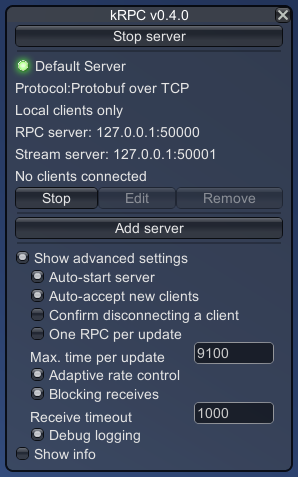
Server window showing the advanced settings.#
kRPC processes its queue of remote procedures when its FixedUpdate method is invoked. This is called every fixed framerate frame, typically about 60 times a second. If kRPC were to only execute one RPC per FixedUpdate, it would only be able to execute at most 60 RPCs per second. In order to achieve a higher RPC throughput, it can execute multiple RPCs per FixedUpdate. However, if it is allowed to process too many RPCs per FixedUpdate, the game’s framerate would be adversely affected. The following settings control this behavior, and the resulting tradeoff between RPC throughput and game FPS:
One RPC per update. When this is enabled, the server will execute at most one RPC per client per update. This will have minimal impact on the games framerate, while still allowing kRPC to execute RPCs. If you don’t need a high RPC throughput, this is a good option to use.
Maximum time per update. When one RPC per update is not enabled, this setting controls the maximum amount of time (in microseconds) that kRPC will spend executing RPCs per FixedUpdate. Setting this to a high value, for example 20000 us, will allow the server to process many RPCs at the expense of the game’s framerate. A low value, for example 1000 us, won’t allow the server to execute many RPCs per update, but will allow the game to run at a much higher framerate.
Adaptive rate control. When enabled, kRPC will automatically adjust the maximum time per update parameter, so that the game has a minimum framerate of 60 FPS. Enabling this setting provides a good tradeoff between RPC throughput and the game framerate.
Another consideration is the responsiveness of the server. Clients must execute RPCs in sequence, one after another, and there is usually a (short) delay between them. This means that when the server finishes executing an RPC, if it were to immediately check for a new RPC it will not find any and will return from the FixedUpdate. This means that any new RPCs will have to wait until the next FixedUpdate, and results in the server only executing a single RPC per FixedUpdate regardless of the maximum time per update setting.
Instead, higher RPC throughput can be obtained if the server waits briefly after finishing an RPC to see if any new RPCs are received. This is done in such a way that the maximum time per update setting (above) is still observed.
This behavior is enabled by the blocking receives option. Receive timeout sets the maximum amount of time the server will wait for a new RPC from a client.
The receive timeout bounds the work a client may do between calls. A client that takes longer than the timeout to send its next call has that call executed in the following FixedUpdate. It is then served one RPC per update, however many it makes. The default timeout is one millisecond, which a program written in Python or Lua exceeds easily.
Holding a Tick#
A client can hold the game on its current physics tick, so every call it makes is executed before the game advances. A control loop can then read the game state, compute with it and write the result back within one tick. See the control loops tutorial for how a program uses it.
What a hold means for the server:
Tick hold timeout sets how long a client may hold a tick, one second by default. It bounds how long the game can be made to appear frozen, and the server owns it rather than the client. A hold also ends when the client disconnects.
The maximum time per update and one RPC per update settings do not apply while a tick is held. Adaptive rate control skips an update that held one, which would otherwise count the client’s own work as time the server spent on RPCs and wind the limit down for every client.
The game renders no frame, takes no input and runs no physics while a tick is held. Physics runs on a fixed time step, so a game whose ticks are held runs slower than real time and simulates every tick in turn.
Streams do not update inside a hold, as stream updates are sent once the update has finished executing calls. New connections are not accepted either, as the servers are polled between updates.