

Parts#
The following classes allow interaction with a vessel’s individual parts.
See also
The parts guide walks the tree of parts, and explains fuel lines, stage numbers and part modules.
Parts#
- class SpaceCenter.Parts#
Instances of this class are used to interact with the parts of a vessel. An instance can be obtained by calling
SpaceCenter.Vessel.parts.-
all:
List# A list of all of the vessels parts.
- Attribute:
Read-only, cannot be set
-
root:
SpaceCenter.Part# The vessels root part.
- Attribute:
Read-only, cannot be set
Note
See the discussion on Traversing the Tree.
-
controlling:
SpaceCenter.Part|nil# The part from which the vessel is controlled. Returns
nilif the vessel has no control point, in which case it is oriented by its root part.- Attribute:
Can be read or written
Note
A vessel gets no control point when it is created by a decoupler or an undocking and none of its parts is a command module with crew aboard. A probe core does not give it one either. Assign this property to choose the control point, which is equivalent to “Control From Here” in game.
-
with_name(name:
string):List# A list of parts whose
SpaceCenter.Part.nameis name.- Parameters:
name – The name of the part.
-
with_title(title:
string):List# A list of all parts whose
SpaceCenter.Part.titleis title.- Parameters:
title – The title of the part.
-
with_tag(tag:
string):List# A list of all parts whose
SpaceCenter.Part.tagis tag.- Parameters:
tag – The name tag of the part.
-
with_module(module_name:
string):List# A list of all parts that contain a
SpaceCenter.ModulewhoseSpaceCenter.Module.nameis module_name.- Parameters:
module_name – The name of the module.
-
modules_with_name(module_name:
string):List# A list of modules (combined across all parts in the vessel) whose
SpaceCenter.Module.nameis module_name.- Parameters:
module_name – The name of the module.
-
antennas:
List# A list of all antennas in the vessel.
- Attribute:
Read-only, cannot be set
Note
A part with several antennas has an entry for each. If RemoteTech is installed, this will always return an empty list. To interact with RemoteTech antennas, use the RemoteTech service APIs.
-
cargo_bays:
List# A list of all cargo bays in the vessel.
- Attribute:
Read-only, cannot be set
-
control_surfaces:
List# A list of all control surfaces in the vessel.
- Attribute:
Read-only, cannot be set
-
decouplers:
List# A list of all decouplers in the vessel.
- Attribute:
Read-only, cannot be set
-
docking_ports:
List# A list of all docking ports in the vessel.
- Attribute:
Read-only, cannot be set
-
engines:
List# A list of all engines in the vessel.
- Attribute:
Read-only, cannot be set
Note
This includes any part that generates thrust. This covers many different types of engine, including liquid fuel rockets, solid rocket boosters, jet engines and RCS thrusters.
-
experiments:
List# A list of all science experiments in the vessel.
- Attribute:
Read-only, cannot be set
-
fairings:
List# A list of all fairings in the vessel.
- Attribute:
Read-only, cannot be set
-
intakes:
List# A list of all intakes in the vessel.
- Attribute:
Read-only, cannot be set
-
legs:
List# A list of all landing legs attached to the vessel.
- Attribute:
Read-only, cannot be set
-
launch_clamps:
List# A list of all launch clamps attached to the vessel.
- Attribute:
Read-only, cannot be set
-
lights:
List# A list of all lights in the vessel.
- Attribute:
Read-only, cannot be set
-
parachutes:
List# A list of all parachutes in the vessel.
- Attribute:
Read-only, cannot be set
-
radiators:
List# A list of all radiators in the vessel.
- Attribute:
Read-only, cannot be set
-
resource_drains:
List# A list of all resource drains in the vessel.
- Attribute:
Read-only, cannot be set
-
rcs:
List# A list of all RCS blocks/thrusters in the vessel.
- Attribute:
Read-only, cannot be set
-
reaction_wheels:
List# A list of all reaction wheels in the vessel.
- Attribute:
Read-only, cannot be set
-
resource_converters:
List# A list of all resource converters in the vessel.
- Attribute:
Read-only, cannot be set
-
resource_harvesters:
List# A list of all resource harvesters in the vessel.
- Attribute:
Read-only, cannot be set
-
robotic_controllers:
List# A list of all robotic controllers in the vessel.
- Attribute:
Read-only, cannot be set
-
robotic_hinges:
List# A list of all robotic hinges in the vessel.
- Attribute:
Read-only, cannot be set
-
robotic_pistons:
List# A list of all robotic pistons in the vessel.
- Attribute:
Read-only, cannot be set
-
robotic_rotations:
List# A list of all robotic rotations in the vessel.
- Attribute:
Read-only, cannot be set
-
robotic_rotors:
List# A list of all robotic rotors in the vessel.
- Attribute:
Read-only, cannot be set
-
sensors:
List# A list of all sensors in the vessel.
- Attribute:
Read-only, cannot be set
-
solar_panels:
List# A list of all solar panels in the vessel.
- Attribute:
Read-only, cannot be set
-
wheels:
List# A list of all wheels in the vessel.
- Attribute:
Read-only, cannot be set
-
all:
Part#
- class SpaceCenter.Part#
Represents an individual part. Vessels are made up of multiple parts. Instances of this class can be obtained by several methods in
SpaceCenter.Parts.-
name:
string# Internal name of the part, as used in part cfg files. For example “Mark1-2Pod”.
- Attribute:
Read-only, cannot be set
-
title:
string# Title of the part, as shown when the part is right clicked in-game. For example “Mk1-2 Command Pod”.
- Attribute:
Read-only, cannot be set
-
config:
SpaceCenter.ConfigNode# The static configuration of the part, as found in its part cfg file. This provides access to data that is not exposed elsewhere, such as the configuration of the part’s modules. Returns
nilif the part has no associated configuration node.- Attribute:
Read-only, cannot be set
-
tag:
string# The name tag for the part. Can be set to a custom string using the in-game user interface. Throws an exception if no name tag part module is installed.
- Attribute:
Can be read or written
Note
Requires KSPCommunityPartModules 0.5 or later, or kOS, which share one name tag.
-
flag_url:
string# The asset URL for the part’s flag.
- Attribute:
Can be read or written
-
highlighted:
boolean# Whether the part is highlighted.
- Attribute:
Can be read or written
Note
The highlighting is removed when the client that enabled it disconnects.
-
highlight_color:
StdLib.ColorRGB# The color used to highlight the part.
- Attribute:
Can be read or written
-
cost:
number# The cost of the part with its resources full, in units of funds.
- Attribute:
Read-only, cannot be set
-
vessel:
SpaceCenter.Vessel# The vessel that contains this part.
- Attribute:
Read-only, cannot be set
-
parent:
SpaceCenter.Part|nil# The parts parent. Returns
nilif the part does not have a parent. This, in combination withSpaceCenter.Part.children, can be used to traverse the vessels parts tree.- Attribute:
Read-only, cannot be set
Note
See the discussion on Traversing the Tree.
-
children:
List# The parts children. Returns an empty list if the part has no children. This, in combination with
SpaceCenter.Part.parent, can be used to traverse the vessels parts tree.- Attribute:
Read-only, cannot be set
Note
See the discussion on Traversing the Tree.
-
axially_attached:
boolean# Whether the part is axially attached to its parent, i.e. on the top or bottom of its parent. If the part has no parent, returns
False.- Attribute:
Read-only, cannot be set
Note
See the discussion on Attachment Modes.
-
radially_attached:
boolean# Whether the part is radially attached to its parent, i.e. on the side of its parent. If the part has no parent, returns
False.- Attribute:
Read-only, cannot be set
Note
See the discussion on Attachment Modes.
-
stage:
number# The stage in which this part will be activated. Returns -1 if the part is not activated by staging.
- Attribute:
Read-only, cannot be set
Note
See the discussion on Staging.
-
decouple_stage:
number# The stage in which this part will be decoupled. Returns -1 if the part is never decoupled from the vessel.
- Attribute:
Read-only, cannot be set
Note
See the discussion on Staging.
-
mass:
number# The current mass of the part, including resources it contains, in kilograms. Returns zero if the part is massless.
- Attribute:
Read-only, cannot be set
-
dry_mass:
number# The mass of the part, not including any resources it contains, in kilograms. Returns zero if the part is massless.
- Attribute:
Read-only, cannot be set
-
shielded:
boolean# Whether the part is shielded from the exterior of the vessel, for example by a fairing.
- Attribute:
Read-only, cannot be set
-
dynamic_pressure:
number# The dynamic pressure acting on the part, in Pascals.
- Attribute:
Read-only, cannot be set
-
static_pressure:
number# The static pressure acting on the part, in Pascals. Below the waterline this includes the pressure of the water.
- Attribute:
Read-only, cannot be set
-
displacement:
number# The volume of water the part displaces when fully submerged, in \(\mathrm{m^{3}}\).
- Attribute:
Read-only, cannot be set
Note
See
SpaceCenter.Part.displaced_volumefor the volume it is displacing now.
-
buoyancy_multiplier:
number# The multiplier applied to the buoyant force on the part. One for most parts.
- Attribute:
Read-only, cannot be set
-
buoyant_force_at(density:
number, gravity:number):number# The buoyant force on the part when fully submerged in a fluid of the given density, in Newtons.
- Parameters:
density – The density of the fluid, in \(\mathrm{kg/m^{3}}\).
gravity – The acceleration due to gravity, in \(\mathrm{m/s^{2}}\).
Note
Applies
SpaceCenter.buoyancy_scalarandSpaceCenter.Part.buoyancy_multiplier, so the result is what the game would do to the part rather than what Archimedes’ principle alone gives.
-
splashed:
boolean# Whether the part is in contact with water.
- Attribute:
Read-only, cannot be set
-
submerged_portion:
number# The fraction of the part below the waterline, between 0 and 1.
- Attribute:
Read-only, cannot be set
-
displaced_volume:
number# The volume of water the part is displacing, in \(\mathrm{m^{3}}\).
- Attribute:
Read-only, cannot be set
-
depth:
number# The depth of the part below the waterline, in meters, measured at
SpaceCenter.Part:center_of_displacement(). Negative above the waterline. Returns zero if the body the vessel is at has no ocean.- Attribute:
Read-only, cannot be set
-
min_depth:
number# The depth of the shallowest point of the part below the waterline, in meters. Returns zero if the body the vessel is at has no ocean.
- Attribute:
Read-only, cannot be set
-
max_depth:
number# The depth of the deepest point of the part below the waterline, in meters. Returns zero if the body the vessel is at has no ocean.
- Attribute:
Read-only, cannot be set
Note
The game ramps the buoyant force in over the first fraction of a meter of this depth.
-
submerged_dynamic_pressure:
number# The dynamic pressure of the water acting on the part, in Pascals.
- Attribute:
Read-only, cannot be set
-
submerged_drag_multiplier:
number# The multiplier applied to the drag on the part while it is submerged.
- Attribute:
Read-only, cannot be set
Note
The game sets this high on splashdown and eases it down as the part moves through the water. It climbs back once the part slows to a crawl, so a hull under way reads lower than one lying still.
-
submerged_lift_multiplier:
number# The multiplier applied to the lift on the part while it is submerged.
- Attribute:
Read-only, cannot be set
-
water_angular_drag_multiplier:
number# The multiplier applied to the angular drag on the part while it is submerged.
- Attribute:
Read-only, cannot be set
Note
Part of the part’s configuration rather than a live readout, so it reads the same in the editor and at a body with no ocean.
-
impact_tolerance:
number# The crash tolerance of the part, in \(\mathrm{m/s}\).
- Attribute:
Read-only, cannot be set
-
breaking_force:
number# The breaking force of the part’s attachments, in \(\mathrm{kN}\).
- Attribute:
Read-only, cannot be set
Note
The joint to the parent part takes the lower breaking force of the two parts, scaled by the size of the attachment node. See
SpaceCenter.Part.joint_break_force.
-
breaking_torque:
number# The breaking torque of the part’s attachments, in \(\mathrm{kN \cdot m}\).
- Attribute:
Read-only, cannot be set
Note
The joint to the parent part takes the lower breaking torque of the two parts, scaled by the size of the attachment node. See
SpaceCenter.Part.joint_break_torque.
-
joint_break_force:
number# The force that breaks the joint to the parent part, in \(\mathrm{kN}\). Throws an exception if the part has no joint to its parent part.
- Attribute:
Read-only, cannot be set
Note
The sum over the joint’s physics joints. It is infinite for a short time after the vessel loads, such as just after launch. The root part and a physicsless part have no joint to their parent.
-
joint_break_torque:
number# The torque that breaks the joint to the parent part, in \(\mathrm{kN \cdot m}\). Throws an exception if the part has no joint to its parent part.
- Attribute:
Read-only, cannot be set
Note
The sum over the joint’s physics joints. It is infinite for a short time after the vessel loads. On a stack node of size 2 or more, the physics joints sit apart around the node. A bending moment then breaks the joint when one physics joint’s force exceeds its share of
SpaceCenter.Part.joint_break_force, usually at a much larger moment than this torque.
-
joint_spring:
number# The spring constant of the joint to the parent part against translation, in \(\mathrm{kN/m}\). Throws an exception if the part has no joint to its parent part.
- Attribute:
Read-only, cannot be set
Note
The sum over the joint’s physics joints. A rigid attachment locks the joint, and this spring then has no effect.
-
joint_damper:
number# The damping constant of the joint to the parent part against translation, in \(\mathrm{kN \cdot s/m}\). Throws an exception if the part has no joint to its parent part.
- Attribute:
Read-only, cannot be set
Note
The sum over the joint’s physics joints. The stock game sets it to zero, and mods such as Kerbal Joint Reinforcement change it.
-
joint_angular_spring:
number# The spring constant of the joint to the parent part against bending, in \(\mathrm{kN \cdot m/rad}\). Throws an exception if the part has no joint to its parent part.
- Attribute:
Read-only, cannot be set
Note
The sum over the joint’s physics joints, about the two axes perpendicular to the joint axis. The joint is far stiffer against twisting about its axis. On a stack node of size 2 or more, the physics joints sit apart around the node, and the joint bends much less than this spring gives. A rigid attachment makes it infinite.
-
joint_angular_damper:
number# The damping constant of the joint to the parent part against bending, in \(\mathrm{kN \cdot m \cdot s/rad}\). Throws an exception if the part has no joint to its parent part.
- Attribute:
Read-only, cannot be set
Note
The sum over the joint’s physics joints. The stock game sets it to zero, and mods such as Kerbal Joint Reinforcement change it.
-
temperature:
number# Temperature of the part, in Kelvin.
- Attribute:
Read-only, cannot be set
-
skin_temperature:
number# Temperature of the skin of the part, in Kelvin.
- Attribute:
Read-only, cannot be set
-
max_temperature:
number# Maximum temperature that the part can survive, in Kelvin.
- Attribute:
Read-only, cannot be set
-
max_skin_temperature:
number# Maximum temperature that the skin of the part can survive, in Kelvin.
- Attribute:
Read-only, cannot be set
-
max_pressure:
number# Maximum pressure that the part can survive, in Pascals.
- Attribute:
Read-only, cannot be set
Note
With part pressure limits enabled in the difficulty settings, the part is destroyed when
SpaceCenter.Part.static_pressureplusSpaceCenter.Part.dynamic_pressureexceeds this.
-
thermal_mass:
number# A measure of how much energy it takes to increase the internal temperature of the part, in Joules per Kelvin.
- Attribute:
Read-only, cannot be set
-
thermal_skin_mass:
number# A measure of how much energy it takes to increase the skin temperature of the part, in Joules per Kelvin.
- Attribute:
Read-only, cannot be set
-
thermal_resource_mass:
number# A measure of how much energy it takes to increase the temperature of the resources contained in the part, in Joules per Kelvin.
- Attribute:
Read-only, cannot be set
-
thermal_conduction_flux:
number# The rate at which heat energy is conducting into or out of the part via contact with other parts. Measured in energy per unit time, or power, in Watts. A positive value means the part is gaining heat energy, and negative means it is losing heat energy.
- Attribute:
Read-only, cannot be set
-
thermal_convection_flux:
number# The rate at which heat energy is convecting into or out of the part from the surrounding atmosphere. Measured in energy per unit time, or power, in Watts. A positive value means the part is gaining heat energy, and negative means it is losing heat energy.
- Attribute:
Read-only, cannot be set
-
thermal_radiation_flux:
number# The rate at which heat energy is radiating into or out of the part from the surrounding environment. Measured in energy per unit time, or power, in Watts. A positive value means the part is gaining heat energy, and negative means it is losing heat energy.
- Attribute:
Read-only, cannot be set
-
thermal_internal_flux:
number# The rate at which heat energy is begin generated by the part. For example, some engines generate heat by combusting fuel. Measured in energy per unit time, or power, in Watts. A positive value means the part is gaining heat energy, and negative means it is losing heat energy.
- Attribute:
Read-only, cannot be set
-
thermal_skin_to_internal_flux:
number# The rate at which heat energy is transferring between the part’s skin and its internals. Measured in energy per unit time, or power, in Watts. A positive value means the part’s internals are gaining heat energy, and negative means its skin is gaining heat energy.
- Attribute:
Read-only, cannot be set
-
crew_capacity:
number# The number of crew members that can occupy the part.
- Attribute:
Read-only, cannot be set
-
crew:
List# The crew members occupying the part.
- Attribute:
Read-only, cannot be set
-
available_seats:
number# How many open seats the part has.
- Attribute:
Read-only, cannot be set
-
resources:
SpaceCenter.Resources# A
SpaceCenter.Part.resourcesobject for the part.- Attribute:
Read-only, cannot be set
-
crossfeed:
boolean# Whether this part is crossfeed capable.
- Attribute:
Read-only, cannot be set
-
is_fuel_line:
boolean# Whether this part is a fuel line.
- Attribute:
Read-only, cannot be set
-
fuel_lines_from:
List# The parts that are connected to this part via fuel lines, where the direction of the fuel line is into this part.
- Attribute:
Read-only, cannot be set
Note
See the discussion on Fuel Lines.
-
fuel_lines_to:
List# The parts that are connected to this part via fuel lines, where the direction of the fuel line is out of this part.
- Attribute:
Read-only, cannot be set
Note
See the discussion on Fuel Lines.
-
modules:
List# The modules for this part.
- Attribute:
Read-only, cannot be set
-
antenna:
SpaceCenter.Antenna|nil# An
SpaceCenter.Part.antennaif the part is an antenna, otherwisenil.- Attribute:
Read-only, cannot be set
Note
For a part with several antennas, this is the first.
SpaceCenter.Parts.antennaslists them all. If RemoteTech is installed, this will always returnnil. To interact with RemoteTech antennas, use the RemoteTech service APIs.
-
cargo_bay:
SpaceCenter.CargoBay|nil# A
SpaceCenter.Part.cargo_bayif the part is a cargo bay, otherwisenil.- Attribute:
Read-only, cannot be set
-
control_surface:
SpaceCenter.ControlSurface|nil# A
SpaceCenter.Part.control_surfaceif the part is an aerodynamic control surface, otherwisenil.- Attribute:
Read-only, cannot be set
-
decoupler:
SpaceCenter.Decoupler|nil# A
SpaceCenter.Part.decouplerif the part is a decoupler, otherwisenil.- Attribute:
Read-only, cannot be set
-
docking_port:
SpaceCenter.DockingPort|nil# A
SpaceCenter.Part.docking_portif the part is a docking port, otherwisenil.- Attribute:
Read-only, cannot be set
-
engine:
SpaceCenter.Engine|nil# An
SpaceCenter.Part.engineif the part is an engine, otherwisenil.- Attribute:
Read-only, cannot be set
-
experiment:
SpaceCenter.Experiment|nil# An
SpaceCenter.Part.experimentif the part contains a single science experiment, otherwisenil.- Attribute:
Read-only, cannot be set
Note
Throws an exception if the part contains more than one experiment. In that case, use
SpaceCenter.Part.experimentsto get the list of experiments in the part.
-
experiments:
List|nil# A list of
SpaceCenter.Part.experimentobjects that the part contains.- Attribute:
Read-only, cannot be set
-
fairing:
SpaceCenter.Fairing|nil# A
SpaceCenter.Part.fairingif the part is a fairing, otherwisenil.- Attribute:
Read-only, cannot be set
-
intake:
SpaceCenter.Intake|nil# An
SpaceCenter.Part.intakeif the part is an intake, otherwisenil.- Attribute:
Read-only, cannot be set
Note
This includes any part that generates thrust. This covers many different types of engine, including liquid fuel rockets, solid rocket boosters and jet engines. For RCS thrusters see
SpaceCenter.Part.rcs.
-
leg:
SpaceCenter.Leg|nil# A
SpaceCenter.Part.legif the part is a landing leg, otherwisenil.- Attribute:
Read-only, cannot be set
-
launch_clamp:
SpaceCenter.LaunchClamp|nil# A
SpaceCenter.Part.launch_clampif the part is a launch clamp, otherwisenil.- Attribute:
Read-only, cannot be set
-
light:
SpaceCenter.Light|nil# A
SpaceCenter.Part.lightif the part is a light, otherwisenil.- Attribute:
Read-only, cannot be set
-
parachute:
SpaceCenter.Parachute|nil# A
SpaceCenter.Part.parachuteif the part is a parachute, otherwisenil.- Attribute:
Read-only, cannot be set
-
radiator:
SpaceCenter.Radiator|nil# A
SpaceCenter.Part.radiatorif the part is a radiator, otherwisenil.- Attribute:
Read-only, cannot be set
-
resource_drain:
SpaceCenter.ResourceDrain|nil# A
SpaceCenter.Part.resource_drainif the part is a resource drain, otherwisenil.- Attribute:
Read-only, cannot be set
-
rcs:
SpaceCenter.RCS|nil# A
SpaceCenter.Part.rcsif the part is an RCS block/thruster, otherwisenil.- Attribute:
Read-only, cannot be set
-
reaction_wheel:
SpaceCenter.ReactionWheel|nil# A
SpaceCenter.Part.reaction_wheelif the part is a reaction wheel, otherwisenil.- Attribute:
Read-only, cannot be set
-
resource_converter:
SpaceCenter.ResourceConverter|nil# A
SpaceCenter.Part.resource_converterif the part is a resource converter, otherwisenil.- Attribute:
Read-only, cannot be set
-
resource_harvester:
SpaceCenter.ResourceHarvester|nil# A
SpaceCenter.Part.resource_harvesterif the part is a resource harvester, otherwisenil.- Attribute:
Read-only, cannot be set
-
robotic_controller:
SpaceCenter.RoboticController|nil# A
SpaceCenter.Part.robotic_controllerif the part is a robotic controller, otherwisenil.- Attribute:
Read-only, cannot be set
-
robotic_hinge:
SpaceCenter.RoboticHinge|nil# A
SpaceCenter.Part.robotic_hingeif the part is a robotic hinge, otherwisenil.- Attribute:
Read-only, cannot be set
-
robotic_piston:
SpaceCenter.RoboticPiston|nil# A
SpaceCenter.Part.robotic_pistonif the part is a robotic piston, otherwisenil.- Attribute:
Read-only, cannot be set
-
robotic_rotation:
SpaceCenter.RoboticRotation|nil# A
SpaceCenter.Part.robotic_rotationif the part is a robotic rotation servo, otherwisenil.- Attribute:
Read-only, cannot be set
-
robotic_rotor:
SpaceCenter.RoboticRotor|nil# A
SpaceCenter.Part.robotic_rotorif the part is a robotic rotor, otherwisenil.- Attribute:
Read-only, cannot be set
-
sensor:
SpaceCenter.Sensor|nil# A
SpaceCenter.Part.sensorif the part is a sensor, otherwisenil.- Attribute:
Read-only, cannot be set
-
solar_panel:
SpaceCenter.SolarPanel|nil# A
SpaceCenter.Part.solar_panelif the part is a solar panel, otherwisenil.- Attribute:
Read-only, cannot be set
-
wheel:
SpaceCenter.Wheel|nil# A
SpaceCenter.Part.wheelif the part is a wheel, otherwisenil.- Attribute:
Read-only, cannot be set
-
position(reference_frame:
SpaceCenter.ReferenceFrame):Tuple# The position of the part in the given reference frame.
- Parameters:
reference_frame – The reference frame that the returned position vector is in.
- Returns:
The position as a vector.
Note
This is a fixed position in the part, defined by the parts model. It s not necessarily the same as the parts center of mass. Use
SpaceCenter.Part:center_of_mass()to get the parts center of mass.
-
center_of_mass(reference_frame:
SpaceCenter.ReferenceFrame):Tuple# The position of the parts center of mass in the given reference frame. If the part is physicsless in flight, this is equivalent to
SpaceCenter.Part:position().- Parameters:
reference_frame – The reference frame that the returned position vector is in.
- Returns:
The position as a vector.
-
bounding_box(reference_frame:
SpaceCenter.ReferenceFrame):SpaceCenter.BoundingBox# The axis-aligned bounding box of the part in the given reference frame.
- Parameters:
reference_frame – The reference frame that the returned position vectors are in.
- Returns:
The positions of the minimum and maximum vertices of the box.
Note
This is computed from the meshes that make up the parts model, and covers only this part - the models of any child parts are excluded. If the part has no visible model, the box has zero volume and is centered on the
SpaceCenter.Part:center_of_mass()of the part.
-
direction(reference_frame:
SpaceCenter.ReferenceFrame):Tuple# The direction the part points in, in the given reference frame.
- Parameters:
reference_frame – The reference frame that the returned direction is in.
- Returns:
The direction as a unit vector.
-
velocity(reference_frame:
SpaceCenter.ReferenceFrame):Tuple# The linear velocity of the part in the given reference frame.
- Parameters:
reference_frame – The reference frame that the returned velocity vector is in.
- Returns:
The velocity as a vector. The vector points in the direction of travel, and its magnitude is the speed of the body in \(\mathrm{m/s}\).
-
rotation(reference_frame:
SpaceCenter.ReferenceFrame):Tuple# The rotation of the part, in the given reference frame.
- Parameters:
reference_frame – The reference frame that the returned rotation is in.
- Returns:
The rotation as a quaternion of the form
(x, y, z, w).
-
lift(reference_frame:
SpaceCenter.ReferenceFrame):Tuple# The aerodynamic lift currently acting on the part.
- Parameters:
reference_frame – The reference frame that the returned vector is in.
- Returns:
A vector pointing in the direction that the force acts, with its magnitude equal to the strength of the force in Newtons.
Note
Not available when Ferram Aerospace Research is installed.
-
drag(reference_frame:
SpaceCenter.ReferenceFrame):Tuple# The aerodynamic drag currently acting on the part.
- Parameters:
reference_frame – The reference frame that the returned vector is in.
- Returns:
A vector pointing in the direction that the force acts, with its magnitude equal to the strength of the force in Newtons.
Note
Not available when Ferram Aerospace Research is installed.
-
center_of_buoyancy(reference_frame:
SpaceCenter.ReferenceFrame):Tuple# The point the buoyant force on the part acts at, in the given reference frame.
- Parameters:
reference_frame – The reference frame that the returned position vector is in.
- Returns:
The position as a vector.
Note
A submerged part reports the point the game applied the force at, which it shifts towards the submerged part of the hull. Any other part reports its configured center of buoyancy.
-
center_of_displacement(reference_frame:
SpaceCenter.ReferenceFrame):Tuple# The point the depth of the part is measured at, in the given reference frame.
- Parameters:
reference_frame – The reference frame that the returned position vector is in.
- Returns:
The position as a vector.
-
buoyant_force(reference_frame:
SpaceCenter.ReferenceFrame):Tuple# The buoyant force currently acting on the part.
- Parameters:
reference_frame – The reference frame that the returned vector is in.
- Returns:
A vector pointing in the direction that the force acts, with its magnitude equal to the strength of the force in Newtons.
Note
The buoyant force on its own. The water drag and lift the game applies alongside it are reported by
SpaceCenter.Part.submerged_drag_multiplierandSpaceCenter.Part.submerged_lift_multiplier.
-
moment_of_inertia:
Tuple# The moment of inertia of the part in \(\mathrm{kg \cdot m^{2}}\) around its center of mass in the parts center of mass reference frame (
SpaceCenter.Part.center_of_mass_reference_frame).- Attribute:
Read-only, cannot be set
-
inertia_tensor:
List# The inertia tensor of the part around its center of mass, in the parts center of mass reference frame (
SpaceCenter.Part.center_of_mass_reference_frame). Returns the 3x3 matrix as a list of elements, in row-major order.- Attribute:
Read-only, cannot be set
-
reference_frame:
SpaceCenter.ReferenceFrame# The reference frame that is fixed relative to this part, and centered on a fixed position within the part, defined by the parts model.
The origin is at the position of the part, as returned by
SpaceCenter.Part:position().The axes rotate with the part.
The x, y and z axis directions depend on the design of the part.
- Attribute:
Read-only, cannot be set
Note
For docking port parts, this reference frame is not necessarily equivalent to the reference frame for the docking port, returned by
SpaceCenter.DockingPort.reference_frame.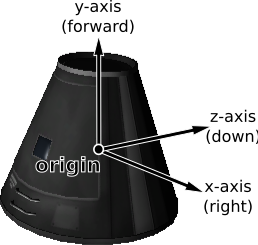
Mk1 Command Pod reference frame origin and axes#
-
center_of_mass_reference_frame:
SpaceCenter.ReferenceFrame# The reference frame that is fixed relative to this part, and centered on its center of mass.
The origin is at the center of mass of the part, as returned by
SpaceCenter.Part:center_of_mass().The axes rotate with the part.
The x, y and z axis directions depend on the design of the part.
- Attribute:
Read-only, cannot be set
Note
For docking port parts, this reference frame is not necessarily equivalent to the reference frame for the docking port, returned by
SpaceCenter.DockingPort.reference_frame.
-
add_force(
force:Tuple,
position:Tuple,
reference_frame:SpaceCenter.ReferenceFrame
):SpaceCenter.Force# Warning
Deprecated. Use
Debug.AddForceinstead.Exert a constant force on the part, acting at the given position.
- Parameters:
force – A vector pointing in the direction that the force acts, with its magnitude equal to the strength of the force in Newtons.
position – The position at which the force acts, as a vector.
reference_frame – The reference frame that the force and position are in.
- Returns:
An object that can be used to remove or modify the force.
Note
The force is removed when the client that added it disconnects.
-
instantaneous_force(
force:Tuple,
position:Tuple,
reference_frame:SpaceCenter.ReferenceFrame
)# Warning
Deprecated. Use
Debug.InstantaneousForceinstead.Exert an instantaneous force on the part, acting at the given position.
- Parameters:
force – A vector pointing in the direction that the force acts, with its magnitude equal to the strength of the force in Newtons.
position – The position at which the force acts, as a vector.
reference_frame – The reference frame that the force and position are in.
Note
The force is applied instantaneously in a single physics update.
-
glow:
boolean# Whether the part is glowing.
- Attribute:
Write-only, cannot be read
-
auto_strut_mode:
SpaceCenter.AutoStrutMode# Auto-strut mode.
- Attribute:
Read-only, cannot be set
-
has_real_fuels_tank:
boolean# Whether the part is a fuel tank managed by RealFuels. The remaining properties in this section are only available when it is.
- Attribute:
Read-only, cannot be set
-
highly_pressurized:
boolean# Whether the tank is highly pressurized, which is what a pressure-fed engine needs to draw from (see
SpaceCenter.Engine.pressure_fed). Throws an exception if the part is not a RealFuels fuel tank (seeSpaceCenter.Part.has_real_fuels_tank).- Attribute:
Read-only, cannot be set
Note
Requires RealFuels.
-
boiloff_rate:
number# The rate at which the tank’s cryogenic contents are boiling off, in kilograms per second of in-game time, measured over the last update RealFuels computed it in. The contents keep boiling off under time warp, where that update covers a much longer span of in-game time than a physics frame does. The rate is zero for a tank holding nothing cryogenic, for one still being fed by a launch clamp, whose temperature RealFuels holds down instead, and in the editor. Throws an exception if the part is not a RealFuels fuel tank (see
SpaceCenter.Part.has_real_fuels_tank).- Attribute:
Read-only, cannot be set
Note
Requires RealFuels.
-
name:
- class SpaceCenter.AutoStrutMode#
The state of an auto-strut.
SpaceCenter.Part.auto_strut_mode- off#
Off
- root#
Root
- heaviest#
Heaviest
- grandparent#
Grandparent
- force_root#
ForceRoot
- force_heaviest#
ForceHeaviest
- force_grandparent#
ForceGrandparent
- class SpaceCenter.Force#
Obtained by calling
Debug.AddForce.-
part:
SpaceCenter.Part# The part that this force is applied to.
- Attribute:
Read-only, cannot be set
-
force_vector:
Tuple# The force vector, in Newtons.
- Attribute:
Can be read or written
- Returns:
A vector pointing in the direction that the force acts, with its magnitude equal to the strength of the force in Newtons.
-
position:
Tuple# The position at which the force acts, in reference frame
SpaceCenter.Force.reference_frame.- Attribute:
Can be read or written
- Returns:
The position as a vector.
-
reference_frame:
SpaceCenter.ReferenceFrame# The reference frame of the force vector and position.
- Attribute:
Can be read or written
- remove()#
Remove the force.
Note
Any further use of this object throws an exception.
-
part:
Module#
- class SpaceCenter.Module#
This can be used to interact with a specific part module. This includes part modules in stock KSP, and those added by mods.
In KSP, each part has zero or more PartModules associated with it. Each one contains some of the functionality of the part. For example, an engine has a “ModuleEngines” part module that contains all the functionality of an engine.
-
name:
string# Name of the PartModule. For example, “ModuleEngines”.
- Attribute:
Read-only, cannot be set
-
part:
SpaceCenter.Part# The part that contains this module.
- Attribute:
Read-only, cannot be set
-
config:
SpaceCenter.ConfigNode# The static configuration of the module, as found in the part’s cfg file. This provides access to data that is not exposed as a field, such as the resources produced by a generator. Returns
nilif the module’s configuration node cannot be found.- Attribute:
Read-only, cannot be set
-
field_list:
List# A list of all the fields of the module, including those not visible in the right-click menu of the part. Filter by
SpaceCenter.PartField.visibleto get just the visible ones.- Attribute:
Read-only, cannot be set
-
event_list:
List# A list of all the events of the module, including those not currently visible or active. Events are the clickable buttons visible in the right-click menu of the part. Filter by
SpaceCenter.PartEvent.visibleandSpaceCenter.PartEvent.activeto get just the ones shown in the menu.- Attribute:
Read-only, cannot be set
-
action_list:
List# A list of all the actions of the module. These are the parts actions that can be assigned to action groups in the in-game editor.
- Attribute:
Read-only, cannot be set
-
name:
- class SpaceCenter.PartField#
A field of a part module. Obtained by calling
SpaceCenter.Module.field_list.Note
Setting a field runs the callbacks that the right-click menu of the part runs.
-
module:
SpaceCenter.Module# The part module that contains this field.
- Attribute:
Read-only, cannot be set
-
name:
string# The identifier of the field. This is stable and does not change between game versions, unlike
SpaceCenter.PartField.gui_name.- Attribute:
Read-only, cannot be set
-
gui_name:
string# The name of the field, as displayed in the right-click menu of the part. This may be empty for fields that are not visible in the menu.
- Attribute:
Read-only, cannot be set
-
visible:
boolean# Whether the field is visible in the right-click menu of the part, in the current scene (flight or editor).
- Attribute:
Read-only, cannot be set
-
type:
SpaceCenter.FieldType# The type of the field.
- Attribute:
Read-only, cannot be set
-
value:
string# The value of the field, as a string. This works for fields of any type, and returns the same string that is shown in the right-click menu of the part.
- Attribute:
Can be read or written
Note
Setting the value using this property is only permitted for string fields. Use the typed properties (
SpaceCenter.PartField.bool_value,SpaceCenter.PartField.int_value,SpaceCenter.PartField.float_value,SpaceCenter.PartField.double_value) to set fields of other types.
-
bool_value:
boolean# The value of a boolean field.
- Attribute:
Can be read or written
Note
The getter throws an exception if the field is not a boolean field (see
SpaceCenter.PartField.type).
-
int_value:
number# The value of an integer field.
- Attribute:
Can be read or written
Note
The getter throws an exception if the field is not an integer field (see
SpaceCenter.PartField.type).
-
float_value:
number# The value of a single precision floating point field.
- Attribute:
Can be read or written
Note
The getter throws an exception if the field is not a single precision floating point field (see
SpaceCenter.PartField.type).
-
double_value:
number# The value of a double precision floating point field.
- Attribute:
Can be read or written
Note
The getter throws an exception if the field is not a double precision floating point field (see
SpaceCenter.PartField.type).
- reset()#
Set the value of the field to its original value.
Note
The original value is the value the field had when the part was loaded. Works for any field, including those not visible in the right-click menu.
-
module:
- class SpaceCenter.FieldType#
The type of a part module field. See
SpaceCenter.PartField.type.- boolean#
A boolean field. Access using
SpaceCenter.PartField.bool_value.
- integer#
An integer field. Access using
SpaceCenter.PartField.int_value.
- float#
A single precision floating point field. Access using
SpaceCenter.PartField.float_value.
- double#
A double precision floating point field. Access using
SpaceCenter.PartField.double_value.
- string#
A string field. Access using
SpaceCenter.PartField.value.
- unknown#
A field whose type is not one of the above. Its value can still be read as a string using
SpaceCenter.PartField.value.
- class SpaceCenter.PartEvent#
An event of a part module. Events are the clickable buttons visible in the right-click menu of the part. Obtained by calling
SpaceCenter.Module.event_list.-
module:
SpaceCenter.Module# The part module that contains this event.
- Attribute:
Read-only, cannot be set
-
name:
string# The identifier of the event. This is stable and does not change between game versions, unlike
SpaceCenter.PartEvent.gui_name.- Attribute:
Read-only, cannot be set
-
gui_name:
string# The name of the event, as displayed in the right-click menu of the part.
- Attribute:
Read-only, cannot be set
-
visible:
boolean# Whether the event is visible in the right-click menu of the part, in the current scene (flight or editor).
- Attribute:
Read-only, cannot be set
-
active:
boolean# Whether the event is currently active.
- Attribute:
Read-only, cannot be set
- trigger()#
Trigger the event. Equivalent to clicking the button in the right-click menu of the part.
-
module:
- class SpaceCenter.PartAction#
An action of a part module. These are the part actions that can be assigned to action groups in the in-game editor. Obtained by calling
SpaceCenter.Module.action_list.-
module:
SpaceCenter.Module# The part module that contains this action.
- Attribute:
Read-only, cannot be set
-
name:
string# The identifier of the action. This is stable and does not change between game versions, unlike
SpaceCenter.PartAction.gui_name.- Attribute:
Read-only, cannot be set
-
gui_name:
string# The name of the action, as displayed in the in-game editor.
- Attribute:
Read-only, cannot be set
-
activated:
boolean# Activate or deactivate the action. Equivalent to triggering the action from an action group. Set to
Trueto activate the action, orFalseto deactivate it.- Attribute:
Write-only, cannot be read
-
module:
Config Node#
- class SpaceCenter.ConfigNode#
Represents a configuration node, as found in a part’s configuration file. A node has a name, a set of named values and a set of child nodes. This is used to access the static configuration of a part or part module, for example via
SpaceCenter.Part.configandSpaceCenter.Module.config.-
name:
string# The name of the configuration node. For example “MODULE”.
- Attribute:
Read-only, cannot be set
-
values:
Map# The values stored in the node, as a dictionary mapping names to values.
- Attribute:
Read-only, cannot be set
Note
If a name appears more than once, only the first value is included. Use
SpaceCenter.ConfigNode:find_values()to get all of the values with a given name.
-
has_value(name:
string):boolean# Returns
Trueif the node has a value with the given name.- Parameters:
name – Name of the value.
-
get_value(name:
string):string# Returns the value with the given name. If there is more than one value with the given name, the first is returned. Throws an exception if there is no value with the given name.
- Parameters:
name – Name of the value.
-
find_values(name:
string):List# Returns all of the values with the given name, as a list.
- Parameters:
name – Name of the values.
-
nodes:
List# The child nodes contained in this node.
- Attribute:
Read-only, cannot be set
-
has_node(name:
string):boolean# Returns
Trueif the node has a child node with the given name.- Parameters:
name – Name of the child node.
-
get_node(name:
string):SpaceCenter.ConfigNode# Returns the child node with the given name. If there is more than one child node with the given name, the first is returned. Throws an exception if there is no child node with the given name.
- Parameters:
name – Name of the child node.
-
find_nodes(name:
string):List# Returns all of the child nodes with the given name, as a list.
- Parameters:
name – Name of the child nodes.
-
name:
Specific Types of Part#
The following classes provide functionality for specific types of part.
Antenna#
Note
If RemoteTech is installed, use the RemoteTech service APIs to interact with antennas. This class covers stock and RealAntennas antennas.
- class SpaceCenter.Antenna#
An antenna. Obtained by calling
SpaceCenter.Part.antenna.-
part:
SpaceCenter.Part# The part object for this antenna.
- Attribute:
Read-only, cannot be set
-
state:
SpaceCenter.DeployableState# The current state of the antenna.
- Attribute:
Read-only, cannot be set
-
deployable:
boolean# Whether the antenna is deployable.
- Attribute:
Read-only, cannot be set
-
deployed:
boolean# Whether the antenna is deployed.
- Attribute:
Can be read or written
Note
Fixed antennas are always deployed. Throws
KRPC.InvalidOperationExceptionif set on a fixed antenna.
-
can_transmit:
boolean# Whether data can be transmitted by this antenna.
- Attribute:
Read-only, cannot be set
- transmit()#
Transmit data.
- cancel()#
Cancel current transmission of data.
-
allow_partial:
boolean# Whether partial data transmission is permitted.
- Attribute:
Can be read or written
-
power:
number# The power of the antenna.
- Attribute:
Read-only, cannot be set
Note
Not used by RealAntennas, which replaces the stock range model.
-
combinable:
boolean# Whether the antenna can be combined with other antennae on the vessel to boost the power.
- Attribute:
Read-only, cannot be set
Note
Not used by RealAntennas, which replaces the stock range model.
-
combinable_exponent:
number# Exponent used to calculate the combined power of multiple antennae on a vessel.
- Attribute:
Read-only, cannot be set
Note
Not used by RealAntennas, which replaces the stock range model.
-
packet_interval:
number# Interval between sending packets in seconds.
- Attribute:
Read-only, cannot be set
-
packet_size:
number# Amount of data sent per packet in Mits.
- Attribute:
Read-only, cannot be set
-
packet_resource_cost:
number# Units of electric charge consumed per packet sent.
- Attribute:
Read-only, cannot be set
-
gain:
number# The gain of the antenna, in \(\mathrm{dBi}\).
- Attribute:
Read-only, cannot be set
Note
Requires RealAntennas.
-
transmit_power:
number# Returns the transmit power of the antenna, in \(\mathrm{dBm}\), and sets it in the editor. Throws an exception if set in flight, or outside zero to
SpaceCenter.Antenna.max_transmit_power.- Attribute:
Can be read or written
Note
Requires RealAntennas.
-
max_transmit_power:
number# The largest transmit power the antenna can be set to, in \(\mathrm{dBm}\).
- Attribute:
Read-only, cannot be set
Note
Requires RealAntennas.
-
tech_level:
number# Returns the tech level of the antenna, and sets it in the editor. Throws an exception if set in flight, or outside zero to
SpaceCenter.Antenna.max_tech_level.- Attribute:
Can be read or written
Note
Requires RealAntennas.
-
max_tech_level:
number# The highest tech level the antenna can be set to.
- Attribute:
Read-only, cannot be set
Note
Requires RealAntennas.
-
band:
string# The name of the radio frequency band the antenna uses, e.g.
"S".- Attribute:
Read-only, cannot be set
Note
Requires RealAntennas.
-
frequency:
number# The frequency of the antenna’s band, in Hz.
- Attribute:
Read-only, cannot be set
Note
Requires RealAntennas.
-
data_rate:
number# The highest data rate the antenna supports, in bits per second.
- Attribute:
Read-only, cannot be set
Note
Requires RealAntennas.
-
beamwidth:
number# The half-power beamwidth of the antenna, in degrees.
- Attribute:
Read-only, cannot be set
Note
Requires RealAntennas.
-
idle_power_draw:
number# The power the antenna draws while idle, in watts.
- Attribute:
Read-only, cannot be set
Note
Requires RealAntennas.
-
active_power_draw:
number# The power the antenna draws while transmitting, in watts. This includes
SpaceCenter.Antenna.idle_power_draw.- Attribute:
Read-only, cannot be set
Note
Requires RealAntennas.
-
enabled:
boolean# Returns whether the antenna is enabled, and sets it in the editor. Throws an exception if set in flight.
- Attribute:
Can be read or written
Note
Requires RealAntennas. A disabled antenna does not communicate and draws no power.
- disable_permanently()#
Disable the antenna for the rest of the flight. It then draws no power.
Note
Requires RealAntennas.
-
can_target:
boolean# Whether the antenna can be pointed at a target. Omnidirectional antennas cannot.
- Attribute:
Read-only, cannot be set
Note
Requires RealAntennas.
-
target_mode:
SpaceCenter.AntennaTargetMode# The kind of target the antenna points at.
- Attribute:
Read-only, cannot be set
Note
Requires RealAntennas.
-
target_vessel:
SpaceCenter.Vessel|nil# Returns the vessel the antenna points at, and sets the vessel to point at.
- Attribute:
Can be read or written
Note
Requires RealAntennas.
nilif the antenna does not point at a vessel. Throws an exception if set tonil, or if the antenna cannot be pointed (seeSpaceCenter.Antenna.can_target).
-
target_body:
SpaceCenter.CelestialBody|nil# Returns the body the antenna points at, and sets the body to point at the center of.
- Attribute:
Can be read or written
Note
Requires RealAntennas. Also the body of a position the antenna points at, or
nilif it points at neither. Throws an exception if set tonil, or if the antenna cannot be pointed (seeSpaceCenter.Antenna.can_target).
-
target_direction(reference_frame:
SpaceCenter.ReferenceFrame):Tuple# The direction the antenna points in, in the given reference frame. Throws an exception if the antenna has no target (see
SpaceCenter.Antenna.target_mode).- Parameters:
reference_frame – The reference frame that the returned direction is in.
- Returns:
The direction as a unit vector.
Note
Requires RealAntennas.
-
set_target_position(
body:SpaceCenter.CelestialBody,
latitude:number,
longitude:number,
altitude:number
)# Point the antenna at a position on or above a body.
- Parameters:
body – The body.
latitude – The latitude, in degrees.
longitude – The longitude, in degrees.
altitude – The altitude above sea level, in meters.
Note
Requires RealAntennas. Throws an exception if the antenna cannot be pointed (see
SpaceCenter.Antenna.can_target).
-
set_target_azimuth_elevation(azimuth:
number, elevation:number)# Point the antenna in a direction relative to the vessel’s position on the surface.
- Parameters:
azimuth – The azimuth, in degrees clockwise from north, from 0 to 360.
elevation – The elevation above the horizon, in degrees, from -90 to 90.
Note
Requires RealAntennas. Throws an exception if the antenna cannot be pointed (see
SpaceCenter.Antenna.can_target).
-
set_target_orbit_relative(deflection:
number, elevation:number)# Point the antenna in a direction relative to the vessel’s orbital velocity.
- Parameters:
deflection – The angle from the orbital velocity in the orbital plane, in degrees, from -180 to 180.
elevation – The angle out of the orbital plane, in degrees, from -90 to 90.
Note
Requires RealAntennas. Throws an exception if the antenna cannot be pointed (see
SpaceCenter.Antenna.can_target).
-
part:
- class SpaceCenter.AntennaTargetMode#
The kind of target a RealAntennas antenna points at. See
SpaceCenter.Antenna.target_mode.- none#
The antenna has no target. Omnidirectional antennas have none.
- vessel#
A vessel. See
SpaceCenter.Antenna.target_vessel.
- body#
The center of a body. See
SpaceCenter.Antenna.target_body.
- position#
A position on or above a body. See
SpaceCenter.Antenna:set_target_position().
- azimuth_elevation#
An azimuth and elevation from the vessel’s position. See
SpaceCenter.Antenna:set_target_azimuth_elevation().
- orbit_relative#
A direction relative to the vessel’s orbital velocity. See
SpaceCenter.Antenna:set_target_orbit_relative().
Cargo Bay#
- class SpaceCenter.CargoBay#
A cargo bay. Obtained by calling
SpaceCenter.Part.cargo_bay.-
part:
SpaceCenter.Part# The part object for this cargo bay.
- Attribute:
Read-only, cannot be set
-
state:
SpaceCenter.DeployableState# The state of the cargo bay.
- Attribute:
Read-only, cannot be set
Note
This describes where the bay’s doors are, which is not the same as whether the parts inside are sheltered: a bay whose open end has nothing attached to it never shelters anything, however tightly shut it is. Use
SpaceCenter.Part.shieldedfor that.A cargo bay is never
SpaceCenter.DeployableState.broken, as the game does not track damage for them.
-
open:
boolean# Whether the cargo bay is open.
- Attribute:
Can be read or written
-
part:
Control Surface#
- class SpaceCenter.ControlSurface#
An aerodynamic control surface. Obtained by calling
SpaceCenter.Part.control_surface.-
part:
SpaceCenter.Part# The part object for this control surface.
- Attribute:
Read-only, cannot be set
-
pitch_enabled:
boolean# Whether the control surface has pitch control enabled.
- Attribute:
Can be read or written
-
yaw_enabled:
boolean# Whether the control surface has yaw control enabled.
- Attribute:
Can be read or written
-
roll_enabled:
boolean# Whether the control surface has roll control enabled.
- Attribute:
Can be read or written
-
authority_limiter:
number# The authority limiter for the control surface, which controls how far the control surface will move.
- Attribute:
Can be read or written
-
inverted:
boolean# Whether the control surface movement is inverted.
- Attribute:
Can be read or written
-
deployed:
boolean# Whether the control surface has been fully deployed. Throws an exception if set while
SpaceCenter.ControlSurface.deflection_overrideis enabled, which holds the surface deployed.- Attribute:
Can be read or written
-
deploy_angle:
number# The deploy angle of the control surface, in degrees.
- Attribute:
Can be read or written
Note
Applied when
SpaceCenter.ControlSurface.deployedis true, and clamped to the range given bySpaceCenter.ControlSurface.min_deploy_angleandSpaceCenter.ControlSurface.max_deploy_angle. WhileSpaceCenter.ControlSurface.deflection_overrideis enabled,SpaceCenter.ControlSurface.deflectiondrives the angle. A value set here takes effect when the override is released.
-
min_deploy_angle:
number# The minimum
SpaceCenter.ControlSurface.deploy_angleof the control surface, in degrees.- Attribute:
Read-only, cannot be set
-
max_deploy_angle:
number# The maximum
SpaceCenter.ControlSurface.deploy_angleof the control surface, in degrees.- Attribute:
Read-only, cannot be set
-
deflection_override:
boolean# Whether the control surface deflection is being set directly, bypassing the vessel’s normal flight control. When enabled, the surface holds the deflection set by
SpaceCenter.ControlSurface.deflectioninstead of responding to pitch, yaw and roll control inputs. The prior state is restored when the override is released, when the controlling client disconnects, or when the vessel changes.- Attribute:
Can be read or written
-
deflection:
number# The deflection command applied when
SpaceCenter.ControlSurface.deflection_overrideis enabled, as a value between -1 and 1, mapped onto the surface’s deploy angle range.- Attribute:
Can be read or written
-
deflection_angle:
number# The current angle of the control surface from its neutral position, in degrees. Includes the
SpaceCenter.ControlSurface.deploy_anglewhile the surface is deployed.- Attribute:
Read-only, cannot be set
-
control_range:
number# The angle the control surface deflects by for a full control input, in degrees, before the
SpaceCenter.ControlSurface.authority_limiteris applied.- Attribute:
Read-only, cannot be set
-
actuator_speed:
number# The rate the control surface deflects at, in degrees per second.
- Attribute:
Read-only, cannot be set
-
surface_area:
number# Surface area of the control surface in \(\mathrm{m^{2}}\).
- Attribute:
Read-only, cannot be set
-
available_torque:
SpaceCenter.AxisRange# The available torque, in \(\mathrm{N \cdot m}\), that can be produced by this control surface, in the positive and negative pitch, roll and yaw axes of the vessel. These axes correspond to the coordinate axes of the
SpaceCenter.Vessel.reference_frame.- Attribute:
Read-only, cannot be set
-
part:
Decoupler#
- class SpaceCenter.Decoupler#
A decoupler. Obtained by calling
SpaceCenter.Part.decoupler-
part:
SpaceCenter.Part# The part object for this decoupler.
- Attribute:
Read-only, cannot be set
-
decouple():
SpaceCenter.Vessel# Fires the decoupler. Returns the new vessel created when the decoupler fires. Throws an exception if the decoupler has already fired.
Note
When called, the active vessel may change. It is therefore possible that, after calling this function, the object(s) returned by previous call(s) to
SpaceCenter.active_vesselno longer refer to the active vessel.
-
decoupled:
boolean# Whether the decoupler has fired.
- Attribute:
Read-only, cannot be set
-
staged:
boolean# Whether the decoupler is enabled in the staging sequence.
- Attribute:
Read-only, cannot be set
-
impulse:
number# The impulse that the decoupler imparts when it is fired, in \(\mathrm{N \cdot s}\).
- Attribute:
Read-only, cannot be set
-
is_omni_decoupler:
boolean# Whether the decoupler is an omni-decoupler (e.g. stack separator)
- Attribute:
Read-only, cannot be set
-
attached_part:
SpaceCenter.Part|nil# The part attached to this decoupler’s explosive node.
- Attribute:
Read-only, cannot be set
-
part:
Deployable State#
The deployment state shared by antennas, cargo bays, landing legs, radiators, resource harvesters, solar panels and wheels.
- class SpaceCenter.DeployableState#
The state of a deployable part.
SpaceCenter.Antenna.state,SpaceCenter.CargoBay.state,SpaceCenter.Leg.state,SpaceCenter.Radiator.state,SpaceCenter.ResourceHarvester.state,SpaceCenter.SolarPanel.state,SpaceCenter.Wheel.state- deployed#
The part is fully deployed. A cargo bay in this state is fully open. Parts that cannot be retracted, such as fixed radiators, solar panels, antennas, landing legs and wheels, are always in this state.
- retracted#
The part is fully retracted. A cargo bay in this state is closed and locked.
- deploying#
The part is being deployed. A cargo bay in this state is opening.
- retracting#
The part is being retracted. A cargo bay in this state is closing.
- broken#
The part is broken. Cargo bays and resource harvesters never report this state, as the game does not track damage for them.
Docking Port#
- class SpaceCenter.DockingPort#
A docking port. Obtained by calling
SpaceCenter.Part.docking_port-
part:
SpaceCenter.Part# The part object for this docking port.
- Attribute:
Read-only, cannot be set
-
state:
SpaceCenter.DockingPortState# The current state of the docking port.
- Attribute:
Read-only, cannot be set
-
docked_part:
SpaceCenter.Part|nil# The part that this docking port is docked to. Returns
nilif this docking port is not docked to anything.- Attribute:
Read-only, cannot be set
-
undock():
SpaceCenter.Vessel# Undocks the docking port and returns the new
SpaceCenter.Vesselthat is created. This method can be called for either docking port in a docked pair. Throws an exception if the docking port is not docked to anything.Note
When called, the active vessel may change. It is therefore possible that, after calling this function, the object(s) returned by previous call(s) to
SpaceCenter.active_vesselno longer refer to the active vessel.
-
reengage_distance:
number# The distance a docking port must move away when it undocks before it becomes ready to dock with another port, in meters.
- Attribute:
Read-only, cannot be set
-
has_shield:
boolean# Whether the docking port has a shield.
- Attribute:
Read-only, cannot be set
-
shielded:
boolean# The state of the docking ports shield, if it has one.
Returns
Trueif the docking port has a shield, and the shield is closed. Otherwise returnsFalse. When set toTrue, the shield is closed, and when set toFalsethe shield is opened. If the docking port does not have a shield, setting this attribute has no effect.- Attribute:
Can be read or written
-
can_rotate:
boolean# Whether the docking port can be commanded to rotate while docked.
- Attribute:
Read-only, cannot be set
-
maximum_rotation:
number# Maximum rotation angle in degrees.
- Attribute:
Read-only, cannot be set
-
minimum_rotation:
number# Minimum rotation angle in degrees.
- Attribute:
Read-only, cannot be set
-
rotation_target:
number# Rotation target angle in degrees.
- Attribute:
Can be read or written
-
rotation_locked:
boolean# Lock rotation. When locked, allows auto-strut to work across the joint.
- Attribute:
Can be read or written
-
position(reference_frame:
SpaceCenter.ReferenceFrame):Tuple# The position of the docking port, in the given reference frame.
- Parameters:
reference_frame – The reference frame that the returned position vector is in.
- Returns:
The position as a vector.
-
direction(reference_frame:
SpaceCenter.ReferenceFrame):Tuple# The direction that docking port points in, in the given reference frame.
- Parameters:
reference_frame – The reference frame that the returned direction is in.
- Returns:
The direction as a unit vector.
-
rotation(reference_frame:
SpaceCenter.ReferenceFrame):Tuple# The rotation of the docking port, in the given reference frame.
- Parameters:
reference_frame – The reference frame that the returned rotation is in.
- Returns:
The rotation as a quaternion of the form
(x, y, z, w).
-
reference_frame:
SpaceCenter.ReferenceFrame# The reference frame that is fixed relative to this docking port, and oriented with the port.
The origin is at the position of the docking port.
The axes rotate with the docking port.
The x-axis points out to the right side of the docking port.
The y-axis points in the direction the docking port is facing.
The z-axis points out of the bottom off the docking port.
- Attribute:
Read-only, cannot be set
Note
This reference frame is not necessarily equivalent to the reference frame for the part, returned by
SpaceCenter.Part.reference_frame.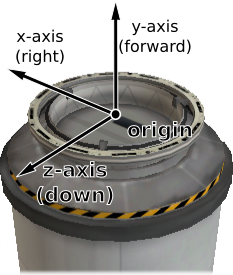
Docking port reference frame origin and axes#
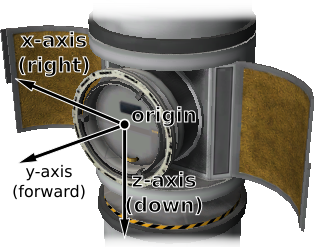
Inline docking port reference frame origin and axes#
-
part:
- class SpaceCenter.DockingPortState#
The state of a docking port. See
SpaceCenter.DockingPort.state.- ready#
The docking port is ready to dock to another docking port.
- docked#
The docking port is docked to another docking port, or docked to another part (from the VAB/SPH).
- docking#
The docking port is very close to another docking port, but has not docked. It is using magnetic force to acquire a solid dock.
- undocking#
The docking port has just been undocked from another docking port, and is disabled until it moves away by a sufficient distance (
SpaceCenter.DockingPort.reengage_distance).
- shielded#
The docking port has a shield, and the shield is closed.
- moving#
The docking ports shield is currently opening/closing.
Engine#
- class SpaceCenter.Engine#
An engine, including ones of various types. For example liquid fuelled gimballed engines, solid rocket boosters and jet engines. Obtained by calling
SpaceCenter.Part.engine.Note
For RCS thrusters
SpaceCenter.Part.rcs.-
part:
SpaceCenter.Part# The part object for this engine.
- Attribute:
Read-only, cannot be set
-
active:
boolean# Whether the engine is active. Setting this attribute may have no effect, depending on
SpaceCenter.Engine.can_shutdownandSpaceCenter.Engine.can_restart.- Attribute:
Can be read or written
-
thrust:
number# The current amount of thrust being produced by the engine, in Newtons.
- Attribute:
Read-only, cannot be set
-
available_thrust:
number# The amount of thrust, in Newtons, that would be produced by the engine when activated and with its throttle set to 100%. Returns zero if the engine does not have any fuel. Takes the engine’s current
SpaceCenter.Engine.thrust_limitand atmospheric conditions into account.- Attribute:
Read-only, cannot be set
-
available_thrust_at(pressure:
number):number# The amount of thrust, in Newtons, that would be produced by the engine when activated and with its throttle set to 100%. Returns zero if the engine does not have any fuel. Takes the given pressure into account.
- Parameters:
pressure – Atmospheric pressure in atmospheres
-
max_thrust:
number# The amount of thrust, in Newtons, that would be produced by the engine when activated and fueled, with its throttle and throttle limiter set to 100%.
- Attribute:
Read-only, cannot be set
-
max_thrust_at(pressure:
number):number# The amount of thrust, in Newtons, that would be produced by the engine when activated and fueled, with its throttle and throttle limiter set to 100%. Takes the given pressure into account.
- Parameters:
pressure – Atmospheric pressure in atmospheres
-
max_vacuum_thrust:
number# The maximum amount of thrust that can be produced by the engine in a vacuum, in Newtons. This is the amount of thrust produced by the engine when activated,
SpaceCenter.Engine.thrust_limitis set to 100%, the main vessel’s throttle is set to 100% and the engine is in a vacuum.- Attribute:
Read-only, cannot be set
-
thrust_limit:
number# The thrust limiter of the engine. A value between 0 and 1. Setting this attribute may have no effect, for example the thrust limit for a solid rocket booster cannot be changed in flight.
- Attribute:
Can be read or written
-
thrusters:
List# The components of the engine that generate thrust.
- Attribute:
Read-only, cannot be set
Note
For example, this corresponds to the rocket nozzel on a solid rocket booster, or the individual nozzels on a RAPIER engine. The overall thrust produced by the engine, as reported by
SpaceCenter.Engine.available_thrust,SpaceCenter.Engine.max_thrustand others, is the sum of the thrust generated by each thruster.
-
specific_impulse:
number# The current specific impulse of the engine, in seconds. Returns zero if the engine is not active.
- Attribute:
Read-only, cannot be set
-
specific_impulse_at(pressure:
number):number# The specific impulse of the engine under the given pressure, in seconds. Returns zero if the engine is not active.
- Parameters:
pressure – Atmospheric pressure in atmospheres
-
vacuum_specific_impulse:
number# The vacuum specific impulse of the engine, in seconds.
- Attribute:
Read-only, cannot be set
-
kerbin_sea_level_specific_impulse:
number# The specific impulse of the engine at sea level on Kerbin, in seconds.
- Attribute:
Read-only, cannot be set
-
propellant_names:
List# The names of the propellants that the engine consumes.
- Attribute:
Read-only, cannot be set
-
propellant_ratios:
Map# The ratio of resources that the engine consumes. A dictionary mapping resource names to the ratio at which they are consumed by the engine.
- Attribute:
Read-only, cannot be set
Note
For example, if the ratios are 0.6 for LiquidFuel and 0.4 for Oxidizer, then for every 0.6 units of LiquidFuel that the engine burns, it will burn 0.4 units of Oxidizer.
-
propellants:
List# The propellants that the engine consumes.
- Attribute:
Read-only, cannot be set
-
has_fuel:
boolean# Whether the engine has any fuel available.
- Attribute:
Read-only, cannot be set
-
flameout:
boolean# Whether the engine has flamed out - it is active but has run out of propellant, so it is producing no thrust. This is the signal a client can use to decide when to activate the next stage. Note that on a vessel with drop tanks or asparagus staging some engines can flame out while others keep burning.
- Attribute:
Read-only, cannot be set
-
throttle:
number# The current throttle setting for the engine. A value between 0 and 1. This is not necessarily the same as the vessel’s main throttle setting, as some engines take time to adjust their throttle (such as jet engines), or independent throttle may be enabled.
When the engine’s independent throttle is enabled (see
SpaceCenter.Engine.independent_throttle), can be used to set the throttle percentage.- Attribute:
Can be read or written
-
throttle_locked:
boolean# Whether the
SpaceCenter.Control.throttleaffects the engine. For example, this isTruefor liquid fueled rockets, andFalsefor solid rocket boosters.- Attribute:
Read-only, cannot be set
-
independent_throttle:
boolean# Whether the independent throttle is enabled for the engine.
- Attribute:
Can be read or written
-
can_restart:
boolean# Whether the engine can be restarted once shutdown. If the engine cannot be shutdown, returns
False. For example, this isTruefor liquid fueled rockets andFalsefor solid rocket boosters.- Attribute:
Read-only, cannot be set
-
can_shutdown:
boolean# Whether the engine can be shutdown once activated. For example, this is
Truefor liquid fueled rockets andFalsefor solid rocket boosters.- Attribute:
Read-only, cannot be set
-
has_modes:
boolean# Whether the engine has multiple modes of operation.
- Attribute:
Read-only, cannot be set
-
mode:
string# The name of the current engine mode.
- Attribute:
Can be read or written
-
modes:
Map# The available modes for the engine. A dictionary mapping mode names to
SpaceCenter.Engineobjects.- Attribute:
Read-only, cannot be set
- toggle_mode()#
Toggle the current engine mode.
-
auto_mode_switch:
boolean# Whether the engine will automatically switch modes.
- Attribute:
Can be read or written
-
gimballed:
boolean# Whether the engine is gimballed.
- Attribute:
Read-only, cannot be set
-
gimbal_range:
number# The range over which the gimbal can move, in degrees. Returns 0 if the engine is not gimballed.
- Attribute:
Read-only, cannot be set
-
gimbal_locked:
boolean# Whether the engines gimbal is locked in place. Setting this attribute has no effect if the engine is not gimballed.
- Attribute:
Can be read or written
-
gimbal_limit:
number# The gimbal limiter of the engine. A value between 0 and 1. Returns 0 if the gimbal is locked.
- Attribute:
Can be read or written
-
gimbal_response_speed_enabled:
boolean# Whether the gimbal moves toward its commanded deflection at
SpaceCenter.Engine.gimbal_response_speed. WhenFalse, the gimbal reaches its commanded deflection in one physics tick. Throws an exception if the engine is not gimballed.- Attribute:
Read-only, cannot be set
-
gimbal_response_speed:
number# The response speed of the gimbal, in \(\mathrm{s^{-1}}\). Throws an exception if the engine is not gimballed.
- Attribute:
Read-only, cannot be set
Note
Each physics tick of length \(\Delta t\), the gimbal moves a fraction \(v \Delta t\) of the way from its deflection to the commanded deflection, where \(v\) is the response speed. The fraction is at most 1, so at high physics warp the gimbal can reach its commanded deflection in one tick. This lag only applies when
SpaceCenter.Engine.gimbal_response_speed_enabledisTrue.
-
gimbal_pitch_enabled:
boolean# Whether the gimbal responds to pitch control input. Throws an exception if the engine is not gimballed.
- Attribute:
Can be read or written
-
gimbal_yaw_enabled:
boolean# Whether the gimbal responds to yaw control input. Throws an exception if the engine is not gimballed.
- Attribute:
Can be read or written
-
gimbal_roll_enabled:
boolean# Whether the gimbal responds to roll control input. Throws an exception if the engine is not gimballed.
- Attribute:
Can be read or written
-
gimbal_override:
boolean# Whether the gimbal is being controlled directly, bypassing the vessel’s normal flight controls. When enabled, the gimbal deflection is set by
SpaceCenter.Engine.gimbal_actuationinstead of the normal control inputs. The override is automatically released if the controlling client disconnects or the vessel changes. Has no effect if the engine is not gimballed.- Attribute:
Can be read or written
-
gimbal_actuation:
Tuple# The gimbal actuation command applied when
SpaceCenter.Engine.gimbal_overrideis enabled, in the pitch, roll and yaw axes. Each component is a normalized control input between -1 and 1. The physical deflection is scaled bySpaceCenter.Engine.gimbal_rangeandSpaceCenter.Engine.gimbal_limit. When the gimbal is not being overridden, returns the current actuation.- Attribute:
Can be read or written
Note
The gimbal ignores the component for an axis it is disabled for, such as pitch when
SpaceCenter.Engine.gimbal_pitch_enabledisFalse.
-
available_torque:
SpaceCenter.AxisRange# The available torque, in \(\mathrm{N \cdot m}\), that can be produced by this engine, in the positive and negative pitch, roll and yaw axes of the vessel. These axes correspond to the coordinate axes of the
SpaceCenter.Vessel.reference_frame. Returns zero if the engine is inactive, or not gimballed.- Attribute:
Read-only, cannot be set
Note
The torque is zero about an axis the gimbal is disabled for, such as pitch when
SpaceCenter.Engine.gimbal_pitch_enabledisFalse.
-
can_reverse_thrust:
boolean# Whether the engine has a recognized thrust reverser. This is
Truefor stock engines with a thrust reverser (such as the J-33 “Wheesley” and J-90 “Goliath” turbofan engines) and for supported mod engines. It isFalsefor engines whose reverser is not recognized, as KSP provides no standard way to detect one.- Attribute:
Read-only, cannot be set
Note
Recognizes the thrust reversers of Firespitter and KerbalActuators.
-
thrust_reversed:
boolean# Whether the engine’s thrust reverser is engaged, reversing the direction of thrust. While the reverser is still moving, this reports the state it is moving to, so a read immediately after a set returns the value that was set and setting the same value again has no effect. Throws an exception if the engine does not have a thrust reverser (see
SpaceCenter.Engine.can_reverse_thrust).- Attribute:
Can be read or written
- toggle_thrust_reversal()#
Toggle the engine’s thrust reverser. Throws an exception if the engine does not have a thrust reverser (see
SpaceCenter.Engine.can_reverse_thrust).
-
has_real_fuels:
boolean# Whether the engine is managed by RealFuels. The remaining properties in this section are only available when it is.
- Attribute:
Read-only, cannot be set
-
ignitions:
number# The number of times the engine can still be ignited, or -1 if it can be ignited an unlimited number of times. Throws an exception if the engine is not managed by RealFuels (see
SpaceCenter.Engine.has_real_fuels).- Attribute:
Read-only, cannot be set
Note
Requires RealFuels.
-
ignition_resources:
Map# The resources the engine consumes each time it ignites, keyed by resource name, with the amount of each that is required. The engine uses up an ignition and fails to light if they are not available. Throws an exception if the engine is not managed by RealFuels (see
SpaceCenter.Engine.has_real_fuels).- Attribute:
Read-only, cannot be set
Note
Requires RealFuels.
-
has_ullage:
boolean# Whether the engine’s propellant is subject to ullage, so that it must be settled before the engine will run reliably. Throws an exception if the engine is not managed by RealFuels (see
SpaceCenter.Engine.has_real_fuels).- Attribute:
Read-only, cannot be set
Note
Requires RealFuels.
-
propellant_stability:
number# How settled the propellant feeding the engine is, from 0 (fully unsettled) to 1 (fully settled). Acceleration along the engine’s thrust axis settles it, and coasting and rotation unsettle it. Throws an exception if the engine is not managed by RealFuels (see
SpaceCenter.Engine.has_real_fuels).- Attribute:
Read-only, cannot be set
Note
Requires RealFuels.
-
propellant_reliability:
number# The probability that the propellant feeding the engine behaves normally, from 0 to 1. This is
SpaceCenter.Engine.propellant_stabilityscaled by the game’s ullage difficulty setting, and is the value RealFuels itself tests against when deciding whether the engine runs. Throws an exception if the engine is not managed by RealFuels (seeSpaceCenter.Engine.has_real_fuels).- Attribute:
Read-only, cannot be set
Note
Requires RealFuels.
-
pressure_fed:
boolean# Whether the engine is fed by tank pressure rather than by a pump, and so needs to draw from a highly pressurized tank. Throws an exception if the engine is not managed by RealFuels (see
SpaceCenter.Engine.has_real_fuels).- Attribute:
Read-only, cannot be set
Note
Requires RealFuels.
-
has_feed_pressure:
boolean# Whether the tanks feeding the engine supply the pressure it needs. Always
Truefor an engine that is not pressure fed. Throws an exception if the engine is not managed by RealFuels (seeSpaceCenter.Engine.has_real_fuels).- Attribute:
Read-only, cannot be set
Note
Requires RealFuels.
-
part:
- class SpaceCenter.Propellant#
A propellant for an engine. Obtains by calling
SpaceCenter.Engine.propellants.-
name:
string# The name of the propellant.
- Attribute:
Read-only, cannot be set
-
current_amount:
number# The current amount of propellant consumed in the current physics update.
- Attribute:
Read-only, cannot be set
-
current_requirement:
number# The required amount of propellant for the current physics update.
- Attribute:
Read-only, cannot be set
-
total_resource_available:
number# The total amount of the underlying resource currently reachable given resource flow rules.
- Attribute:
Read-only, cannot be set
-
total_resource_capacity:
number# The total vehicle capacity for the underlying propellant resource, restricted by resource flow rules.
- Attribute:
Read-only, cannot be set
-
ignore_for_isp:
boolean# If this propellant should be ignored when calculating required mass flow given specific impulse.
- Attribute:
Read-only, cannot be set
-
ignore_for_thrust_curve:
boolean# If this propellant should be ignored for thrust curve calculations.
- Attribute:
Read-only, cannot be set
-
draw_stack_gauge:
boolean# If this propellant has a stack gauge or not.
- Attribute:
Read-only, cannot be set
-
is_deprived:
boolean# If this propellant is deprived.
- Attribute:
Read-only, cannot be set
-
ratio:
number# The propellant ratio.
- Attribute:
Read-only, cannot be set
-
name:
Experiment#
- class SpaceCenter.Experiment#
Obtained by calling
SpaceCenter.Part.experiment.Note
Includes the experiments of DMagic’s DMModuleScienceAnimateGeneric.
-
part:
SpaceCenter.Part# The part object for this experiment.
- Attribute:
Read-only, cannot be set
-
name:
string# Internal name of the experiment, as used in part cfg files.
- Attribute:
Read-only, cannot be set
-
title:
string# Title of the experiment, as shown on the in-game UI.
- Attribute:
Read-only, cannot be set
- run()#
Run the experiment.
- transmit()#
Transmit all experimental data contained by this part.
- dump()#
Dump the experimental data contained by the experiment.
- reset()#
Reset the experiment.
-
deployed:
boolean# Whether the experiment has been deployed.
- Attribute:
Read-only, cannot be set
-
rerunnable:
boolean# Whether the experiment can be re-run.
- Attribute:
Read-only, cannot be set
-
inoperable:
boolean# Whether the experiment is inoperable.
- Attribute:
Read-only, cannot be set
-
has_data:
boolean# Whether the experiment contains data.
- Attribute:
Read-only, cannot be set
-
data:
List# The data contained in this experiment.
- Attribute:
Read-only, cannot be set
-
biome:
string# The name of the biome the experiment is currently in.
- Attribute:
Read-only, cannot be set
-
available:
boolean# Determines if the experiment is available given the current conditions.
- Attribute:
Read-only, cannot be set
-
science_subject:
SpaceCenter.ScienceSubject|nil# Containing information on the corresponding specific science result for the current conditions. Returns
nilif the experiment is unavailable.- Attribute:
Read-only, cannot be set
-
part:
- class SpaceCenter.ScienceData#
Obtained by calling
SpaceCenter.Experiment.data.-
data_amount:
number# Data amount.
-
science_value:
number# Science value.
-
transmit_value:
number# Transmit value.
-
data_amount:
- class SpaceCenter.ScienceSubject#
Obtained by calling
SpaceCenter.Experiment.science_subject.-
id:
string# The identifier of the subject, e.g.
crewReport@KerbinSrfLandedLaunchPad.
-
title:
string# The title of the subject, as shown in the science archives.
-
is_complete:
boolean# Whether the subject has been fully researched. This is true once the science banked for the subject reaches the science cap. As the banked science (see
SpaceCenter.ScienceSubject.science) is only updated after transmission/recovery, this reflects fully mining the subject over repeated experiments, not whether a single run has produced data. To check whether a run has produced data, and how valuable it is, useSpaceCenter.Experiment.has_dataandSpaceCenter.ScienceData.transmit_value.
-
science:
number# Amount of science already earned from this subject, not updated until after transmission/recovery.
-
science_cap:
number# Total science allowable for this subject.
-
data_scale:
number# Multiply science value by this to determine data amount in mits.
-
subject_value:
number# Multiplier for specific Celestial Body/Experiment Situation combination.
-
scientific_value:
number# Diminishing value multiplier for decreasing the science value returned from repeated experiments.
-
id:
Fairing#
- class SpaceCenter.Fairing#
A fairing. Obtained by calling
SpaceCenter.Part.fairing.Note
Includes the fairings of ProceduralFairings.
-
part:
SpaceCenter.Part# The part object for this fairing.
- Attribute:
Read-only, cannot be set
- jettison()#
Jettison the fairing. Has no effect if it has already been jettisoned.
-
jettisoned:
boolean# Whether the fairing has been jettisoned.
- Attribute:
Read-only, cannot be set
-
part:
Intake#
- class SpaceCenter.Intake#
An air intake. Obtained by calling
SpaceCenter.Part.intake.-
part:
SpaceCenter.Part# The part object for this intake.
- Attribute:
Read-only, cannot be set
-
open:
boolean# Whether the intake is open.
- Attribute:
Can be read or written
-
speed:
number# Speed of the flow into the intake, in \(\mathrm{m/s}\).
- Attribute:
Read-only, cannot be set
-
flow:
number# The rate of flow into the intake, in units of resource per second.
- Attribute:
Read-only, cannot be set
-
area:
number# The area of the intake’s opening, in \(\mathrm{m^{2}}\).
- Attribute:
Read-only, cannot be set
-
part:
Leg#
- class SpaceCenter.Leg#
A landing leg. Obtained by calling
SpaceCenter.Part.leg.-
part:
SpaceCenter.Part# The part object for this landing leg.
- Attribute:
Read-only, cannot be set
-
state:
SpaceCenter.DeployableState# The current state of the landing leg.
- Attribute:
Read-only, cannot be set
-
deployable:
boolean# Whether the leg is deployable.
- Attribute:
Read-only, cannot be set
-
deployed:
boolean# Whether the landing leg is deployed.
- Attribute:
Can be read or written
Note
Fixed landing legs are always deployed. Throws
KRPC.InvalidOperationExceptionif set on a fixed landing leg.
-
is_grounded:
boolean# Returns whether the leg is touching the ground.
- Attribute:
Read-only, cannot be set
-
load:
number# The force pressing the leg’s foot into the ground, in \(\mathrm{kN}\).
- Attribute:
Read-only, cannot be set
Note
The game raises the load of a grounded leg to at least 10 kN.
SpaceCenter.Leg.impact_toleranceapplies to the rise in this value.
-
contact_position(reference_frame:
SpaceCenter.ReferenceFrame):Tuple# The position of the bottom of the leg’s foot, in the given reference frame. While the leg is grounded, this is where it touches the ground.
- Parameters:
reference_frame – The reference frame that the returned position vector is in.
- Returns:
The position as a vector.
-
suspension_spring_strength:
number# Suspension spring strength, as set in the editor. Throws an exception if the leg has no suspension.
- Attribute:
Read-only, cannot be set
-
suspension_damper_strength:
number# Suspension damper strength, as set in the editor. Throws an exception if the leg has no suspension.
- Attribute:
Read-only, cannot be set
-
suspension_spring:
number|nil# The spring constant of the suspension, in \(\mathrm{kN/m}\), or
nilwhile the leg is not grounded.- Attribute:
Read-only, cannot be set
Note
The game updates it while the leg is grounded, from
SpaceCenter.Leg.suspension_spring_strength, the vessel’s mass, the leg’s compression and the local gravity.
-
suspension_damper:
number|nil# The damping constant of the suspension, in \(\mathrm{kN \cdot s/m}\), or
nilwhile the leg is not grounded.- Attribute:
Read-only, cannot be set
Note
The game updates it while the leg is grounded, from
SpaceCenter.Leg.suspension_damper_strengthandSpaceCenter.Leg.suspension_spring.
-
suspension_travel:
number# The travel of the suspension, in meters.
- Attribute:
Read-only, cannot be set
-
impact_tolerance:
number# The rise in
SpaceCenter.Leg.loadover one physics tick that breaks the leg, in \(\mathrm{kN}\). Throws an exception if the leg is not breakable.- Attribute:
Read-only, cannot be set
Note
The game scales the rise by the local gravity divided by standard gravity before comparing it with this tolerance.
-
explode_multiplier:
number# The multiple of
SpaceCenter.Leg.impact_tolerancethat destroys the leg, in place of breaking it. Throws an exception if the leg is not breakable.- Attribute:
Read-only, cannot be set
-
part:
Launch Clamp#
- class SpaceCenter.LaunchClamp#
A launch clamp. Obtained by calling
SpaceCenter.Part.launch_clamp.-
part:
SpaceCenter.Part# The part object for this launch clamp.
- Attribute:
Read-only, cannot be set
- release()#
Releases the docking clamp. Has no effect if the clamp has already been released.
-
part:
Light#
- class SpaceCenter.Light#
A light. Obtained by calling
SpaceCenter.Part.light.-
part:
SpaceCenter.Part# The part object for this light.
- Attribute:
Read-only, cannot be set
-
active:
boolean# Whether the light is switched on.
- Attribute:
Can be read or written
-
color:
StdLib.ColorRGB# The color of the light.
- Attribute:
Can be read or written
-
blink:
boolean# Whether blinking is enabled.
- Attribute:
Can be read or written
-
blink_rate:
number# The blink rate of the light.
- Attribute:
Can be read or written
-
power_usage:
number# The current power usage, in units of charge per second.
- Attribute:
Read-only, cannot be set
-
part:
Parachute#
- class SpaceCenter.Parachute#
A parachute. Obtained by calling
SpaceCenter.Part.parachute.Note
Includes the parachutes of RealChute.
-
part:
SpaceCenter.Part# The part object for this parachute.
- Attribute:
Read-only, cannot be set
- deploy()#
Deploys the parachute. This has no effect if the parachute has already been deployed.
-
deployed:
boolean# Whether the parachute has been deployed.
- Attribute:
Read-only, cannot be set
- arm()#
Deploys the parachute. This has no effect if the parachute has already been armed or deployed.
-
armed:
boolean# Whether the parachute has been armed or deployed.
- Attribute:
Read-only, cannot be set
- cut()#
Cuts the parachute.
-
state:
SpaceCenter.ParachuteState# The current state of the parachute.
- Attribute:
Read-only, cannot be set
-
deploy_altitude:
number# The altitude at which the parachute will full deploy, in meters. Only applicable to stock parachutes.
- Attribute:
Can be read or written
-
deploy_min_pressure:
number# The minimum pressure at which the parachute will semi-deploy, in atmospheres. Only applicable to stock parachutes.
- Attribute:
Can be read or written
-
safe_state:
SpaceCenter.ParachuteSafeState# Whether it is currently safe to deploy the parachute, given the vessel’s flight conditions. Computed by KSP from the current airspeed, pressure and temperature. Only applicable to stock parachutes. Note that KSP reports
SpaceCenter.ParachuteSafeState.unsafefor the first second after the vessel unpacks, before its thermal data is valid.- Attribute:
Read-only, cannot be set
-
part:
- class SpaceCenter.ParachuteState#
The state of a parachute. See
SpaceCenter.Parachute.state.- stowed#
The parachute is safely tucked away inside its housing.
- armed#
The parachute is armed for deployment.
- semi_deployed#
The parachute has been deployed and is providing some drag, but is not fully deployed yet. (Stock parachutes only)
- deployed#
The parachute is fully deployed.
- cut#
The parachute has been cut.
- class SpaceCenter.ParachuteSafeState#
The safety state of deploying a parachute. See
SpaceCenter.Parachute.safe_state.- safe#
The parachute is safe to deploy.
- risky#
Deploying the parachute is risky, and it may break off.
- unsafe#
The parachute is unsafe to deploy, and will break off.
- none#
The safety state is not available, because the vessel is not in an atmosphere or the parachute has already been deployed or cut.
Radiator#
- class SpaceCenter.Radiator#
A radiator. Obtained by calling
SpaceCenter.Part.radiator.-
part:
SpaceCenter.Part# The part object for this radiator.
- Attribute:
Read-only, cannot be set
-
deployable:
boolean# Whether the radiator is deployable.
- Attribute:
Read-only, cannot be set
-
deployed:
boolean# For a deployable radiator,
Trueif the radiator is extended. If the radiator is not deployable, this is alwaysTrue.- Attribute:
Can be read or written
-
state:
SpaceCenter.DeployableState# The current state of the radiator.
- Attribute:
Read-only, cannot be set
Note
A fixed radiator is always
SpaceCenter.DeployableState.deployed.
-
part:
Resource Converter#
- class SpaceCenter.ResourceConverter#
A resource converter. Obtained by calling
SpaceCenter.Part.resource_converter.-
part:
SpaceCenter.Part# The part object for this converter.
- Attribute:
Read-only, cannot be set
-
count:
number# The number of converters in the part.
- Attribute:
Read-only, cannot be set
-
name(index:
number):string# The name of the specified converter.
- Parameters:
index – Index of the converter.
-
active(index:
number):boolean# True if the specified converter is active.
- Parameters:
index – Index of the converter.
-
start(index:
number)# Start the specified converter.
- Parameters:
index – Index of the converter.
-
stop(index:
number)# Stop the specified converter.
- Parameters:
index – Index of the converter.
-
state(index:
number):SpaceCenter.ResourceConverterState# The state of the specified converter.
- Parameters:
index – Index of the converter.
-
status_info(index:
number):string# Status information for the specified converter. This is the full status message shown in the in-game UI.
- Parameters:
index – Index of the converter.
-
inputs(index:
number):List# List of the names of resources consumed by the specified converter.
- Parameters:
index – Index of the converter.
-
outputs(index:
number):List# List of the names of resources produced by the specified converter.
- Parameters:
index – Index of the converter.
-
optimum_core_temperature:
number# The core temperature at which the converter will operate with peak efficiency, in Kelvin.
- Attribute:
Read-only, cannot be set
-
core_temperature:
number# The core temperature of the converter, in Kelvin.
- Attribute:
Read-only, cannot be set
-
thermal_efficiency:
number# The thermal efficiency of the converter, as a percentage of its maximum.
- Attribute:
Read-only, cannot be set
-
part:
- class SpaceCenter.ResourceConverterState#
The state of a resource converter. See
SpaceCenter.ResourceConverter:state().- running#
Converter is running.
- idle#
Converter is idle.
- missing_resource#
Converter is missing a required resource.
- storage_full#
No available storage for output resource.
- capacity#
At preset resource capacity.
- unknown#
Unknown state. Possible with modified resource converters. In this case, check
SpaceCenter.ResourceConverter:status_info()for more information.
Resource Harvester#
- class SpaceCenter.ResourceHarvester#
A resource harvester (drill). Obtained by calling
SpaceCenter.Part.resource_harvester.-
part:
SpaceCenter.Part# The part object for this harvester.
- Attribute:
Read-only, cannot be set
-
state:
SpaceCenter.DeployableState# The deployment state of the harvester. Whether it is drilling is reported separately by
SpaceCenter.ResourceHarvester.active.- Attribute:
Read-only, cannot be set
Note
A harvester is never
SpaceCenter.DeployableState.broken, as the game does not track damage for them.
-
deployed:
boolean# Whether the harvester is deployed.
- Attribute:
Can be read or written
-
active:
boolean# Whether the harvester is actively drilling.
- Attribute:
Can be read or written
Note
A value set while the harvester is deploying is applied when the deploy completes, so it can be set immediately after setting
SpaceCenter.ResourceHarvester.deployedwithout waiting for the deploy animation. Setting it has no effect while the harvester is retracted or retracting.
-
extraction_rate:
number# The rate at which the drill is extracting ore, in \(\mathrm{units/s}\).
- Attribute:
Read-only, cannot be set
-
thermal_efficiency:
number# The thermal efficiency of the drill, as a percentage of its maximum.
- Attribute:
Read-only, cannot be set
-
core_temperature:
number# The core temperature of the drill, in Kelvin.
- Attribute:
Read-only, cannot be set
-
optimum_core_temperature:
number# The core temperature at which the drill will operate with peak efficiency, in Kelvin.
- Attribute:
Read-only, cannot be set
-
part:
Reaction Wheel#
- class SpaceCenter.ReactionWheel#
A reaction wheel. Obtained by calling
SpaceCenter.Part.reaction_wheel.-
part:
SpaceCenter.Part# The part object for this reaction wheel.
- Attribute:
Read-only, cannot be set
-
active:
boolean# Whether the reaction wheel is active.
- Attribute:
Can be read or written
-
broken:
boolean# Whether the reaction wheel is broken.
- Attribute:
Read-only, cannot be set
-
available_torque:
SpaceCenter.AxisRange# The available torque, in \(\mathrm{N \cdot m}\), that can be produced by this reaction wheel, in the positive and negative pitch, roll and yaw axes of the vessel. These axes correspond to the coordinate axes of the
SpaceCenter.Vessel.reference_frame. Returns zero if the reaction wheel is inactive or broken.- Attribute:
Read-only, cannot be set
-
max_torque:
SpaceCenter.AxisRange# The maximum torque, in \(\mathrm{N \cdot m}\), that can be produced by this reaction wheel, when it is active, in the positive and negative pitch, roll and yaw axes of the vessel. These axes correspond to the coordinate axes of the
SpaceCenter.Vessel.reference_frame.- Attribute:
Read-only, cannot be set
-
authority_limiter:
number# The authority limiter for the reaction wheel, as a percentage of maximum torque. A value between 0 and 1.
- Attribute:
Can be read or written
-
part:
Resource Drain#
- class SpaceCenter.ResourceDrain#
A resource drain. Obtained by calling
SpaceCenter.Part.resource_drain.-
part:
SpaceCenter.Part# The part object for this resource drain.
- Attribute:
Read-only, cannot be set
-
available_resources:
List# List of available resources.
- Attribute:
Read-only, cannot be set
-
set_resource(resource:
SpaceCenter.Resource, enabled:boolean)# Whether the given resource should be drained.
-
check_resource(resource:
SpaceCenter.Resource):boolean# Whether the provided resource is enabled for draining.
-
drain_mode:
SpaceCenter.DrainMode# The drain mode.
- Attribute:
Can be read or written
-
min_rate:
number# Minimum possible drain rate
- Attribute:
Read-only, cannot be set
-
max_rate:
number# Maximum possible drain rate.
- Attribute:
Read-only, cannot be set
-
rate:
number# Current drain rate.
- Attribute:
Can be read or written
- start()#
Activates resource draining for all enabled parts.
- stop()#
Turns off resource draining.
-
part:
- class SpaceCenter.DrainMode#
Resource drain mode. See
SpaceCenter.ResourceDrain.drain_mode.- part#
Drains from the parent part.
- vessel#
Drains from all available parts.
Robotic Controller#
- class SpaceCenter.RoboticController#
A robotic controller. Obtained by calling
SpaceCenter.Part.robotic_controller.-
part:
SpaceCenter.Part# The part object for this controller.
- Attribute:
Read-only, cannot be set
-
enabled:
boolean# Whether the controller is enabled.
- Attribute:
Can be read or written
-
playing:
boolean# Whether the controller’s sequence is currently playing.
- Attribute:
Read-only, cannot be set
-
position:
number# The current position along the sequence, in seconds.
- Attribute:
Can be read or written
-
length:
number# The length of the sequence, in seconds.
- Attribute:
Read-only, cannot be set
-
play_speed:
number# The speed at which the sequence is played back, as a multiple of normal speed.
- Attribute:
Read-only, cannot be set
- play()#
Start playing the controller’s sequence.
- stop()#
Stop playing the controller’s sequence.
-
has_part(part:
SpaceCenter.Part):boolean# Whether the controller has a part.
-
axes():
List# The axes for the controller.
-
add_axis(module:
SpaceCenter.Module, field_name:string):boolean# Add an axis to the controller.
- Parameters:
module – The part module that the axis belongs to.
field_name – The name of the axis field, as returned by
SpaceCenter.RoboticController:axes().
- Returns:
Returns
Trueif the axis is added successfully.
-
add_key_frame(
module:SpaceCenter.Module,
field_name:string,
time:number,
value:number
):boolean# Add key frame value for controller axis.
- Parameters:
module – The part module that the axis belongs to.
field_name – The name of the axis field, as returned by
SpaceCenter.RoboticController:axes().time – The time of the key frame.
value – The value of the key frame.
- Returns:
Returns
Trueif the key frame is added successfully.
-
clear_axis(module:
SpaceCenter.Module, field_name:string):boolean# Clear axis.
- Parameters:
module – The part module that the axis belongs to.
field_name – The name of the axis field, as returned by
SpaceCenter.RoboticController:axes().
- Returns:
Returns
Trueif the axis is cleared successfully.
-
part:
- class SpaceCenter.RoboticAxis#
An axis of a robotic controller.
Note
-
module:
SpaceCenter.Module# The part module the axis belongs to.
-
field_name:
string# The name of the field the axis controls.
-
module:
Robotic Hinge#
- class SpaceCenter.RoboticHinge#
A robotic hinge. Obtained by calling
SpaceCenter.Part.robotic_hinge.-
part:
SpaceCenter.Part# The part object for this robotic hinge.
- Attribute:
Read-only, cannot be set
-
target_angle:
number# Target angle.
- Attribute:
Can be read or written
-
current_angle:
number# Current angle.
- Attribute:
Read-only, cannot be set
-
min_angle:
number# The minimum angle the hinge can move to, in degrees.
- Attribute:
Can be read or written
-
max_angle:
number# The maximum angle the hinge can move to, in degrees.
- Attribute:
Can be read or written
-
rate:
number# Target movement rate in \(\mathrm{{}^{\circ}/s}\).
- Attribute:
Can be read or written
-
damping:
number# Damping percentage.
- Attribute:
Can be read or written
-
locked:
boolean# Lock movement.
- Attribute:
Can be read or written
-
motor_engaged:
boolean# Whether the motor is engaged.
- Attribute:
Can be read or written
-
is_moving:
boolean# Whether the servo is currently moving.
- Attribute:
Read-only, cannot be set
- move_home()#
Move hinge to its built position.
-
part:
Robotic Piston#
- class SpaceCenter.RoboticPiston#
A robotic piston part. Obtained by calling
SpaceCenter.Part.robotic_piston.-
part:
SpaceCenter.Part# The part object for this robotic piston.
- Attribute:
Read-only, cannot be set
-
target_extension:
number# Target extension of the piston.
- Attribute:
Can be read or written
-
current_extension:
number# Current extension of the piston.
- Attribute:
Read-only, cannot be set
-
min_extension:
number# The minimum extension of the piston, in meters.
- Attribute:
Can be read or written
-
max_extension:
number# The maximum extension of the piston, in meters.
- Attribute:
Can be read or written
-
rate:
number# Target movement rate in \(\mathrm{m/s}\).
- Attribute:
Can be read or written
-
damping:
number# Damping percentage.
- Attribute:
Can be read or written
-
locked:
boolean# Lock movement.
- Attribute:
Can be read or written
-
motor_engaged:
boolean# Whether the motor is engaged.
- Attribute:
Can be read or written
-
is_moving:
boolean# Whether the servo is currently moving.
- Attribute:
Read-only, cannot be set
- move_home()#
Move piston to its built position.
-
part:
Robotic Rotation#
- class SpaceCenter.RoboticRotation#
A robotic rotation servo. Obtained by calling
SpaceCenter.Part.robotic_rotation.-
part:
SpaceCenter.Part# The part object for this robotic rotation servo.
- Attribute:
Read-only, cannot be set
-
target_angle:
number# Target angle.
- Attribute:
Can be read or written
-
current_angle:
number# Current angle.
- Attribute:
Read-only, cannot be set
-
min_angle:
number# The minimum angle the servo can rotate to, in degrees.
- Attribute:
Can be read or written
-
max_angle:
number# The maximum angle the servo can rotate to, in degrees.
- Attribute:
Can be read or written
-
allow_full_rotation:
boolean# Whether the servo is allowed to rotate freely through a full revolution, ignoring the angle limits.
- Attribute:
Can be read or written
-
rate:
number# Target movement rate in \(\mathrm{{}^{\circ}/s}\).
- Attribute:
Can be read or written
-
damping:
number# Damping percentage.
- Attribute:
Can be read or written
-
locked:
boolean# Lock Movement
- Attribute:
Can be read or written
-
motor_engaged:
boolean# Whether the motor is engaged.
- Attribute:
Can be read or written
-
is_moving:
boolean# Whether the servo is currently moving.
- Attribute:
Read-only, cannot be set
- move_home()#
Move rotation servo to its built position.
-
part:
Robotic Rotor#
- class SpaceCenter.RoboticRotor#
A robotic rotor. Obtained by calling
SpaceCenter.Part.robotic_rotor.-
part:
SpaceCenter.Part# The part object for this robotic rotor.
- Attribute:
Read-only, cannot be set
-
target_rpm:
number# Target RPM.
- Attribute:
Can be read or written
-
current_rpm:
number# Current RPM.
- Attribute:
Read-only, cannot be set
-
inverted:
boolean# Whether the rotor direction is inverted.
- Attribute:
Can be read or written
-
torque_limit:
number# Torque limit percentage.
- Attribute:
Can be read or written
-
max_torque:
number# The maximum torque the rotor can generate, in kilonewtons.
- Attribute:
Can be read or written
-
brake_percentage:
number# The percentage of braking force applied to the rotor.
- Attribute:
Can be read or written
-
locked:
boolean# Lock movement.
- Attribute:
Can be read or written
-
motor_engaged:
boolean# Whether the motor is engaged.
- Attribute:
Can be read or written
-
is_moving:
boolean# Whether the rotor is currently moving.
- Attribute:
Read-only, cannot be set
-
part:
RCS#
- class SpaceCenter.RCS#
An RCS block or thruster. Obtained by calling
SpaceCenter.Part.rcs.-
part:
SpaceCenter.Part# The part object for this RCS.
- Attribute:
Read-only, cannot be set
-
active:
boolean# Whether the RCS thrusters are active. An RCS thruster is inactive if the RCS action group is disabled (
SpaceCenter.Control.rcs), the RCS thruster itself is not enabled (SpaceCenter.RCS.enabled), or it is covered by a fairing (SpaceCenter.Part.shielded) and cannot thrust while shielded.- Attribute:
Read-only, cannot be set
-
enabled:
boolean# Whether the RCS thrusters are enabled.
- Attribute:
Can be read or written
-
pitch_enabled:
boolean# Whether the RCS thruster will fire when pitch control input is given.
- Attribute:
Can be read or written
-
yaw_enabled:
boolean# Whether the RCS thruster will fire when yaw control input is given.
- Attribute:
Can be read or written
-
roll_enabled:
boolean# Whether the RCS thruster will fire when roll control input is given.
- Attribute:
Can be read or written
-
forward_enabled:
boolean# Whether the RCS thruster will fire when forward control input is given.
- Attribute:
Can be read or written
-
up_enabled:
boolean# Whether the RCS thruster will fire when up control input is given.
- Attribute:
Can be read or written
-
right_enabled:
boolean# Whether the RCS thruster will fire when right control input is given.
- Attribute:
Can be read or written
-
input_override:
boolean# Whether the RCS control is being set directly, bypassing the vessel’s normal flight controls. When enabled, the rotation and translation demand is set by
SpaceCenter.RCS.rotation_overrideandSpaceCenter.RCS.translation_overrideinstead of the normal control inputs. The override is automatically released if the controlling client disconnects or the vessel changes. Precision mode leaves an overridden block at full thrust.- Attribute:
Can be read or written
-
rotation_override:
Tuple# The rotation demand applied when
SpaceCenter.RCS.input_overrideis enabled, in the pitch, roll and yaw axes. Each component is a normalized control input between -1 and 1.- Attribute:
Can be read or written
Note
The block ignores the component for an axis it is disabled for, such as pitch when
SpaceCenter.RCS.pitch_enabledisFalse.
-
translation_override:
Tuple# The translation demand applied when
SpaceCenter.RCS.input_overrideis enabled, in the right, up and forward axes. Each component is a normalized control input between -1 and 1.- Attribute:
Can be read or written
Note
The block ignores the component for an axis it is disabled for, such as right when
SpaceCenter.RCS.right_enabledisFalse.
-
available_torque:
SpaceCenter.AxisRange# The available torque, in \(\mathrm{N \cdot m}\), that can be produced by this RCS, in the positive and negative pitch, roll and yaw axes of the vessel. These axes correspond to the coordinate axes of the
SpaceCenter.Vessel.reference_frame. Returns zero if RCS is disable.- Attribute:
Read-only, cannot be set
Note
Precision mode weakens the block, and the available torque follows it. A block driven by
SpaceCenter.RCS.input_overrideis exempt, soSpaceCenter.RCS:override_wrench()can report the larger torque an override reaches.
-
available_force:
SpaceCenter.AxisRange# The available force, in Newtons, that can be produced by this RCS, in the positive and negative x, y and z axes of the vessel. These axes correspond to the coordinate axes of the
SpaceCenter.Vessel.reference_frame. Returns zero if RCS is disabled.- Attribute:
Read-only, cannot be set
Note
Precision mode weakens the block, and the available force follows it. A block driven by
SpaceCenter.RCS.input_overrideis exempt, soSpaceCenter.RCS:override_wrench()can report the larger force an override reaches.
-
force:
Tuple# The force being applied by the RCS thrusters, in Newtons. The vector is in the vessel’s reference frame (
SpaceCenter.Vessel.reference_frame). Returns zero if the RCS is inactive.- Attribute:
Read-only, cannot be set
-
torque:
Tuple# The torque being applied by the RCS thrusters about the vessel’s center of mass, in \(\mathrm{N \cdot m}\). The vector is in the vessel’s reference frame (
SpaceCenter.Vessel.reference_frame). Returns zero if the RCS is inactive.- Attribute:
Read-only, cannot be set
-
override_wrench(rotation:
Tuple, translation:Tuple):SpaceCenter.Wrench# The force and torque the given demands would produce, in Newtons and \(\mathrm{N \cdot m}\).
- Parameters:
rotation – A rotation demand, as set by
SpaceCenter.RCS.rotation_override.translation – A translation demand, as set by
SpaceCenter.RCS.translation_override.
- Returns:
The force, and the torque about the vessel’s center of mass, in the vessel’s reference frame (
SpaceCenter.Vessel.reference_frame), or zero if the RCS is inactive.
Note
The demands do not have to be applied. The prediction leaves out full thrust, which
SpaceCenter.RCS.forceandSpaceCenter.RCS.torqueinclude.
-
available_thrust:
number# The amount of thrust, in Newtons, that would be produced by the thruster when activated. Returns zero if the thruster does not have any fuel. Takes the thrusters current
SpaceCenter.RCS.thrust_limitand atmospheric conditions into account.- Attribute:
Read-only, cannot be set
-
max_thrust:
number# The maximum amount of thrust that can be produced by the RCS thrusters when active, in Newtons, with the
SpaceCenter.RCS.thrust_limitset to 100%. Takes atmospheric conditions into account.- Attribute:
Read-only, cannot be set
-
max_vacuum_thrust:
number# The maximum amount of thrust that can be produced by the RCS thrusters when active in a vacuum, in Newtons.
- Attribute:
Read-only, cannot be set
-
thrust_limit:
number# The thrust limiter of the thruster. A value between 0 and 1.
- Attribute:
Can be read or written
-
thrusters:
List# A list of thrusters, one of each nozzel in the RCS part.
- Attribute:
Read-only, cannot be set
-
specific_impulse:
number# The current specific impulse of the RCS, in seconds. Returns zero if the RCS is not active.
- Attribute:
Read-only, cannot be set
-
vacuum_specific_impulse:
number# The vacuum specific impulse of the RCS, in seconds.
- Attribute:
Read-only, cannot be set
-
kerbin_sea_level_specific_impulse:
number# The specific impulse of the RCS at sea level on Kerbin, in seconds.
- Attribute:
Read-only, cannot be set
-
propellants:
List# The names of resources that the RCS consumes.
- Attribute:
Read-only, cannot be set
-
propellant_ratios:
Map# The ratios of resources that the RCS consumes. A dictionary mapping resource names to the ratios at which they are consumed by the RCS.
- Attribute:
Read-only, cannot be set
-
has_fuel:
boolean# Whether the RCS has fuel available.
- Attribute:
Read-only, cannot be set
-
part:
Sensor#
- class SpaceCenter.Sensor#
A sensor, such as a thermometer. Obtained by calling
SpaceCenter.Part.sensor.-
part:
SpaceCenter.Part# The part object for this sensor.
- Attribute:
Read-only, cannot be set
-
active:
boolean# Whether the sensor is active.
- Attribute:
Can be read or written
-
value:
string# The current value of the sensor.
- Attribute:
Read-only, cannot be set
Note
This is the same readout string shown in the part’s right-click menu in-game, and is intended for display rather than for parsing. Both its units and the way it formats numbers follow the language the game is running in, so it is not stable across locales. For programmatic access to the underlying quantities, use
SpaceCenter.Part.temperature(temperature sensors),SpaceCenter.Flight.g_force(accelerometers) orSpaceCenter.Flight.static_pressure(barometers).
-
part:
Solar Panel#
- class SpaceCenter.SolarPanel#
A solar panel. Obtained by calling
SpaceCenter.Part.solar_panel.Note
Includes the curved solar panels of Near Future Solar.
-
part:
SpaceCenter.Part# The part object for this solar panel.
- Attribute:
Read-only, cannot be set
-
deployable:
boolean# Whether the solar panel is deployable.
- Attribute:
Read-only, cannot be set
-
deployed:
boolean# Whether the solar panel is extended.
- Attribute:
Can be read or written
-
state:
SpaceCenter.DeployableState# The current state of the solar panel.
- Attribute:
Read-only, cannot be set
-
energy_flow:
number# The current amount of energy being generated by the solar panel, in units of charge per second.
- Attribute:
Read-only, cannot be set
-
sun_exposure:
number# The current amount of sunlight that is incident on the solar panel, as a percentage. A value between 0 and 1.
- Attribute:
Read-only, cannot be set
-
part:
Thruster#
- class SpaceCenter.Thruster#
The component of an
SpaceCenter.EngineorSpaceCenter.RCSpart that generates thrust. Can obtained by callingSpaceCenter.Engine.thrustersorSpaceCenter.RCS.thrusters.Note
Engines can consist of multiple thrusters. For example, the S3 KS-25x4 “Mammoth” has four rocket nozzels, and so consists of four thrusters.
-
part:
SpaceCenter.Part# The
SpaceCenter.Thruster.partthat contains this thruster.- Attribute:
Read-only, cannot be set
-
thrust:
number# The thrust being produced by the thruster, in Newtons.
- Attribute:
Read-only, cannot be set
-
thrust_position(reference_frame:
SpaceCenter.ReferenceFrame):Tuple# The position at which the thruster generates thrust, in the given reference frame. For gimballed engines, this takes into account the current rotation of the gimbal.
- Parameters:
reference_frame – The reference frame that the returned position vector is in.
- Returns:
The position as a vector.
-
thrust_direction(reference_frame:
SpaceCenter.ReferenceFrame):Tuple# The direction of the force generated by the thruster, in the given reference frame. This is opposite to the direction in which the thruster expels propellant. For gimballed engines, this takes into account the current rotation of the gimbal.
- Parameters:
reference_frame – The reference frame that the returned direction is in.
- Returns:
The direction as a unit vector.
-
thrust_reference_frame:
SpaceCenter.ReferenceFrame# A reference frame that is fixed relative to the thruster and orientated with its thrust direction (
SpaceCenter.Thruster:thrust_direction()). For gimballed engines, this takes into account the current rotation of the gimbal.The origin is at the position of thrust for this thruster (
SpaceCenter.Thruster:thrust_position()).The axes rotate with the thrust direction. This is the direction in which the thruster expels propellant, including any gimballing.
The y-axis points along the thrust direction.
The x-axis and z-axis are perpendicular to the thrust direction.
- Attribute:
Read-only, cannot be set
-
gimballed:
boolean# Whether the thruster is gimballed.
- Attribute:
Read-only, cannot be set
-
gimbal_position(reference_frame:
SpaceCenter.ReferenceFrame):Tuple# Position around which the gimbal pivots.
- Parameters:
reference_frame – The reference frame that the returned position vector is in.
- Returns:
The position as a vector.
-
gimbal_angle:
Tuple# The current gimbal angle in the pitch, roll and yaw axes, in degrees.
- Attribute:
Read-only, cannot be set
-
initial_thrust_position(reference_frame:
SpaceCenter.ReferenceFrame):Tuple# The position at which the thruster generates thrust, when the engine is in its initial position (no gimballing), in the given reference frame.
- Parameters:
reference_frame – The reference frame that the returned position vector is in.
- Returns:
The position as a vector.
Note
This position can move when the gimbal rotates. This is because the thrust position and gimbal position are not necessarily the same.
-
initial_thrust_direction(reference_frame:
SpaceCenter.ReferenceFrame):Tuple# The direction of the force generated by the thruster, when the engine is in its initial position (no gimballing), in the given reference frame. This is opposite to the direction in which the thruster expels propellant.
- Parameters:
reference_frame – The reference frame that the returned direction is in.
- Returns:
The direction as a unit vector.
-
part:
Wheel#
- class SpaceCenter.Wheel#
A wheel. Includes landing gear and rover wheels. Obtained by calling
SpaceCenter.Part.wheel. Can be used to control the motors, steering and deployment of wheels, among other things.-
part:
SpaceCenter.Part# The part object for this wheel.
- Attribute:
Read-only, cannot be set
-
state:
SpaceCenter.DeployableState# The current state of the wheel.
- Attribute:
Read-only, cannot be set
-
radius:
number# Radius of the wheel, in meters.
- Attribute:
Read-only, cannot be set
-
grounded:
boolean# Whether the wheel is touching the ground.
- Attribute:
Read-only, cannot be set
-
has_brakes:
boolean# Whether the wheel has brakes.
- Attribute:
Read-only, cannot be set
-
brakes:
number# The braking force, as a percentage of maximum, when the brakes are applied.
- Attribute:
Can be read or written
-
auto_friction_control:
boolean# Whether automatic friction control is enabled.
- Attribute:
Can be read or written
-
manual_friction_control:
number# Manual friction control value. Only has an effect if automatic friction control is disabled. A value between 0 and 5 inclusive.
- Attribute:
Can be read or written
-
deployable:
boolean# Whether the wheel is deployable.
- Attribute:
Read-only, cannot be set
-
deployed:
boolean# Whether the wheel is deployed.
- Attribute:
Can be read or written
-
powered:
boolean# Whether the wheel is powered by a motor.
- Attribute:
Read-only, cannot be set
-
motor_enabled:
boolean# Whether the motor is enabled.
- Attribute:
Can be read or written
-
motor_inverted:
boolean# Whether the direction of the motor is inverted.
- Attribute:
Can be read or written
-
motor_state:
SpaceCenter.MotorState# Whether the direction of the motor is inverted.
- Attribute:
Read-only, cannot be set
-
motor_output:
number# The output of the motor. This is the torque currently being generated, in \(\mathrm{N \cdot m}\).
- Attribute:
Read-only, cannot be set
-
traction_control_enabled:
boolean# Whether automatic traction control is enabled. A wheel only has traction control if it is powered.
- Attribute:
Can be read or written
-
traction_control:
number# Setting for the traction control. Only takes effect if the wheel has automatic traction control enabled. A value between 0 and 5 inclusive.
- Attribute:
Can be read or written
-
drive_limiter:
number# Manual setting for the motor limiter. Only takes effect if the wheel has automatic traction control disabled. A value between 0 and 100 inclusive.
- Attribute:
Can be read or written
-
steerable:
boolean# Whether the wheel has steering.
- Attribute:
Read-only, cannot be set
-
steering_enabled:
boolean# Whether the wheel steering is enabled.
- Attribute:
Can be read or written
-
steering_inverted:
boolean# Whether the wheel steering is inverted.
- Attribute:
Can be read or written
-
steering_angle_auto:
boolean# Whether the steering angle is automatically limited based on the vessel’s speed, reducing the maximum angle as the vessel moves faster. See also
SpaceCenter.Wheel.steering_angle_limit.- Attribute:
Can be read or written
-
steering_angle_limit:
number# The steering angle limit.
- Attribute:
Can be read or written
-
steering_response_time:
number# Steering response time.
- Attribute:
Can be read or written
-
has_suspension:
boolean# Whether the wheel has suspension.
- Attribute:
Read-only, cannot be set
-
suspension_spring_strength:
number# Suspension spring strength, as set in the editor.
- Attribute:
Read-only, cannot be set
-
suspension_damper_strength:
number# Suspension damper strength, as set in the editor.
- Attribute:
Read-only, cannot be set
-
suspension_spring:
number|nil# The spring constant of the suspension, in \(\mathrm{kN/m}\), or
nilwhile the wheel is not grounded. Throws an exception if the wheel has no suspension.- Attribute:
Read-only, cannot be set
Note
The game updates it while the wheel is grounded, from
SpaceCenter.Wheel.suspension_spring_strength, the vessel’s mass, the wheel’s compression and the local gravity.
-
suspension_damper:
number|nil# The damping constant of the suspension, in \(\mathrm{kN \cdot s/m}\), or
nilwhile the wheel is not grounded. Throws an exception if the wheel has no suspension.- Attribute:
Read-only, cannot be set
Note
The game updates it while the wheel is grounded, from
SpaceCenter.Wheel.suspension_damper_strengthandSpaceCenter.Wheel.suspension_spring.
-
suspension_travel:
number# The travel of the suspension, in meters.
- Attribute:
Read-only, cannot be set
-
load:
number# The force pressing the wheel into the ground, in \(\mathrm{kN}\).
- Attribute:
Read-only, cannot be set
Note
The game raises the load of a grounded wheel to at least 0.5 kN, or 10 kN for a wheel with the old friction model.
SpaceCenter.Wheel.impact_toleranceapplies to the rise in this value.
-
contact_position(reference_frame:
SpaceCenter.ReferenceFrame):Tuple# The position of the bottom of the wheel, in the given reference frame. While the wheel is grounded, this is where it touches the ground.
- Parameters:
reference_frame – The reference frame that the returned position vector is in.
- Returns:
The position as a vector.
-
broken:
boolean# Whether the wheel is broken.
- Attribute:
Read-only, cannot be set
-
repairable:
boolean# Whether the wheel is repairable.
- Attribute:
Read-only, cannot be set
-
stress:
number# Current stress on the wheel.
- Attribute:
Read-only, cannot be set
-
stress_tolerance:
number# Stress tolerance of the wheel.
- Attribute:
Read-only, cannot be set
-
impact_tolerance:
number# The rise in
SpaceCenter.Wheel.loadover one physics tick that breaks the wheel, in \(\mathrm{kN}\). Throws an exception if the wheel is not breakable.- Attribute:
Read-only, cannot be set
Note
The game scales the rise by the local gravity divided by standard gravity before comparing it with this tolerance.
-
explode_multiplier:
number# The multiple of
SpaceCenter.Wheel.impact_tolerancethat destroys the wheel, in place of breaking it. Throws an exception if the wheel is not breakable.- Attribute:
Read-only, cannot be set
-
stress_percentage:
number# Current stress on the wheel as a percentage of its stress tolerance.
- Attribute:
Read-only, cannot be set
-
deflection:
number# Current deflection of the wheel.
- Attribute:
Read-only, cannot be set
-
slip:
number# Current slip of the wheel.
- Attribute:
Read-only, cannot be set
-
part:
- class SpaceCenter.MotorState#
The state of the motor on a powered wheel. See
SpaceCenter.Wheel.motor_state.- idle#
The motor is idle.
- running#
The motor is running.
- disabled#
The motor is disabled.
- inoperable#
The motor is inoperable.
- not_enough_resources#
The motor does not have enough resources to run.