

Vessel#
Vessel
These objects are used to interact with vessels in KSP. This includes getting
orbital and flight data, manipulating control inputs and managing resources.
Created using GET /space-center/active-vessel or GET /space-center/vessels.
A Vessel object is passed and returned as its identifier, a number. A path that acts on
an object takes it as (id).
- GET /space-center/vessel/(id)/name#
The name of the vessel.
- Parameters:
id – The identifier of the Vessel object.
- Response JSON Object:
value (string)
- PUT /space-center/vessel/(id)/name#
The name of the vessel.
- Parameters:
id – The identifier of the Vessel object.
- Request JSON Object:
value (string) – The new value.
- GET /space-center/vessel/(id)/type#
The type of the vessel.
- Parameters:
id – The identifier of the Vessel object.
- Response JSON Object:
value (SpaceCenter.VesselType)
- PUT /space-center/vessel/(id)/type#
The type of the vessel.
- Parameters:
id – The identifier of the Vessel object.
- Request JSON Object:
value (SpaceCenter.VesselType) – The new value.
- GET /space-center/vessel/(id)/situation#
The situation the vessel is in.
- Parameters:
id – The identifier of the Vessel object.
- Response JSON Object:
value (SpaceCenter.VesselSituation)
- GET /space-center/vessel/(id)/loaded#
Whether the vessel is loaded, i.e. its parts are instantiated in the scene because it is within loading range of the active vessel. A vessel that is not loaded exists only as orbital data and is always on-rails (see
GET /space-center/vessel/(id)/packed).- Parameters:
id – The identifier of the Vessel object.
- Response JSON Object:
value (bool)
- GET /space-center/vessel/(id)/packed#
Whether the vessel is packed (on-rails). A packed vessel has its physics simulation suspended and follows its orbit analytically. A vessel that is not loaded (see
GET /space-center/vessel/(id)/loaded) is always packed.- Parameters:
id – The identifier of the Vessel object.
- Response JSON Object:
value (bool)
- GET /space-center/vessel/(id)/physics-range#
The distance from the active vessel, in meters, out to which this vessel keeps running its physics simulation, and so stays controllable, able to burn its engines and respond to its autopilot. Setting this raises the vessel out of the stock physics bubble, so that it keeps flying while the active vessel is far away. Set to zero to restore the game’s default range.
Note
This always reports the vessel’s live range, so reading it when no range has been set gives the game’s default for the vessel’s current
GET /space-center/vessel/(id)/situation, which is much shorter than the distance at which the vessel unloads. In orbit a vessel is put on rails just 350m away, long before it unloads at 2.5km, and a vessel on rails produces no thrust and ignores control input even though it is still loaded.There is a 10% margin below the range, so that a vessel hovering at the threshold does not repeatedly drop out of the simulation and rejoin it. The vessel leaves the simulation at the distance set here, and rejoins it at 90% of that distance; in between it keeps whichever state it is already in.
The requested range applies in every situation. The game’s own defaults are not uniform, and a vessel flying in atmosphere stays loaded out to 22.5km, so setting a small range can shorten the range such a vessel would otherwise have had.
A range lasts until it is set back to zero or the game is exited. Unlike most state a client sets, it is not released when that client disconnects, because dropping a distant vessel back to the default range would put it on-rails part way through a maneuver.
Holding a vessel off-rails a long way from the active vessel costs performance, and accumulates positional error that can destroy it. Raise the range on the vessels that need it, by as little as they need.
- Parameters:
id – The identifier of the Vessel object.
- Response JSON Object:
value (float)
- PUT /space-center/vessel/(id)/physics-range#
The distance from the active vessel, in meters, out to which this vessel keeps running its physics simulation, and so stays controllable, able to burn its engines and respond to its autopilot. Setting this raises the vessel out of the stock physics bubble, so that it keeps flying while the active vessel is far away. Set to zero to restore the game’s default range.
Note
This always reports the vessel’s live range, so reading it when no range has been set gives the game’s default for the vessel’s current
GET /space-center/vessel/(id)/situation, which is much shorter than the distance at which the vessel unloads. In orbit a vessel is put on rails just 350m away, long before it unloads at 2.5km, and a vessel on rails produces no thrust and ignores control input even though it is still loaded.There is a 10% margin below the range, so that a vessel hovering at the threshold does not repeatedly drop out of the simulation and rejoin it. The vessel leaves the simulation at the distance set here, and rejoins it at 90% of that distance; in between it keeps whichever state it is already in.
The requested range applies in every situation. The game’s own defaults are not uniform, and a vessel flying in atmosphere stays loaded out to 22.5km, so setting a small range can shorten the range such a vessel would otherwise have had.
A range lasts until it is set back to zero or the game is exited. Unlike most state a client sets, it is not released when that client disconnects, because dropping a distant vessel back to the default range would put it on-rails part way through a maneuver.
Holding a vessel off-rails a long way from the active vessel costs performance, and accumulates positional error that can destroy it. Raise the range on the vessels that need it, by as little as they need.
- Parameters:
id – The identifier of the Vessel object.
- Request JSON Object:
value (float) – The new value.
- GET /space-center/vessel/(id)/recoverable#
Whether the vessel is recoverable.
- Parameters:
id – The identifier of the Vessel object.
- Response JSON Object:
value (bool)
- POST /space-center/vessel/(id)/recover#
Recover the vessel. The crew return to the astronaut complex, and the funds and science the vessel is worth are awarded.
Note
Recovering the active vessel ends the flight and returns to the space center, as pressing recover in game does. When a non-active vessel is recovered the current scene is unaffected, and the mission completion dialog is not shown, so a script flying several vessels keeps control of the rest of them.
Returns immediately, does not wait for the vessel to be recovered.
- Parameters:
id – The identifier of the Vessel object.
- POST /space-center/vessel/(id)/terminate#
Terminate the vessel. The vessel and its parts are removed from the game, and its crew are lost, as when the vessel is terminated from the tracking station. Nothing is recovered: no funds, no science and no crew.
Note
The crew are reported missing, and return to the astronaut complex once their respawn timer expires, or never if the game is set up so that missing crews do not respawn.
The active vessel cannot be terminated, because the vessel being flown cannot be taken out of the scene it is being flown in. Switch to another vessel first, or use
POST /space-center/vessel/(id)/recover, which ends the flight and returns to the space center.Returns immediately, does not wait for the vessel to be terminated.
- Parameters:
id – The identifier of the Vessel object.
- GET /space-center/vessel/(id)/met#
The mission elapsed time in seconds.
- Parameters:
id – The identifier of the Vessel object.
- Response JSON Object:
value (double)
- GET /space-center/vessel/(id)/launch-site#
The launch site the vessel was launched from, or
nullif the vessel was not launched from a known launch site, such as a vessel spawned by a contract.- Parameters:
id – The identifier of the Vessel object.
- Response JSON Object:
value (SpaceCenter.LaunchSite?)
- GET /space-center/vessel/(id)/biome#
The name of the biome the vessel is currently in.
- Parameters:
id – The identifier of the Vessel object.
- Response JSON Object:
value (string)
- POST /space-center/vessel/(id)/flight#
Returns a Flight object that can be used to get flight telemetry for the vessel, in the specified reference frame.
- Parameters:
id – The identifier of the Vessel object.
- Request JSON Object:
reference_frame (SpaceCenter.ReferenceFrame?) – Reference frame. Defaults to the vessel’s surface reference frame (
GET /space-center/vessel/(id)/surface-reference-frame). Optional, defaults tonull.
- Response JSON Object:
value (SpaceCenter.Flight)
Note
When this is called with no arguments, the vessel’s surface reference frame is used. This reference frame moves with the vessel, therefore velocities and speeds returned by the flight object will be zero. See the reference frames guide for examples of getting the orbital and surface speeds of a vessel.
- GET /space-center/vessel/(id)/orbit#
The current orbit of the vessel.
- Parameters:
id – The identifier of the Vessel object.
- Response JSON Object:
value (SpaceCenter.Orbit)
- GET /space-center/vessel/(id)/control#
Returns a
GET /space-center/vessel/(id)/controlobject that can be used to manipulate the vessel’s control inputs. For example, its pitch/yaw/roll controls, RCS and thrust.- Parameters:
id – The identifier of the Vessel object.
- Response JSON Object:
value (SpaceCenter.Control)
- GET /space-center/vessel/(id)/comms#
Returns a
GET /space-center/vessel/(id)/commsobject that can be used to interact with CommNet for this vessel.- Parameters:
id – The identifier of the Vessel object.
- Response JSON Object:
value (SpaceCenter.Comms)
- GET /space-center/vessel/(id)/auto-pilot#
An
GET /space-center/vessel/(id)/auto-pilotobject, that can be used to perform simple auto-piloting of the vessel.- Parameters:
id – The identifier of the Vessel object.
- Response JSON Object:
value (SpaceCenter.AutoPilot)
- GET /space-center/vessel/(id)/crew-capacity#
The number of crew that can occupy the vessel.
- Parameters:
id – The identifier of the Vessel object.
- Response JSON Object:
value (int32)
- GET /space-center/vessel/(id)/crew-count#
The number of crew that are occupying the vessel.
- Parameters:
id – The identifier of the Vessel object.
- Response JSON Object:
value (int32)
- GET /space-center/vessel/(id)/crew#
The crew in the vessel.
- Parameters:
id – The identifier of the Vessel object.
- Response JSON Object:
value (list<SpaceCenter.CrewMember>)
- GET /space-center/vessel/(id)/resources#
A
GET /space-center/vessel/(id)/resourcesobject, that can used to get information about resources stored in the vessel.- Parameters:
id – The identifier of the Vessel object.
- Response JSON Object:
value (SpaceCenter.Resources)
- GET /space-center/vessel/(id)/stages#
Activation (burn) stages for this vessel, in ascending stage order. This does not include the -1 stage (parts with no staging icon), as it carries no delta-v; use
POST /space-center/vessel/(id)/stage-atwith -1 to get those parts.- Parameters:
id – The identifier of the Vessel object.
- Response JSON Object:
value (list<SpaceCenter.Stage>)
Note
Lists activation stages only (decouple is false). See also
Staging.
- POST /space-center/vessel/(id)/stage-at#
The activation stage with the given number. Pass -1 to get the parts that are never activated (those with no staging icon).
- Parameters:
id – The identifier of the Vessel object.
- Request JSON Object:
stage (int32) – Get activation stage at this index.
- Response JSON Object:
value (SpaceCenter.Stage)
- GET /space-center/vessel/(id)/decouple-stages#
Decouple stages for this vessel, in ascending stage order. The -1 stage, containing the parts that are never decoupled and remain on the vessel, is included first when any such parts exist.
- Parameters:
id – The identifier of the Vessel object.
- Response JSON Object:
value (list<SpaceCenter.Stage>)
Note
Lists decouple stages only. Delta-v is not defined on these stages.
- POST /space-center/vessel/(id)/decouple-stage-at#
The decouple stage with the given number. Pass -1 to get the parts that are never decoupled and remain on the vessel after all stages have fired.
- Parameters:
id – The identifier of the Vessel object.
- Request JSON Object:
stage (int32) – Get decouple stage at this index.
- Response JSON Object:
value (SpaceCenter.Stage)
- GET /space-center/vessel/(id)/delta-v-ready#
Whether the vessel’s delta-v figures are current.
Note
The game calculates delta-v for the active vessel alone, over the several ticks after the vessel changes. A delta-v member reports the figures from the last calculation, and waits only when the game has calculated none.
- Parameters:
id – The identifier of the Vessel object.
- Response JSON Object:
value (bool)
- POST /space-center/vessel/(id)/recalculate-delta-v#
Recalculates the vessel’s delta-v figures, and waits until they are current. Throws an exception if the vessel is not the active vessel.
- Parameters:
id – The identifier of the Vessel object.
- GET /space-center/vessel/(id)/delta-v#
Total delta-v for the vessel in the current situation, in \(\mathrm{m/s}\).
- Parameters:
id – The identifier of the Vessel object.
- Response JSON Object:
value (float)
Note
Requires the stock delta-v display to be ready. Units are meters per second.
- GET /space-center/vessel/(id)/vacuum-delta-v#
Total vacuum delta-v for the vessel, in \(\mathrm{m/s}\).
- Parameters:
id – The identifier of the Vessel object.
- Response JSON Object:
value (float)
- GET /space-center/vessel/(id)/sea-level-delta-v#
Total sea-level delta-v for the vessel, in \(\mathrm{m/s}\).
- Parameters:
id – The identifier of the Vessel object.
- Response JSON Object:
value (float)
- GET /space-center/vessel/(id)/burn-time#
Total burn time for the vessel, in seconds.
- Parameters:
id – The identifier of the Vessel object.
- Response JSON Object:
value (float)
- GET /space-center/vessel/(id)/parts#
A Parts object, that can used to interact with the parts that make up this vessel.
- Parameters:
id – The identifier of the Vessel object.
- Response JSON Object:
value (SpaceCenter.Parts)
- GET /space-center/vessel/(id)/mass#
The total mass of the vessel, including resources, in \(\mathrm{kg}\).
- Parameters:
id – The identifier of the Vessel object.
- Response JSON Object:
value (float)
- GET /space-center/vessel/(id)/dry-mass#
The total mass of the vessel, excluding resources, in \(\mathrm{kg}\).
- Parameters:
id – The identifier of the Vessel object.
- Response JSON Object:
value (float)
- GET /space-center/vessel/(id)/thrust#
The total thrust currently being produced by the vessel’s engines, in Newtons. This is computed by summing
GET /space-center/engine/(id)/thrustfor every engine in the vessel.- Parameters:
id – The identifier of the Vessel object.
- Response JSON Object:
value (float)
- GET /space-center/vessel/(id)/available-thrust#
Gets the total available thrust that can be produced by the vessel’s active engines, in Newtons. This is computed by summing
GET /space-center/engine/(id)/available-thrustfor every active engine in the vessel.- Parameters:
id – The identifier of the Vessel object.
- Response JSON Object:
value (float)
- POST /space-center/vessel/(id)/available-thrust-at#
Gets the total available thrust that can be produced by the vessel’s active engines, in Newtons. This is computed by summing
POST /space-center/engine/(id)/available-thrust-atfor every active engine in the vessel. Takes the given pressure into account.- Parameters:
id – The identifier of the Vessel object.
- Request JSON Object:
pressure (double) – Atmospheric pressure in atmospheres
- Response JSON Object:
value (float)
- GET /space-center/vessel/(id)/max-thrust#
The total maximum thrust that can be produced by the vessel’s active engines, in Newtons. This is computed by summing
GET /space-center/engine/(id)/max-thrustfor every active engine.- Parameters:
id – The identifier of the Vessel object.
- Response JSON Object:
value (float)
- POST /space-center/vessel/(id)/max-thrust-at#
The total maximum thrust that can be produced by the vessel’s active engines, in Newtons. This is computed by summing
POST /space-center/engine/(id)/max-thrust-atfor every active engine. Takes the given pressure into account.- Parameters:
id – The identifier of the Vessel object.
- Request JSON Object:
pressure (double) – Atmospheric pressure in atmospheres
- Response JSON Object:
value (float)
- GET /space-center/vessel/(id)/max-vacuum-thrust#
The total maximum thrust that can be produced by the vessel’s active engines when the vessel is in a vacuum, in Newtons. This is computed by summing
GET /space-center/engine/(id)/max-vacuum-thrustfor every active engine.- Parameters:
id – The identifier of the Vessel object.
- Response JSON Object:
value (float)
- GET /space-center/vessel/(id)/acceleration#
The acceleration currently produced by the vessel’s engines, in \(\mathrm{m/s^{2}}\). This is
GET /space-center/vessel/(id)/thrustdivided by the vessel’sGET /space-center/vessel/(id)/mass.- Parameters:
id – The identifier of the Vessel object.
- Response JSON Object:
value (float)
- GET /space-center/vessel/(id)/available-acceleration#
The total available acceleration that can be produced by the vessel’s active engines, in \(\mathrm{m/s^{2}}\). This is
GET /space-center/vessel/(id)/available-thrustdivided by the vessel’sGET /space-center/vessel/(id)/mass.- Parameters:
id – The identifier of the Vessel object.
- Response JSON Object:
value (float)
- POST /space-center/vessel/(id)/available-acceleration-at#
The total available acceleration that can be produced by the vessel’s active engines, in \(\mathrm{m/s^{2}}\). This is
POST /space-center/vessel/(id)/available-thrust-atdivided by the vessel’sGET /space-center/vessel/(id)/mass. Takes the given pressure into account.- Parameters:
id – The identifier of the Vessel object.
- Request JSON Object:
pressure (double) – Atmospheric pressure in atmospheres
- Response JSON Object:
value (float)
- GET /space-center/vessel/(id)/max-acceleration#
The total maximum acceleration that can be produced by the vessel’s active engines, in \(\mathrm{m/s^{2}}\). This is
GET /space-center/vessel/(id)/max-thrustdivided by the vessel’sGET /space-center/vessel/(id)/mass.- Parameters:
id – The identifier of the Vessel object.
- Response JSON Object:
value (float)
- POST /space-center/vessel/(id)/max-acceleration-at#
The total maximum acceleration that can be produced by the vessel’s active engines, in \(\mathrm{m/s^{2}}\). This is
POST /space-center/vessel/(id)/max-thrust-atdivided by the vessel’sGET /space-center/vessel/(id)/mass. Takes the given pressure into account.- Parameters:
id – The identifier of the Vessel object.
- Request JSON Object:
pressure (double) – Atmospheric pressure in atmospheres
- Response JSON Object:
value (float)
- GET /space-center/vessel/(id)/max-vacuum-acceleration#
The total maximum acceleration that can be produced by the vessel’s active engines when the vessel is in a vacuum, in \(\mathrm{m/s^{2}}\). This is
GET /space-center/vessel/(id)/max-vacuum-thrustdivided by the vessel’sGET /space-center/vessel/(id)/mass.- Parameters:
id – The identifier of the Vessel object.
- Response JSON Object:
value (float)
- GET /space-center/vessel/(id)/specific-impulse#
The combined specific impulse of all active engines, in seconds. This is computed using the formula described here.
- Parameters:
id – The identifier of the Vessel object.
- Response JSON Object:
value (float)
- POST /space-center/vessel/(id)/specific-impulse-at#
The combined specific impulse of all active engines, in seconds. This is computed using the formula described here. Takes the given pressure into account.
- Parameters:
id – The identifier of the Vessel object.
- Request JSON Object:
pressure (double) – Atmospheric pressure in atmospheres
- Response JSON Object:
value (float)
- GET /space-center/vessel/(id)/vacuum-specific-impulse#
The combined vacuum specific impulse of all active engines, in seconds. This is computed using the formula described here.
- Parameters:
id – The identifier of the Vessel object.
- Response JSON Object:
value (float)
- GET /space-center/vessel/(id)/kerbin-sea-level-specific-impulse#
The combined specific impulse of all active engines at sea level on Kerbin, in seconds. This is computed using the formula described here.
- Parameters:
id – The identifier of the Vessel object.
- Response JSON Object:
value (float)
- GET /space-center/vessel/(id)/moment-of-inertia#
The moment of inertia of the vessel around its center of mass in \(\mathrm{kg \cdot m^{2}}\). The inertia values in the returned 3-tuple are around the pitch, roll and yaw directions respectively. This corresponds to the vessels reference frame (
GET /space-center/vessel/(id)/reference-frame).- Parameters:
id – The identifier of the Vessel object.
- Response JSON Object:
value (tuple<double, double, double>)
- GET /space-center/vessel/(id)/inertia-tensor#
The inertia tensor of the vessel around its center of mass, in the vessels reference frame (
GET /space-center/vessel/(id)/reference-frame). Returns the 3x3 matrix as a list of elements, in row-major order.- Parameters:
id – The identifier of the Vessel object.
- Response JSON Object:
value (list<double>)
- GET /space-center/vessel/(id)/available-torque#
The maximum torque that the vessel generates. Includes contributions from reaction wheels, RCS, gimballed engines and aerodynamic control surfaces. Returns the torques in \(\mathrm{N \cdot m}\) around each of the coordinate axes of the vessels reference frame (
GET /space-center/vessel/(id)/reference-frame). These axes are equivalent to the pitch, roll and yaw axes of the vessel.- Parameters:
id – The identifier of the Vessel object.
- Response JSON Object:
value (SpaceCenter.AxisRange)
- GET /space-center/vessel/(id)/available-reaction-wheel-torque#
The maximum torque that the currently active and powered reaction wheels can generate. Returns the torques in \(\mathrm{N \cdot m}\) around each of the coordinate axes of the vessels reference frame (
GET /space-center/vessel/(id)/reference-frame). These axes are equivalent to the pitch, roll and yaw axes of the vessel.- Parameters:
id – The identifier of the Vessel object.
- Response JSON Object:
value (SpaceCenter.AxisRange)
- GET /space-center/vessel/(id)/available-rcs-torque#
The maximum torque that the currently active RCS thrusters can generate. Returns the torques in \(\mathrm{N \cdot m}\) around each of the coordinate axes of the vessels reference frame (
GET /space-center/vessel/(id)/reference-frame). These axes are equivalent to the pitch, roll and yaw axes of the vessel.- Parameters:
id – The identifier of the Vessel object.
- Response JSON Object:
value (SpaceCenter.AxisRange)
- GET /space-center/vessel/(id)/available-rcs-force#
The maximum force that the currently active RCS thrusters can generate. Returns the forces in \(\mathrm{N}\) along each of the coordinate axes of the vessels reference frame (
GET /space-center/vessel/(id)/reference-frame). These axes are equivalent to the right, forward and bottom directions of the vessel.- Parameters:
id – The identifier of the Vessel object.
- Response JSON Object:
value (SpaceCenter.AxisRange)
- GET /space-center/vessel/(id)/available-rcs-acceleration#
The maximum acceleration that the currently active RCS thrusters can generate. This is
GET /space-center/vessel/(id)/available-rcs-forcedivided by the vessel’sGET /space-center/vessel/(id)/mass. Returns the accelerations in \(\mathrm{m/s^{2}}\) along each of the coordinate axes of the vessels reference frame (GET /space-center/vessel/(id)/reference-frame). These axes are equivalent to the right, forward and bottom directions of the vessel.- Parameters:
id – The identifier of the Vessel object.
- Response JSON Object:
value (SpaceCenter.AxisRange)
- GET /space-center/vessel/(id)/available-engine-torque#
The maximum torque that the currently active and gimballed engines can generate. Returns the torques in \(\mathrm{N \cdot m}\) around each of the coordinate axes of the vessels reference frame (
GET /space-center/vessel/(id)/reference-frame). These axes are equivalent to the pitch, roll and yaw axes of the vessel.- Parameters:
id – The identifier of the Vessel object.
- Response JSON Object:
value (SpaceCenter.AxisRange)
- GET /space-center/vessel/(id)/available-control-surface-torque#
The maximum torque that the aerodynamic control surfaces can generate. Returns the torques in \(\mathrm{N \cdot m}\) around each of the coordinate axes of the vessels reference frame (
GET /space-center/vessel/(id)/reference-frame). These axes are equivalent to the pitch, roll and yaw axes of the vessel.- Parameters:
id – The identifier of the Vessel object.
- Response JSON Object:
value (SpaceCenter.AxisRange)
- GET /space-center/vessel/(id)/available-other-torque#
The maximum torque that parts (excluding reaction wheels, gimballed engines, RCS and control surfaces) can generate. Returns the torques in \(\mathrm{N \cdot m}\) around each of the coordinate axes of the vessels reference frame (
GET /space-center/vessel/(id)/reference-frame). These axes are equivalent to the pitch, roll and yaw axes of the vessel.- Parameters:
id – The identifier of the Vessel object.
- Response JSON Object:
value (SpaceCenter.AxisRange)
- GET /space-center/vessel/(id)/available-angular-acceleration#
The maximum angular acceleration that the vessel can generate. Includes contributions from reaction wheels, RCS, gimballed engines and aerodynamic control surfaces. This is
GET /space-center/vessel/(id)/available-torquedivided by the vessel’sGET /space-center/vessel/(id)/moment-of-inertia. Returns the angular accelerations in \(\mathrm{rad/s^{2}}\) around each of the coordinate axes of the vessels reference frame (GET /space-center/vessel/(id)/reference-frame). These axes are equivalent to the pitch, roll and yaw axes of the vessel.- Parameters:
id – The identifier of the Vessel object.
- Response JSON Object:
value (SpaceCenter.AxisRange)
- GET /space-center/vessel/(id)/available-reaction-wheel-angular-acceleration#
The maximum angular acceleration that the currently active and powered reaction wheels can generate. This is
GET /space-center/vessel/(id)/available-reaction-wheel-torquedivided by the vessel’sGET /space-center/vessel/(id)/moment-of-inertia. Returns the angular accelerations in \(\mathrm{rad/s^{2}}\) around each of the coordinate axes of the vessels reference frame (GET /space-center/vessel/(id)/reference-frame). These axes are equivalent to the pitch, roll and yaw axes of the vessel.- Parameters:
id – The identifier of the Vessel object.
- Response JSON Object:
value (SpaceCenter.AxisRange)
- GET /space-center/vessel/(id)/available-rcs-angular-acceleration#
The maximum angular acceleration that the currently active RCS thrusters can generate. This is
GET /space-center/vessel/(id)/available-rcs-torquedivided by the vessel’sGET /space-center/vessel/(id)/moment-of-inertia. Returns the angular accelerations in \(\mathrm{rad/s^{2}}\) around each of the coordinate axes of the vessels reference frame (GET /space-center/vessel/(id)/reference-frame). These axes are equivalent to the pitch, roll and yaw axes of the vessel.- Parameters:
id – The identifier of the Vessel object.
- Response JSON Object:
value (SpaceCenter.AxisRange)
- GET /space-center/vessel/(id)/available-engine-angular-acceleration#
The maximum angular acceleration that the currently active and gimballed engines can generate. This is
GET /space-center/vessel/(id)/available-engine-torquedivided by the vessel’sGET /space-center/vessel/(id)/moment-of-inertia. Returns the angular accelerations in \(\mathrm{rad/s^{2}}\) around each of the coordinate axes of the vessels reference frame (GET /space-center/vessel/(id)/reference-frame). These axes are equivalent to the pitch, roll and yaw axes of the vessel.- Parameters:
id – The identifier of the Vessel object.
- Response JSON Object:
value (SpaceCenter.AxisRange)
- GET /space-center/vessel/(id)/available-control-surface-angular-acceleration#
The maximum angular acceleration that the aerodynamic control surfaces can generate. This is
GET /space-center/vessel/(id)/available-control-surface-torquedivided by the vessel’sGET /space-center/vessel/(id)/moment-of-inertia. Returns the angular accelerations in \(\mathrm{rad/s^{2}}\) around each of the coordinate axes of the vessels reference frame (GET /space-center/vessel/(id)/reference-frame). These axes are equivalent to the pitch, roll and yaw axes of the vessel.- Parameters:
id – The identifier of the Vessel object.
- Response JSON Object:
value (SpaceCenter.AxisRange)
- GET /space-center/vessel/(id)/available-other-angular-acceleration#
The maximum angular acceleration that parts (excluding reaction wheels, gimballed engines, RCS and control surfaces) can generate. This is
GET /space-center/vessel/(id)/available-other-torquedivided by the vessel’sGET /space-center/vessel/(id)/moment-of-inertia. Returns the angular accelerations in \(\mathrm{rad/s^{2}}\) around each of the coordinate axes of the vessels reference frame (GET /space-center/vessel/(id)/reference-frame). These axes are equivalent to the pitch, roll and yaw axes of the vessel.- Parameters:
id – The identifier of the Vessel object.
- Response JSON Object:
value (SpaceCenter.AxisRange)
- GET /space-center/vessel/(id)/reference-frame#
The reference frame that is fixed relative to the vessel, and orientated with the vessel.
The origin is at the center of mass of the vessel.
The axes rotate with the vessel.
The x-axis points out to the right of the vessel.
The y-axis points in the forward direction of the vessel.
The z-axis points out of the bottom off the vessel.
- Parameters:
id – The identifier of the Vessel object.
- Response JSON Object:
value (SpaceCenter.ReferenceFrame)
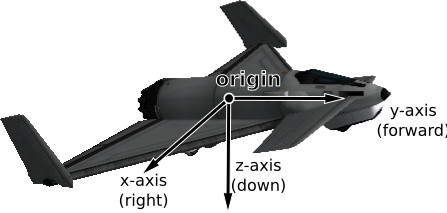
Vessel reference frame origin and axes for the Aeris 3A aircraft#
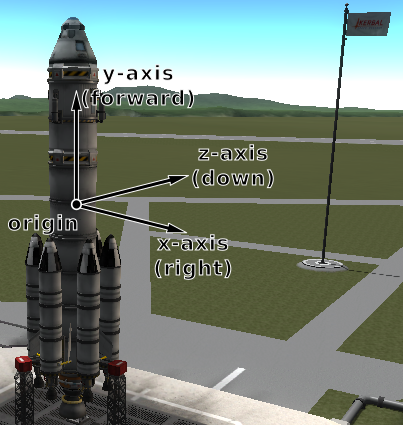
Vessel reference frame origin and axes for the Kerbal-X rocket#
- GET /space-center/vessel/(id)/orbital-reference-frame#
The reference frame that is fixed relative to the vessel, and orientated with the vessels orbital prograde/normal/radial directions.
The origin is at the center of mass of the vessel.
The axes rotate with the orbital prograde/normal/radial directions.
The x-axis points in the orbital anti-radial direction.
The y-axis points in the orbital prograde direction.
The z-axis points in the orbital normal direction.
Note
Be careful not to confuse this with ‘orbit’ mode on the navball.
- Parameters:
id – The identifier of the Vessel object.
- Response JSON Object:
value (SpaceCenter.ReferenceFrame)
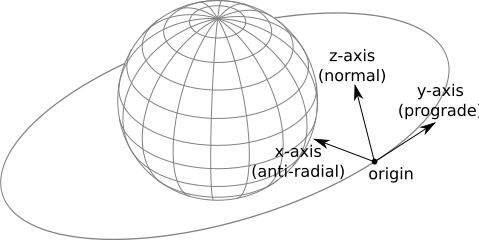
Vessel orbital reference frame origin and axes#
- GET /space-center/vessel/(id)/surface-reference-frame#
The reference frame that is fixed relative to the vessel, and orientated with the surface of the body being orbited.
The origin is at the center of mass of the vessel.
The axes rotate with the north and up directions on the surface of the body.
The x-axis points in the zenith direction (upwards, normal to the body being orbited, from the center of the body towards the center of mass of the vessel).
The y-axis points northwards towards the astronomical horizon (north, and tangential to the surface of the body – the direction in which a compass would point when on the surface).
The z-axis points eastwards towards the astronomical horizon (east, and tangential to the surface of the body – east on a compass when on the surface).
Note
Be careful not to confuse this with ‘surface’ mode on the navball.
- Parameters:
id – The identifier of the Vessel object.
- Response JSON Object:
value (SpaceCenter.ReferenceFrame)
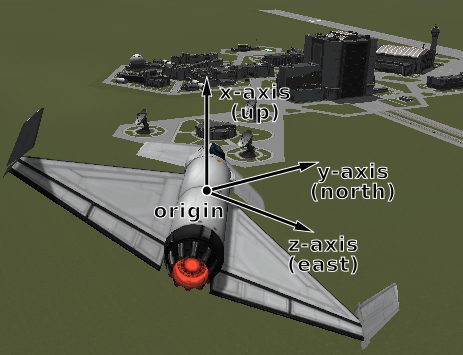
Vessel surface reference frame origin and axes#
- GET /space-center/vessel/(id)/surface-velocity-reference-frame#
The reference frame that is fixed relative to the vessel, and orientated with the velocity vector of the vessel relative to the surface of the body being orbited.
The origin is at the center of mass of the vessel.
The axes rotate with the vessel’s velocity vector.
The y-axis points in the direction of the vessel’s velocity vector, relative to the surface of the body being orbited.
The z-axis is in the plane of the astronomical horizon.
The x-axis is orthogonal to the other two axes.
- Parameters:
id – The identifier of the Vessel object.
- Response JSON Object:
value (SpaceCenter.ReferenceFrame)
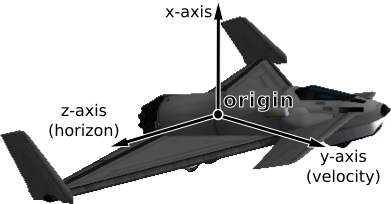
Vessel surface velocity reference frame origin and axes#
- GET /space-center/vessel/(id)/orbit-speed-reference-frame#
The reference frame that the navball measures speed against in ‘orbit’ mode.
The origin is at the center of mass of the vessel.
The axes are those of
GET /space-center/vessel/(id)/orbital-reference-frame, which are the directions the navball marks in this mode: the x-axis points in the orbital anti-radial direction, the y-axis in the orbital prograde direction and the z-axis in the orbital normal direction.The frame moves with the body being orbited, but does not rotate with it.
Note
The velocity of the vessel in this frame is the one the navball shows in ‘orbit’ mode:
GET /space-center/flight/(id)/speedis the speed it displays, andGET /space-center/flight/(id)/velocitypoints along the y-axis, towards its prograde marker.- Parameters:
id – The identifier of the Vessel object.
- Response JSON Object:
value (SpaceCenter.ReferenceFrame)
- GET /space-center/vessel/(id)/surface-speed-reference-frame#
The reference frame that the navball measures speed against in ‘surface’ mode.
The origin is at the center of mass of the vessel.
The axes are the directions the navball marks in this mode, in the same arrangement as
GET /space-center/vessel/(id)/orbital-reference-frame: the y-axis points in the direction the vessel is moving relative to the surface, which is where the prograde marker points; the z-axis is normal to the plane of that motion; and the x-axis is anti-radial, pointing towards the body and perpendicular to the other two.The frame moves with the surface of the body being orbited, so it rotates with the body.
Note
The velocity of the vessel in this frame is the one the navball shows in ‘surface’ mode:
GET /space-center/flight/(id)/speedis the speed it displays, andGET /space-center/flight/(id)/velocitypoints along the y-axis, towards its prograde marker. The velocity gives the frame its orientation, so, as withGET /space-center/vessel/(id)/surface-velocity-reference-frame, the frame is singular and raises an error when the vessel is stationary relative to the surface.- Parameters:
id – The identifier of the Vessel object.
- Response JSON Object:
value (SpaceCenter.ReferenceFrame)
- GET /space-center/vessel/(id)/target-speed-reference-frame#
The reference frame that the navball measures speed against in ‘target’ mode.
The origin is at the center of mass of the vessel.
The axes are the directions the navball marks in this mode, in the same arrangement as
GET /space-center/vessel/(id)/orbital-reference-frame: the y-axis points in the direction the vessel is moving relative to the target, which is where the prograde marker points; the z-axis is normal to the plane of that motion; and the x-axis is anti-radial, pointing towards the body being orbited and perpendicular to the other two.The frame moves with the vessels target.
Note
The velocity of the vessel in this frame is the one the navball shows in ‘target’ mode:
GET /space-center/flight/(id)/speedis the speed it displays, andGET /space-center/flight/(id)/velocitypoints along the y-axis, towards its prograde marker. The target is the one set for the active vessel, via for exampleGET /space-center/target-vesselorGET /space-center/target-body. This is undefined when no target is set. The velocity gives the frame its orientation, so it is also singular, and raises an error, when the vessel matches the velocity of its target.- Parameters:
id – The identifier of the Vessel object.
- Response JSON Object:
value (SpaceCenter.ReferenceFrame)
- POST /space-center/vessel/(id)/position#
The position of the center of mass of the vessel, in the given reference frame.
- Parameters:
id – The identifier of the Vessel object.
- Request JSON Object:
reference_frame (SpaceCenter.ReferenceFrame) – The reference frame that the returned position vector is in.
- Response JSON Object:
value (tuple<double, double, double>) – The position as a vector.
- POST /space-center/vessel/(id)/bounding-box#
The axis-aligned bounding box of the vessel in the given reference frame.
- Parameters:
id – The identifier of the Vessel object.
- Request JSON Object:
reference_frame (SpaceCenter.ReferenceFrame) – The reference frame that the returned position vectors are in.
- Response JSON Object:
value (SpaceCenter.BoundingBox) – The positions of the minimum and maximum vertices of the box.
- POST /space-center/vessel/(id)/velocity#
The velocity of the center of mass of the vessel, in the given reference frame.
- Parameters:
id – The identifier of the Vessel object.
- Request JSON Object:
reference_frame (SpaceCenter.ReferenceFrame) – The reference frame that the returned velocity vector is in.
- Response JSON Object:
value (tuple<double, double, double>) – The velocity as a vector. The vector points in the direction of travel, and its magnitude is the speed of the body in \(\mathrm{m/s}\).
- POST /space-center/vessel/(id)/rotation#
The rotation of the vessel, in the given reference frame.
- Parameters:
id – The identifier of the Vessel object.
- Request JSON Object:
reference_frame (SpaceCenter.ReferenceFrame) – The reference frame that the returned rotation is in.
- Response JSON Object:
value (tuple<double, double, double, double>) – The rotation as a quaternion of the form
(x, y, z, w).
- POST /space-center/vessel/(id)/direction#
The direction in which the vessel is pointing, in the given reference frame.
- Parameters:
id – The identifier of the Vessel object.
- Request JSON Object:
reference_frame (SpaceCenter.ReferenceFrame) – The reference frame that the returned direction is in.
- Response JSON Object:
value (tuple<double, double, double>) – The direction as a unit vector.
- POST /space-center/vessel/(id)/angular-velocity#
The angular velocity of the vessel, in the given reference frame.
- Parameters:
id – The identifier of the Vessel object.
- Request JSON Object:
reference_frame (SpaceCenter.ReferenceFrame) – The reference frame the returned angular velocity is in.
- Response JSON Object:
value (tuple<double, double, double>) – The angular velocity as a vector. The magnitude of the vector is the rotational speed of the vessel, in \(\mathrm{rad/s}\). The direction of the vector indicates the axis of rotation, using the right-hand rule.
AxisRange
The largest value of a quantity, such as a torque or a force, in the positive and the negative direction of each of three axes.
Passed and returned as an object with these fields:
positive(tuple<double, double, double>)The value in the positive direction of each axis.
negative(tuple<double, double, double>)The value in the negative direction of each axis, which is zero or less.
BoundingBox
An axis-aligned bounding box, as the positions of its minimum and maximum vertices.
Passed and returned as an object with these fields:
min(tuple<double, double, double>)The position of the minimum vertex of the box.
max(tuple<double, double, double>)The position of the maximum vertex of the box.
VesselType
The type of a vessel.
See GET /space-center/vessel/(id)/type.
Passed and returned as the name of one of its values:
"base"Base.
"debris"Debris.
"lander"Lander.
"plane"Plane.
"probe"Probe.
"relay"Relay.
"rover"Rover.
"ship"Ship.
"station"Station.
"space_object"SpaceObject.
"unknown"Unknown.
"eva"EVA.
"flag"Flag.
"deployed_science_controller"DeployedScienceController.
"deployed_science_part"DeploedSciencePart.
"dropped_part"DroppedPart.
"deployed_ground_part"DeployedGroundPart.
VesselSituation
The situation a vessel is in.
See GET /space-center/vessel/(id)/situation.
Passed and returned as the name of one of its values:
"docked"Vessel is docked to another.
"escaping"Escaping.
"flying"Vessel is flying through an atmosphere.
"landed"Vessel is landed on the surface of a body.
"orbiting"Vessel is orbiting a body.
"pre_launch"Vessel is awaiting launch.
"splashed"Vessel has splashed down in an ocean.
"sub_orbital"Vessel is on a sub-orbital trajectory.
CrewMember
A Kerbal in the crew roster. Can be obtained using GET /space-center/vessel/(id)/crew,
GET /space-center/kerbals or POST /space-center/get-kerbal.
A CrewMember object is passed and returned as its identifier, a number. A path that acts on
an object takes it as (id).
- GET /space-center/crew-member/(id)/name#
The crew members name.
- Parameters:
id – The identifier of the CrewMember object.
- Response JSON Object:
value (string)
- PUT /space-center/crew-member/(id)/name#
The crew members name.
- Parameters:
id – The identifier of the CrewMember object.
- Request JSON Object:
value (string) – The new value.
- GET /space-center/crew-member/(id)/type#
The type of crew member.
- Parameters:
id – The identifier of the CrewMember object.
- Response JSON Object:
value (SpaceCenter.CrewMemberType)
- GET /space-center/crew-member/(id)/on-mission#
Whether the crew member is on a mission, assigned to a vessel.
- Parameters:
id – The identifier of the CrewMember object.
- Response JSON Object:
value (bool)
- GET /space-center/crew-member/(id)/inactive#
Whether the crew member is inactive, and so unavailable for a mission until
GET /space-center/crew-member/(id)/inactive-until.- Parameters:
id – The identifier of the CrewMember object.
- Response JSON Object:
value (bool)
- GET /space-center/crew-member/(id)/inactive-until#
The universal time at which the crew member stops being inactive, in seconds. Returns
nullif the crew member is not inactive.- Parameters:
id – The identifier of the CrewMember object.
- Response JSON Object:
value (double?)
- GET /space-center/crew-member/(id)/courage#
The crew members courage.
- Parameters:
id – The identifier of the CrewMember object.
- Response JSON Object:
value (float)
- PUT /space-center/crew-member/(id)/courage#
The crew members courage.
- Parameters:
id – The identifier of the CrewMember object.
- Request JSON Object:
value (float) – The new value.
- GET /space-center/crew-member/(id)/stupidity#
The crew members stupidity.
- Parameters:
id – The identifier of the CrewMember object.
- Response JSON Object:
value (float)
- PUT /space-center/crew-member/(id)/stupidity#
The crew members stupidity.
- Parameters:
id – The identifier of the CrewMember object.
- Request JSON Object:
value (float) – The new value.
- GET /space-center/crew-member/(id)/experience#
The crew members experience.
- Parameters:
id – The identifier of the CrewMember object.
- Response JSON Object:
value (float)
- PUT /space-center/crew-member/(id)/experience#
The crew members experience.
- Parameters:
id – The identifier of the CrewMember object.
- Request JSON Object:
value (float) – The new value.
- GET /space-center/crew-member/(id)/experience-level#
The crew member’s experience level, the number of stars, from 0 to 5.
- Parameters:
id – The identifier of the CrewMember object.
- Response JSON Object:
value (int32)
- GET /space-center/crew-member/(id)/badass#
Whether the crew member is a badass.
- Parameters:
id – The identifier of the CrewMember object.
- Response JSON Object:
value (bool)
- PUT /space-center/crew-member/(id)/badass#
Whether the crew member is a badass.
- Parameters:
id – The identifier of the CrewMember object.
- Request JSON Object:
value (bool) – The new value.
- GET /space-center/crew-member/(id)/veteran#
Whether the crew member is a veteran.
- Parameters:
id – The identifier of the CrewMember object.
- Response JSON Object:
value (bool)
- PUT /space-center/crew-member/(id)/veteran#
Whether the crew member is a veteran.
- Parameters:
id – The identifier of the CrewMember object.
- Request JSON Object:
value (bool) – The new value.
- GET /space-center/crew-member/(id)/trait#
The crew member’s job.
- Parameters:
id – The identifier of the CrewMember object.
- Response JSON Object:
value (string)
- GET /space-center/crew-member/(id)/gender#
The crew member’s gender.
- Parameters:
id – The identifier of the CrewMember object.
- Response JSON Object:
value (SpaceCenter.CrewMemberGender)
- GET /space-center/crew-member/(id)/roster-status#
The crew member’s current roster status.
- Parameters:
id – The identifier of the CrewMember object.
- Response JSON Object:
value (SpaceCenter.RosterStatus)
- GET /space-center/crew-member/(id)/part#
The part containing the crew member. Returns
nullif the crew member is not occupying a part, or the vessel containing the part is not loaded.- Parameters:
id – The identifier of the CrewMember object.
- Response JSON Object:
value (SpaceCenter.Part?)
- POST /space-center/crew-member/(id)/eva#
Send the crew member outside on EVA, through the hatch of the part it is in, and return the vessel it becomes. The game switches to that vessel, which can then be walked around and flown using its
GET /space-center/vessel/(id)/control, and brought back in withPOST /space-center/control/(id)/board. The kerbal climbs out onto the ladder by the hatch, if there is one.Note
Throws an exception if EVA is disabled for the game, if the crew member is not in a loaded vessel, if it is already on EVA, or if every hatch out of the part it is in is obstructed.
- Parameters:
id – The identifier of the CrewMember object.
- Response JSON Object:
value (SpaceCenter.Vessel)
- GET /space-center/crew-member/(id)/suit-type#
The crew member’s suit type.
- Parameters:
id – The identifier of the CrewMember object.
- Response JSON Object:
value (SpaceCenter.SuitType)
- PUT /space-center/crew-member/(id)/suit-type#
The crew member’s suit type.
- Parameters:
id – The identifier of the CrewMember object.
- Request JSON Object:
value (SpaceCenter.SuitType) – The new value.
- GET /space-center/crew-member/(id)/career-log#
The entries in the crew member’s career flight log.
- Parameters:
id – The identifier of the CrewMember object.
- Response JSON Object:
value (list<SpaceCenter.FlightLogEntry>)
FlightLogEntry
An entry in a crew member’s career flight log.
Passed and returned as an object with these fields:
flight(int32)The flight identifier of the entry.
type(string)The type of the entry, e.g.
OrbitorLand.target(string)The name of the body the entry is for.
CrewMemberType
The type of a crew member.
See GET /space-center/crew-member/(id)/type.
Passed and returned as the name of one of its values:
"applicant"An applicant for crew.
"crew"Rocket crew.
"tourist"A tourist.
"unowned"An unowned crew member.
CrewMemberGender
A crew member’s gender.
See GET /space-center/crew-member/(id)/gender.
Passed and returned as the name of one of its values:
"male"Male.
"female"Female.
RosterStatus
A crew member’s roster status.
See GET /space-center/crew-member/(id)/roster-status.
Passed and returned as the name of one of its values:
"available"Available.
"assigned"Assigned.
"dead"Dead.
"missing"Missing.
SuitType
A crew member’s suit type.
See GET /space-center/crew-member/(id)/suit-type.
Passed and returned as the name of one of its values:
"default"Default.
"vintage"Vintage.
"future"Future.
"slim"Slim.