Sub-Orbital Flight#
This introductory tutorial uses kRPC to send some Kerbals on a sub-orbital flight, and return them safely to Kerbin. It covers the following topics:
Controlling a rocket, by activating stages and setting the throttle
Using the autopilot to point the vessel in a direction
Using events to wait for things to happen in the game
Tracking the amount of resources in the vessel
Tracking flight and orbital data, such as altitude and apoapsis altitude
Note
For details on how to write scripts and connect to kRPC, see the Getting Started guide.
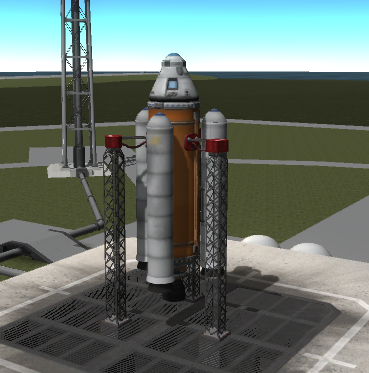
The tutorial uses the two stage rocket pictured below. Download the craft file to fly it yourself.
The tutorial includes source code for the main client languages kRPC supports. Download the whole program in your chosen language:
Part One: Preparing for Launch#
First we open a connection to the server, passing a name for the script. The name appears in the server window in the game:
  krpc_connection_t conn;
  krpc_open(&conn, "COM0");
  krpc_connect(conn, "Sub-orbital flight");
var conn = new Connection ("Sub-orbital flight");
  krpc::Client conn = krpc::connect("Sub-orbital flight");
  krpc::services::SpaceCenter space_center(&conn);
    Connection connection = Connection.newInstance("Sub-orbital flight");
    SpaceCenter spaceCenter = SpaceCenter.newInstance(connection);
local krpc = require 'krpc'
local platform = require 'krpc.platform'
local conn = krpc.connect('Sub-orbital flight')
conn = krpc.connect(name="Sub-orbital flight")
Next we get an object representing the active vessel. We send instructions to the rocket through this object:
  krpc_SpaceCenter_Vessel_t vessel;
  krpc_SpaceCenter_ActiveVessel(conn, &vessel);

  krpc_SpaceCenter_AutoPilot_t auto_pilot;
  krpc_SpaceCenter_Vessel_AutoPilot(conn, &auto_pilot, vessel);

  krpc_SpaceCenter_Control_t control;
  krpc_SpaceCenter_Vessel_Control(conn, &control, vessel);
var vessel = conn.SpaceCenter ().ActiveVessel;
auto vessel = space_center.active_vessel().value();
SpaceCenter.Vessel vessel = spaceCenter.getActiveVessel();
local vessel = conn.space_center.active_vessel
vessel = conn.space_center.active_vessel
Then we prepare the rocket for launch. This sets the throttle to maximum, and has the autopilot hold a pitch and heading of 90°, pointing straight up. It then waits a second for the settings to take effect:
  krpc_SpaceCenter_AutoPilot_TargetPitchAndHeading(conn, auto_pilot, 90, 90);
  krpc_SpaceCenter_AutoPilot_set_Engaged(conn, auto_pilot, true);
  krpc_SpaceCenter_Control_set_Throttle(conn, control, 1);
  sleep(1);
        vessel.AutoPilot.TargetPitchAndHeading (90, 90);
        vessel.AutoPilot.Engaged = true;
        vessel.Control.Throttle = 1;
        System.Threading.Thread.Sleep (1000);
  vessel.auto_pilot().target_pitch_and_heading(90, 90);
  vessel.auto_pilot().set_engaged(true);
  vessel.control().set_throttle(1);
  std::this_thread::sleep_for(std::chrono::seconds(1));
    vessel.getAutoPilot().targetPitchAndHeading(90, 90);
    vessel.getAutoPilot().setEngaged(true);
    vessel.getControl().setThrottle(1);
    Thread.sleep(1000);
vessel.auto_pilot:target_pitch_and_heading(90, 90)
vessel.auto_pilot.engaged = true
vessel.control.throttle = 1
platform.sleep(1)
vessel.auto_pilot.target_pitch_and_heading(90, 90)
vessel.auto_pilot.engaged = True
vessel.control.throttle = 1
time.sleep(1)
Part Two: Lift-off!#
We launch by activating the first stage, which is the same as pressing the space bar:
  printf("Launch!\n");
  krpc_SpaceCenter_Control_ActivateNextStage(conn, NULL, control);
        Console.WriteLine ("Launch!");
        vessel.Control.ActivateNextStage ();
  std::cout << "Launch!" << std::endl;
  vessel.control().activate_next_stage();
    System.out.println("Launch!");
    vessel.getControl().activateNextStage();
print('Launch!')
vessel.control:activate_next_stage()
print("Launch!")
vessel.control.activate_next_stage()
The solid fuel boosters soon run out, and the rocket has to jettison them. We wait for an event that fires when less than 0.1 units of solid fuel are left, then activate the next stage:
  krpc_SpaceCenter_Resources_t resources;
  krpc_SpaceCenter_Vessel_Resources(conn, &resources, vessel);
  while (true) {
    float solid_fuel;
    krpc_SpaceCenter_Resources_Amount(conn, &solid_fuel, resources, "SolidFuel");
    if (solid_fuel < 0.1)
      break;
  }

  printf("Booster separation\n");
  krpc_SpaceCenter_Control_ActivateNextStage(conn, NULL, control);
        {
            var evnt = conn.AddEvent (() => vessel.Resources.Amount ("SolidFuel") < 0.1f);
            lock (evnt.Condition) {
                evnt.Wait ();
            }
        }
        Console.WriteLine ("Booster separation");
        vessel.Control.ActivateNextStage ();
  typedef krpc::services::KRPC::Expression Expr;

  {
    auto solid_fuel = vessel.resources().amount_call("SolidFuel");
    auto expr = Expr::less_than(
      conn, Expr::call(conn, solid_fuel), Expr::constant_float(conn, 0.1));
    auto event = krpc::add_event(expr);
    event.acquire();
    event.wait();
    event.release();
  }
  std::cout << "Booster separation" << std::endl;
  vessel.control().activate_next_stage();
    {
      ProcedureCall solidFuel = connection.getCall(vessel.getResources(), "amount", "SolidFuel");
      Expression expr = Expression.lessThan(
        connection,
        Expression.call(connection, solidFuel),
        Expression.constantFloat(connection, 0.1f));
      Event event = connection.addEvent(expr);
      synchronized (event.getCondition()) {
        event.waitFor();
      }
    }
    System.out.println("Booster separation");
    vessel.getControl().activateNextStage();
while vessel.resources:amount('SolidFuel') > 0.1 do
    platform.sleep(1)
end
print('Booster separation')
vessel.control:activate_next_stage()
event = conn.add_event(lambda: vessel.resources.amount("SolidFuel") < 0.1)
with event.condition:
    event.wait()
print("Booster separation")
vessel.control.activate_next_stage()
vessel.resources returns a Resources object, which gives the amounts of the
resources in the rocket. The event is a server side function
that compares the amount of solid fuel with 0.1. The server checks it every physics tick, and
the script sleeps until it fires.
The Python and C# clients compile the lambda into the function. The C++ and Java clients build it
from expression objects: an embedded call to amount, a constant and a comparison. The C and
Lua clients do not support events, so their scripts poll the amount in a loop.
Part Three: Reaching Apoapsis#
Next we start a gravity turn once the rocket is high enough. This waits for an event that fires at an altitude of 10 km:
  krpc_SpaceCenter_Flight_t flight;
  krpc_SpaceCenter_Vessel_Flight(conn, &flight, vessel, KRPC_NULL);
  while (true) {
    double mean_altitude;
    krpc_SpaceCenter_Flight_MeanAltitude(conn, &mean_altitude, flight);
    if (mean_altitude > 10000)
      break;
  }
        var flight = vessel.Flight ();
        {
            var evnt = conn.AddEvent (() => flight.MeanAltitude > 10000);
            lock (evnt.Condition) {
                evnt.Wait ();
            }
        }
  auto flight = vessel.flight();
  {
    auto expr = Expr::greater_than(
      conn, Expr::call(conn, flight.mean_altitude_call()), Expr::constant_double(conn, 10000));
    auto event = krpc::add_event(expr);
    event.acquire();
    event.wait();
    event.release();
  }
    Flight flight = vessel.flight(null);
    {
      ProcedureCall meanAltitude = connection.getCall(flight, "getMeanAltitude");
      Expression expr = Expression.greaterThan(
        connection,
        Expression.call(connection, meanAltitude),
        Expression.constantDouble(connection, 10000));
      Event event = connection.addEvent(expr);
      synchronized (event.getCondition()) {
        event.waitFor();
      }
    }
while vessel:flight().mean_altitude < 10000 do
    platform.sleep(1)
end
flight = vessel.flight()
event = conn.add_event(lambda: flight.mean_altitude > 10000)
with event.condition:
    event.wait()
vessel.flight() returns a Flight object, which gives information about the rocket in
flight, such as its altitude, direction and velocity.
Now we tilt the rocket over to a pitch of 60°, and hold a heading of 90°, due east. The autopilot takes the new target:
  printf("Gravity turn\n");
  krpc_SpaceCenter_AutoPilot_TargetPitchAndHeading(conn, auto_pilot, 60, 90);
        Console.WriteLine ("Gravity turn");
        vessel.AutoPilot.TargetPitchAndHeading (60, 90);
  std::cout << "Gravity turn" << std::endl;
  vessel.auto_pilot().target_pitch_and_heading(60, 90);
    System.out.println("Gravity turn");
    vessel.getAutoPilot().targetPitchAndHeading(60, 90);
print('Gravity turn')
vessel.auto_pilot:target_pitch_and_heading(60, 90)
print("Gravity turn")
vessel.auto_pilot.target_pitch_and_heading(60, 90)
Next we wait for an event that fires when the apoapsis reaches 100 km. Then we cut the throttle, jettison the launch stage and turn off the autopilot:
  krpc_SpaceCenter_Orbit_t orbit;
  krpc_SpaceCenter_Vessel_Orbit(conn, &orbit, vessel);
  while (true) {
    double apoapsis_altitude;
    krpc_SpaceCenter_Orbit_ApoapsisAltitude(conn, &apoapsis_altitude, orbit);
    if (apoapsis_altitude > 100000)
      break;
  }

  printf("Launch stage separation\n");
  krpc_SpaceCenter_Control_set_Throttle(conn, control, 0);
  sleep(1);
  krpc_SpaceCenter_Control_ActivateNextStage(conn, NULL, control);
  krpc_SpaceCenter_AutoPilot_set_Engaged(conn, auto_pilot, false);
        {
            var evnt = conn.AddEvent (() => vessel.Orbit.ApoapsisAltitude > 100000);
            lock (evnt.Condition) {
                evnt.Wait ();
            }
        }

        Console.WriteLine ("Launch stage separation");
        vessel.Control.Throttle = 0;
        System.Threading.Thread.Sleep (1000);
        vessel.Control.ActivateNextStage ();
        vessel.AutoPilot.Engaged = false;
  {
    auto apoapsis_altitude = vessel.orbit().apoapsis_altitude_call();
    auto expr = Expr::greater_than(
      conn, Expr::call(conn, apoapsis_altitude), Expr::constant_double(conn, 100000));
    auto event = krpc::add_event(expr);
    event.acquire();
    event.wait();
    event.release();
  }

  std::cout << "Launch stage separation" << std::endl;
  vessel.control().set_throttle(0);
  std::this_thread::sleep_for(std::chrono::seconds(1));
  vessel.control().activate_next_stage();
  vessel.auto_pilot().set_engaged(false);
    {
      ProcedureCall apoapsisAltitude = connection.getCall(
        vessel.getOrbit(), "getApoapsisAltitude");
      Expression expr = Expression.greaterThan(
        connection,
        Expression.call(connection, apoapsisAltitude),
        Expression.constantDouble(connection, 100000));
      Event event = connection.addEvent(expr);
      synchronized (event.getCondition()) {
        event.waitFor();
      }
    }

    System.out.println("Launch stage separation");
    vessel.getControl().setThrottle(0);
    Thread.sleep(1000);
    vessel.getControl().activateNextStage();
    vessel.getAutoPilot().setEngaged(false);
while vessel.orbit.apoapsis_altitude < 100000 do
    platform.sleep(1)
end
print('Launch stage separation')
vessel.control.throttle = 0
platform.sleep(1)
vessel.control:activate_next_stage()
vessel.auto_pilot.engaged = false
event = conn.add_event(lambda: vessel.orbit.apoapsis_altitude > 100000)
with event.condition:
    event.wait()

print("Launch stage separation")
vessel.control.throttle = 0
time.sleep(1)
vessel.control.activate_next_stage()
vessel.auto_pilot.engaged = False
vessel.orbit returns an Orbit object, which describes the orbit of the rocket.
Part Four: Returning Safely to Kerbin#
The Kerbals are now on a sub-orbital trajectory, on a collision course with the surface. We wait until they fall to 1 km above the surface, then deploy the parachutes. You can use time warp to skip ahead to just before this happens, and the script carries on working:
  while (true) {
    double srf_altitude;
    krpc_SpaceCenter_Flight_SurfaceAltitude(conn, &srf_altitude, flight);
    if (srf_altitude < 1000)
      break;
  }

  krpc_SpaceCenter_Control_ActivateNextStage(conn, NULL, control);
        {
            var evnt = conn.AddEvent (() => flight.SurfaceAltitude < 1000);
            lock (evnt.Condition) {
                evnt.Wait ();
            }
        }

        vessel.Control.ActivateNextStage ();
  {
    auto expr = Expr::less_than(
      conn, Expr::call(conn, flight.surface_altitude_call()), Expr::constant_double(conn, 1000));
    auto event = krpc::add_event(expr);
    event.acquire();
    event.wait();
    event.release();
  }

  vessel.control().activate_next_stage();
    {
      ProcedureCall srfAltitude = connection.getCall(flight, "getSurfaceAltitude");
      Expression expr = Expression.lessThan(
        connection,
        Expression.call(connection, srfAltitude),
        Expression.constantDouble(connection, 1000));
      Event event = connection.addEvent(expr);
      synchronized (event.getCondition()) {
        event.waitFor();
      }
    }

    vessel.getControl().activateNextStage();
while vessel:flight().surface_altitude > 1000 do
    platform.sleep(1)
end
vessel.control:activate_next_stage()
event = conn.add_event(lambda: flight.surface_altitude < 1000)
with event.condition:
    event.wait()

vessel.control.activate_next_stage()
The parachutes are now deployed. This prints the altitude of the capsule once a second, until its vertical speed reaches zero when it lands:
  krpc_SpaceCenter_CelestialBody_t body;
  krpc_SpaceCenter_Orbit_Body(conn, &body, orbit);
  krpc_SpaceCenter_ReferenceFrame_t body_ref_frame;
  krpc_SpaceCenter_CelestialBody_ReferenceFrame(conn, &body_ref_frame, body);
  krpc_SpaceCenter_Flight_t body_flight;
  krpc_SpaceCenter_Vessel_Flight(conn, &body_flight, vessel, body_ref_frame);

  while (true) {
    double vertical_speed;
    krpc_SpaceCenter_Flight_VerticalSpeed(conn, &vertical_speed, body_flight);
    if (vertical_speed > -0.1)
      break;
    double altitude;
    krpc_SpaceCenter_Flight_SurfaceAltitude(conn, &altitude, flight);
    printf("Altitude = %.1f meters\n", altitude);
    sleep(1);
  }
  printf("Landed!\n");
        while (vessel.Flight (vessel.Orbit.Body.ReferenceFrame).VerticalSpeed < -0.1) {
            Console.WriteLine ("Altitude = {0:F1} meters", flight.SurfaceAltitude);
            System.Threading.Thread.Sleep (1000);
        }
        Console.WriteLine ("Landed!");
  while (vessel.flight(vessel.orbit().body().reference_frame()).vertical_speed() < -0.1) {
    std::cout << "Altitude = " << flight.surface_altitude() << " meters" << std::endl;
    std::this_thread::sleep_for(std::chrono::seconds(1));
  }
  std::cout << "Landed!" << std::endl;
    while (vessel.flight(vessel.getOrbit().getBody().getReferenceFrame()).getVerticalSpeed() < -0.1) {
      System.out.printf("Altitude = %.1f meters\n", flight.getSurfaceAltitude());
      Thread.sleep(1000);
    }
    System.out.println("Landed!");
while vessel:flight(vessel.orbit.body.reference_frame).vertical_speed < -0.1 do
    print(string.format('Altitude = %.1f meters',
                        vessel:flight().surface_altitude))
    platform.sleep(1)
end
print('Landed!')
while vessel.flight(vessel.orbit.body.reference_frame).vertical_speed < -0.1:
    print("Altitude = %.1f meters" % flight.surface_altitude)
    time.sleep(1)
print("Landed!")
This calls vessel.flight() again, now with a ReferenceFrame. We want the vertical
speed relative to the surface of Kerbin, so the flight object has to give values in a frame fixed
to Kerbin. vessel.orbit.body.reference_frame has its origin at the center of Kerbin, and
rotates with the planet. See the Reference Frames tutorial for more.
Your Kerbals should now be safely back on the surface.